Auto-Flattening
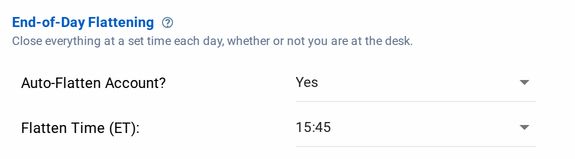
Auto-Flatten closes all open positions in an account at an end-of-day (EOD) time you set, configured per monitor.
This page's Add-On and NT8 connection details apply to NinjaTrader accounts. Tradovate Account Manager runs in CrossTrade's cloud and does not require NinjaTrader. Its scheduled flatten is eligible only during the five minutes immediately after the configured US/Eastern time, and a missed window never flattens later in the session. It cancels working orders, liquidates positions, and confirms the account is flat before reporting success. See Tradovate Account Manager.
Key Functionality
- User-Configured Flatten Time: The EOD flatten time is set via a 24-hour format string (HH:mm). Time is always interpreted in the US/Eastern time zone.
- Non-Mandatory Feature: EOD flattening is optional. Set Auto-Flatten Account? to No to turn it off. That clears the saved time, so set a time again when you turn it back on.
- Server-Side Execution: The flatten timer runs on CrossTrade's servers and comes due on schedule whether or not you are connected. Carrying out the flatten on NinjaTrader 8 needs the CrossTrade NT8 add-on connected at that moment. A missed attempt is recorded in your Management Log rather than skipped silently.
- Enabled Monitor Dependency: EOD flattening only executes while the monitor is switched on. A disabled (PAUSED) monitor does not flatten.
- No Flat Start Required: Unlike continuous monitoring, EOD flattening does not depend on a flat session start.
- After a Flatten: A successful EOD flatten leaves the monitor STOPPED for the rest of the session. It re-arms at the next session open, or you can restart it sooner, subject to Monitor Lock.
- Weekday Operational Scope: EOD flattening runs on weekdays (Monday to Friday) only. It does not run on weekends, so manage any position you hold into the weekend yourself.
- Order Type: Each open position is closed with a market order.
Technical Details
Holidays and early closes
The configured flatten time is a fixed US/Eastern wall-clock time. CrossTrade does not automatically move it earlier or suppress it using the holiday calendar. CME close times vary by product, and an approximate calendar entry is not sufficient to decide whether an account still has tradable exposure.
For an early-close session, check the exchange schedule for the instruments you trade and set your flatten time before their close. A configured time after the close can still produce a scheduled attempt and a management-log entry. It does not change the normal next-session re-arm behavior.
Retries
EOD flattening triggers with "best effort" execution. That means CrossTrade will attempt to flatten positions at the time specified. If the account cannot be flattened, for example because the CrossTrade NT8 add-on is disconnected, the servers will try again at the top of every minute for up to 5 minutes.
If at the end of 5 minutes the account still cannot be flattened, the servers will stop trying.