Economic-Event Lockout
Economic-Event Lockout puts a short freeze around scheduled economic news. For five minutes before and five minutes after a high-impact release, CrossTrade stops acting on incoming webhook signals, and can optionally close what is already open.
The point is the spread, not the direction. In the seconds around an FOMC statement or a Non-Farm Payrolls print, the book thins out and a market order can fill far from the last quote.
Economic-Event Lockout works on both platforms. The signal-blocking half runs in CrossTrade's cloud and applies to any signal arriving at your webhook, regardless of destination. The auto-flatten half is configured per monitor in the Account Manager and works on NinjaTrader and Tradovate accounts alike.
The two halves
Lockout is two separate controls with two different jobs, and they are configured in different places.
| Blocks incoming signals | Flattens open positions | Where you turn it on | Plan | |
|---|---|---|---|---|
| Global lockout | Yes | No | Webhooks page, Master Controls | Standard and above |
| Per-monitor lockout | Yes | Yes, if you enable it | The monitor's settings, News Lockout switches | Pro and above |
Global lockout is the simple one. It is account-wide and it only ever blocks. A signal that arrives inside a lockout window is dropped and recorded, the same way a signal outside your trading window is dropped. Nothing you already hold is touched.
Per-monitor lockout lives with the rest of your Account Manager controls and has a second switch: flatten. With flatten on, the moment a lockout window opens, that account is flattened. This is the setting a prop-firm rule is usually asking for.
Because the two are independent, a common setup is global blocking on everything plus flatten on only the accounts that carry a news rule.
The window
Five minutes before the release, five minutes after. That window is fixed and is not currently configurable.
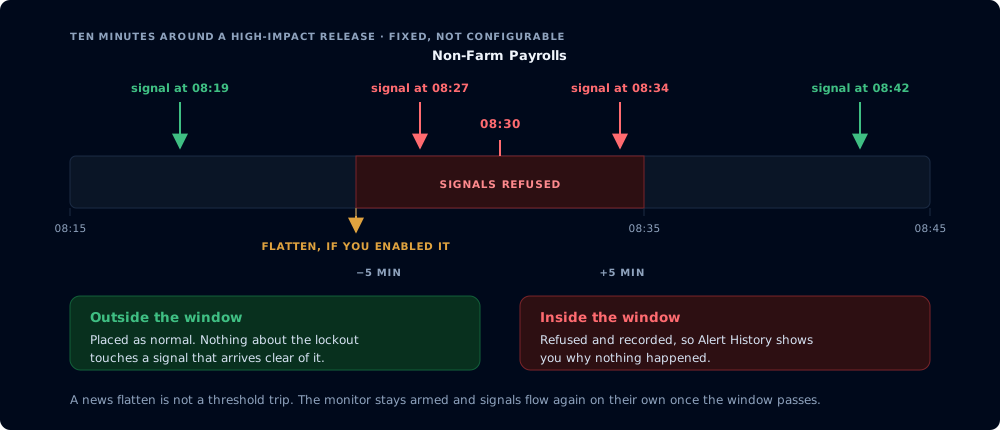
Ten minutes around the release, and what happens to a signal on each side of it
By default a lockout considers high-impact events in USD. That is the set that moves US equity index and rate futures, which is what most CrossTrade accounts trade.
What gets treated as an event
Events come from the Fair Economy ForexFactory feed, refreshed every five minutes.
One consequence worth knowing: Fair Economy publishes the current week only. There is no next-week feed. So the calendar can show you the rest of this week and nothing beyond it, and a Monday morning release becomes visible when that week's feed rolls, not a fortnight out. The Econ Calendar page shows exactly what CrossTrade currently knows about.
What happens when a window opens
Two things run independently.
Incoming signals are refused. Every signal reaching your webhook is checked against your active lockout windows before anything is placed. A blocked signal is recorded so you can see it in Alert History rather than wondering why nothing happened.
Open positions are flattened, if you asked for that. A watcher runs every minute and flattens accounts whose lockout window is opening. It is idempotent: one flatten per account per event, no matter how many times the check runs inside the same minute. You get an in-app alert naming the event that caused it.
A news flatten is not a threshold trip. It closes the position and leaves the monitor running, because a lockout is a bounded window around one event rather than the end of your session. You do not need to restart anything. Once the window passes, signals flow again on their own.
This is deliberately different from a P/L threshold trip, which does stop the monitor for the remainder of the session.
Setting it up
Global blocking lives on the Webhooks page under Master Controls. One switch. It applies to every account and every destination.
Per-monitor blocking and flattening lives in the monitor's own settings, in the News Lockout section, as two switches:
- Flatten this account 5 min before: close this account's positions when a window opens.
- Block incoming signals until 5 min after: refuse incoming signals for this account during a window.
Turning on flatten without block is legal but rarely what you want: it would close your position and then let the next signal immediately reopen it inside the same window.
Notes and limits
- Per-monitor lockout needs the monitor switched on. A disabled monitor's News Lockout switches do nothing. Global lockout does not depend on any monitor.
- Blocking is not the same as cancelling. A lockout refuses new signals. Working orders you already have resting at the broker are not cancelled by the lockout itself. Enable flatten if you want the account genuinely clear before the release.
- Free accounts do not have lockout. The global switch shows an upgrade prompt.
- It is not a substitute for watching the calendar. The feed is a third-party source and unscheduled news is, by definition, not on it.
Related
- Trading Windows: time-of-day restrictions, and the right tool for a wider freeze.
- Auto-Flattening: the scheduled end-of-day flatten.
- Tradovate Account Manager: feature comparison across platforms.