Trading Windows
Account-level trading windows are available on Tradovate too: each Tradovate monitor carries up to five windows, configured in the monitor editor with the same US/Eastern times and an optional flatten at each window's end. This page describes the NT8 Account Manager's windows; for the Tradovate specifics see Tradovate Account Manager.
Account-level trading windows behave similarly to both the global trade window and the alert-level trade window, with the differences below.
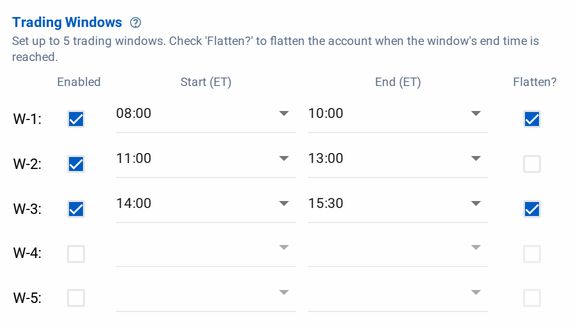
To set a trade window, click the "Enabled" checkbox next to one of the window labels (ordering doesn't matter), and set both a "Start" and "End" time, which are both set in Eastern Time (NYC).
How It Works
When a webhook alert signal arrives at CrossTrade, it is checked against trade windows at three levels: the global controls in Master Controls, the alert-level controls in each message, and the account-level windows in the Account Manager.
With the Account Manager you can set up to 5 distinct windows per account.
If the arrival time of an alert signal is inside any of the five trade windows, the signal is allowed to proceed. If the alert is outside all five trade windows, the alert is blocked and the alert is logged with the reason why it was blocked.
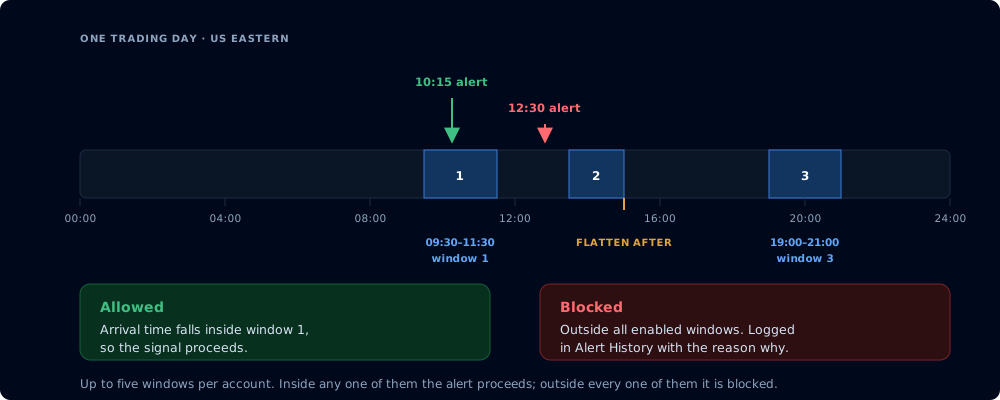
Inside any one window the alert proceeds; outside every window it is blocked
Flatten After
Check Flatten? on a window to flatten the account when that window ends. Like Auto-Flatten, it only runs while the monitor is enabled.
Timing
Within a minute of the window closing, we send the flatten command to your NT8 account.
Retry logic
If your CrossTrade NT8 add-on is offline, we retry once per minute for 5 minutes before standing down.
Continuous monitoring
Unlike Auto-Flatten, a window flatten does not stop the monitor, so you’ll be back in business for the next window without lifting a finger.