Management Logs
The Management Log is the audit trail for your Account Manager: the changes you make and the actions CrossTrade takes automatically. Open it with See Logs on the Account Manager page.
Tradovate behavior
Tradovate monitors write to the Management Log too. To review Tradovate events, open See Logs on the Tradovate Account Manager. See Tradovate Account Manager.
Log Entry Structure
Each entry in the Management Log consists of the following components:
- Date: When the event happened, shown in your browser's time zone.
- Event Type: What happened:
- Create: A new monitor was created.
- Enable Monitor / Disable Monitor: The monitor was switched on or off.
- Reset: A stopped monitor was restarted.
- Stop Monitor: The monitor stopped, for example because a profit or loss threshold was reached, or positions were open at session start.
- Auto-Flatten: A scheduled end-of-day flatten or a news lockout flatten ran, or was attempted.
- Window Flatten: A trading window's Flatten After ran, or was attempted.
- Exit Position: A Position Profit or Position Loss threshold in Unrealized Mode closed a position.
- Block Signals / Allow Signals: The Block Signals switch was turned on or off.
- Closing Only / Allow Opens: The Closing Only switch was turned on or off.
- Delete: A monitor was deleted.
- Account: The account the event applies to.
- Message: A short description of what happened.
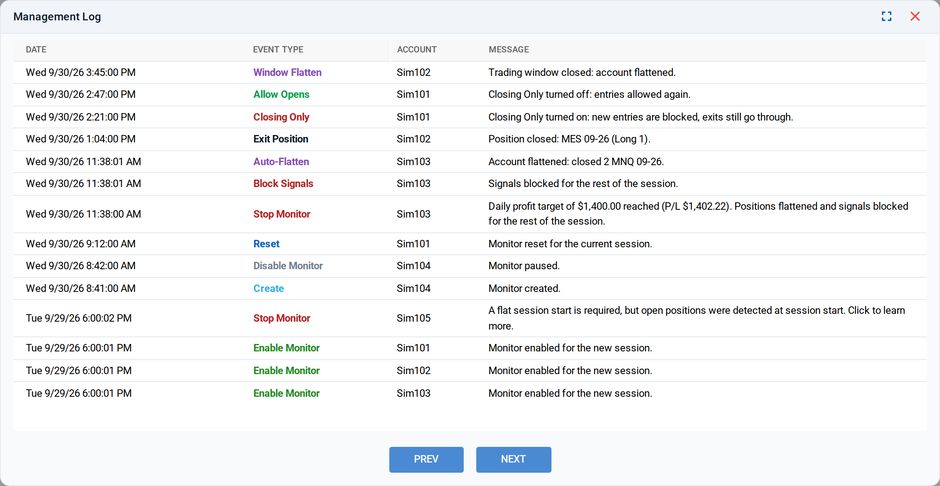
Example of a Management Log for actions taken in the Account Manager
Retention
Entries older than 90 days are removed. The log is paginated, newest first.