Account Floor
Account Floor is a fixed minimum net-liquidation amount for a monitored account. It is available in both the NinjaTrader and Tradovate Account Managers on plans that include Account Manager.
For example, a floor of 48,000 means: if reported net liquidation falls below 48,000, cancel working orders, flatten the account, and block incoming signals for the session. A balance exactly equal to the floor does not trigger it.
Configure it
- Open the account's monitor editor.
- Enable Account Floor and enter the amount in the account's reported balance currency.
- Save, then enable the monitor if it is paused.
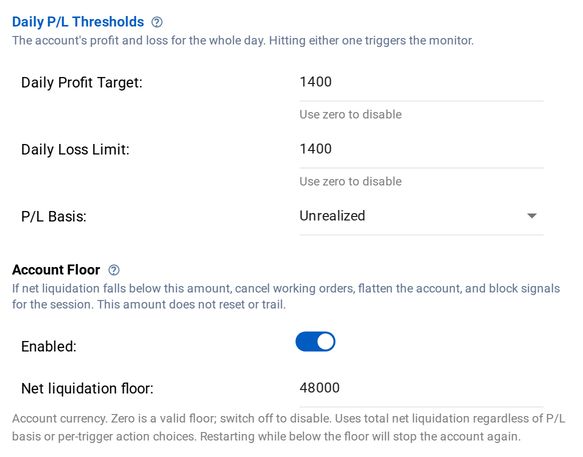
Account Floor in the monitor editor (Tradovate shown; NinjaTrader is the same)
Zero and negative amounts are valid floors. Use the switch to disable the rule; zero does not mean disabled. Templates can include the floor, so review the absolute amount when applying a template to a differently sized account.
How it differs from daily limits
- Daily Loss Limit measures the selected session P/L.
- Trailing Drawdown follows a high watermark.
- Account Floor compares net liquidation directly to one fixed amount. There is no activation profit, high watermark, or daily reset of that amount.
The rule uses net liquidation regardless of the monitor's Realized, Total, or Unrealized P/L basis. Its action is always cancel, flatten, and block signals, independent of the other thresholds' action dropdowns and the legacy per-monitor auto-close flag. Even an Unrealized-mode monitor stops for the session when its Account Floor trips.
Connection and valuation requirements
The monitor must be enabled and entitled to Account Manager. NinjaTrader enforcement runs on CrossTrade's server from connected add-on reports, not as an offline add-on rule. It requires a report no more than 30 seconds old and the global execution setting enabled. Keep the NinjaTrader computer's clock synchronized.
Tradovate uses the monitor engine's consensus-valued net liquidation. Missing or non-finite valuation does not count as a zero balance and cannot trigger a floor. The normal Tradovate execution controls still apply. Both brokers pause evaluation during the daily 5 PM to 6 PM ET maintenance break.
This is sampled enforcement, not a broker-held stop or a guaranteed exit balance. Connection loss, missing pricing, and slippage can prevent an exit at the configured amount. Check the management log and broker positions if a flatten cannot be verified.
Restart and the next session
The monitor re-arms under its normal session rules, but the configured floor stays unchanged. Restarting while net liquidation is still below it will trigger another stop on the next eligible evaluation. The same applies at the next session. Clearing or changing the floor does not itself release an existing signal lock; use the normal Restart controls, subject to Monitor Lock.