Advanced Usage
Everything on this page is specific to the NinjaTrader 8 Account Manager. Unrealized Mode, the clean-session requirement, and position-level threshold logic have no Tradovate equivalent: Tradovate monitors run in Standard Mode only. See Tradovate Account Manager.
Unrealized Mode
Unrealized Mode is one of the three mode cards in the monitor editor (see Monitor Mode).
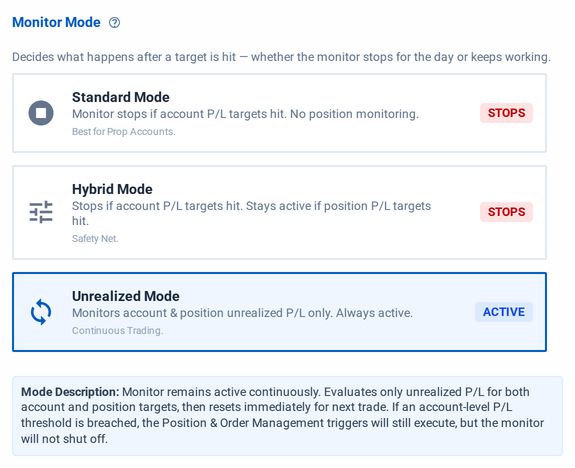
Unrealized Mode is a special setting that:
1) Bases all management decisions on the total unrealized P&L of all open positions in the account,
2) Prevents the Monitor from shutting off (STOPPED) when triggered, which effectively allows you to run a Monitor continuously throughout the trading day.
This mode is compatible with Profit/Loss Thresholds, Minimum Profit Drawdown, and Trailing Drawdown based on P&L.
New Unrealized Chart Line
When Unrealized Mode is enabled, a new unrealized P&L "shadow" line will be visible on the Session Profit/Loss graph after you click on an account in the Account Management list. The unrealized shadow line is now the trigger line responsible for flatten actions or drawdown activation, whereas the solid blue line shows the overall session profit/loss.
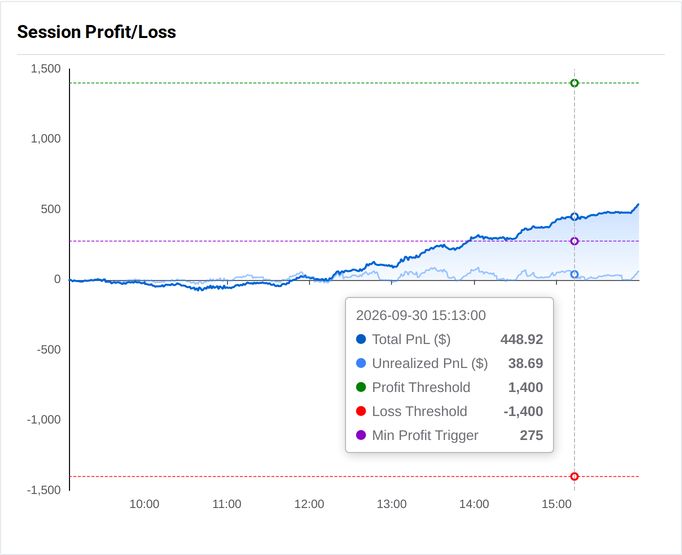
Session Profit/Loss curve in unrealized mode
Management Reset Behavior
Unrealized Mode tracks the unrealized high watermark to decide when stopping criteria or drawdown minimums are met, and the Monitor stays active after a flatten.
When a Monitor triggers a flattening event in Unrealized Mode, the high watermark of the unrealized P&L gets reset to zero (can be seen in the image above). This allows the Monitor to reset with fresh tracking the moment a new position is opened.
Similarly, even if a flatten action is not triggered by the Monitor but the account is flattened and the position count returns to zero, so too will the unrealized profit/loss tracking. Any time the account goes flat, for whatever reason, tracking is reset.
Monitor Settings Requirements
Unrealized Mode has two settings requirements, and the editor won't save a monitor that breaks them.
First, all enabled Position Management actions must be set to flatten the account. A Monitor can't "Do nothing" when a Profit/Loss threshold is met. The account must be flattened so the unrealized tracking metrics can be zeroed, as discussed above.
Second, both Minimum Profit and Trailing Drawdown types are compatible with Unrealized Mode. However, Trailing Drawdown cannot be based on Net Liq and must be set to use Session P&L (i.e., unrealized profit/loss).
This precaution is necessary because otherwise, once triggered, the Monitor would continue triggering endlessly since it is never shut down in this mode.
Unrealized Profit/Loss Thresholds
In Unrealized Mode (and in Hybrid Mode), two more options appear: Position Profit and Position Loss thresholds. These optional settings operate almost identically to the Profit/Loss thresholds at the account-level, but they will only evaluate the unrealized P&L on individual positions in the account.
Position thresholds are evaluated faster than account thresholds: the P&L of each position in the account is checked every one second.
Once the position's P&L crosses above the Profit Threshold or below the Loss Threshold, the position is flattened immediately and the event is reported and logged in the Account Management logs. The Monitor will remain active and continue evaluating any other account- or position-level profit/loss settings.
Switching to Standard Mode, or setting the Position Profit/Loss thresholds to zero, turns the position thresholds off.
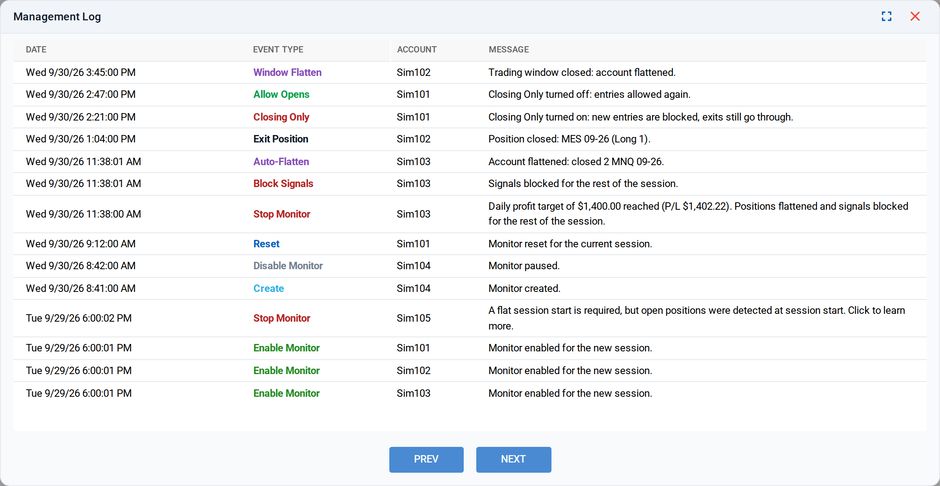
Exit Position event is visible in the Account Management logs
Position Profit/Loss Thresholds in Unrealized Mode track the true unrealized profit/loss for each position, as reported by NT8. This value excludes commissions, regardless if "Include Commission?" is set to Yes in the Monitor Settings.
Commissions only apply at the account-level and cannot be tracked at the position-level.
Require Clean Sessions
CrossTrade often has to work around NinjaTrader 8's idiosyncrasies. Chief among them is NT8's inability to query execution data beyond the current session. Because of this, the way NT8 reports unrealized and realized Day P&L is nuanced.
If a position is carried over from a previous session, i.e., held from before 5 PM ET into the open of the new session at 6 PM ET, NT8 will consider any gains from that position as part of the day's unrealized P&L. However, as soon as that position is closed, NT8 will omit that profit or loss from the calculation, making it very difficult to track the true Session P&L.

Account Manager monitor marked inactive
For this reason, by default we require a clean session (session opens with no active positions) for Account Management Monitors to run properly.
If the session is determined to be "unclean," the Monitor is marked as "INACTIVE" and goes into a waiting state until the next session begins.
Consequences of Unclean Sessions
If the session begins with one or more positions already open, the Session P&L and its high watermark are tracked normally at first.
The moment any of those positions is closed, whether by the Monitor or by hand, NT8 drops that position's P&L from its Session P&L calculation.
In the example below, a single MNQ position was carried into the session from the previous close, and the Session P&L tracked it correctly from the session start.
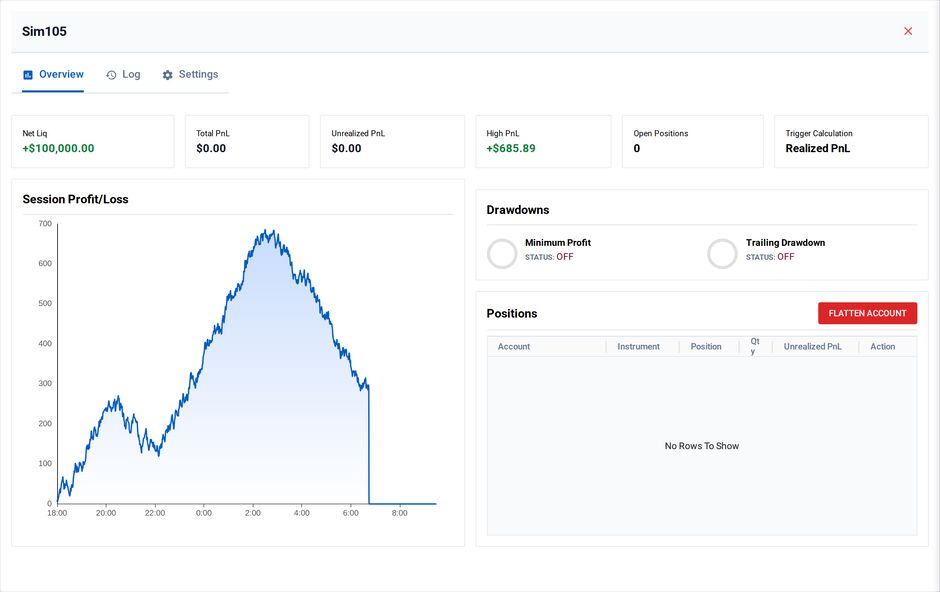
Result of unexpected drop in P&L from carried positions
When the position was closed by hand at 7:00 AM ET for about $300 profit, NT8 dropped it from the Session P&L, and Profit/Loss fell to zero as if the trade never happened (highlighted).
If you know this will happen, disabling Require Clean Session can work for a strategy that carries positions overnight.
Allowing Unclean Sessions
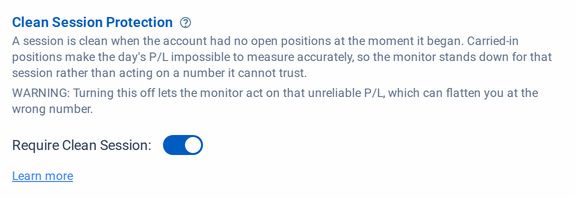
To turn it off, click Edit on the Monitor, switch off Require Clean Session under Advanced Options, and save.
Reasons to Disable the Clean Session Check
Intentional Strategy
The main reason to disable it is carrying overnight risk on purpose and wanting the Monitor to manage those positions.
Let the Monitor handle exits with P&L thresholds, and once a flatten triggers, stop trading for the day.
If you restart the Monitor in this scenario, check the Profit/Loss value first, because it may have changed a lot.
Erroneous Prop Firm Reporting
In some circumstances, prop firms have been known to alter/modify the execution history of prop accounts in such a way that it fools the Clean Session algorithm into thinking a position is open in the account when, in fact, no positions are open at all.
In this case, it may be prudent to disable the Clean Session requirement if you are certain the account will end the day flat, either through Account Manager End-of-Day Auto-Flattening or otherwise.