Minimum Profit Drawdown
Minimum Profit Drawdown (MPD) works like a fixed, profit-based stop for the whole account. Once the session's P&L reaches a profit level you choose, MPD watches for it to fall back below a floor you set, and acts if it does, so you keep that part of the day's gains.
Minimum Profit Drawdown is available on Tradovate with the same three settings described here (Enabled, Minimum Profit Trigger, Minimum Profit Threshold) and the same position and alert actions. No NinjaTrader is involved there. See Tradovate Account Manager.
Functionality
Minimum Profit Drawdown works in three stages:
- Inactive Stage (Waiting): At the start of a trading session, MPD is dormant. It doesn't do anything until the trigger is reached.
- Monitoring Stage (Watching): This stage begins when the account's total P&L for the current session (which resets to zero each session) reaches or exceeds the "Minimum Profit Trigger" value set by the trader. Once triggered, MPD constantly watches the session P&L. It's now "on" and actively looking for a potential drawdown.
- Action Stage (Protecting): This stage is triggered only after the Monitoring Stage has begun. If the session P&L falls below the "Minimum Profit Threshold" (also set by the trader), MPD takes immediate action. The specific action is chosen by the user from a set of options and is designed to prevent further losses. In Unrealized Mode, MPD then resets to the Inactive Stage; in Standard and Hybrid Mode, the trip stops the monitor for the rest of the session.
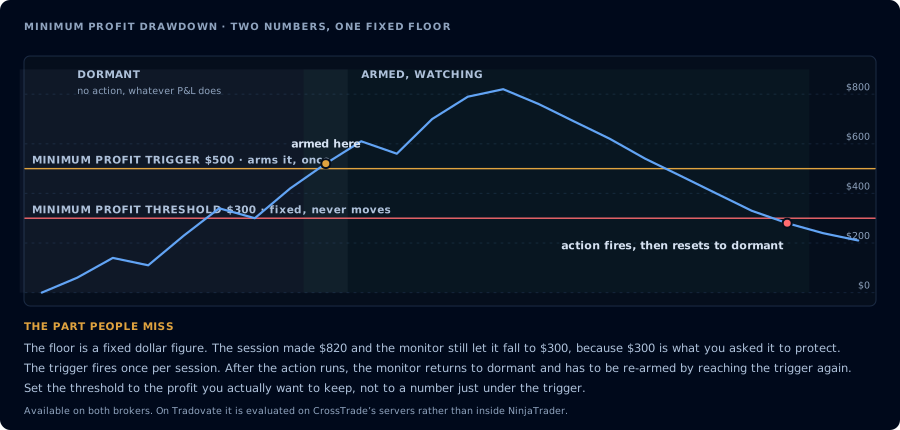
Two numbers: the trigger arms it, the threshold is a fixed floor that never moves.
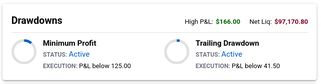
Activated drawdowns awaiting execution below target levels
Settings
MPD has four settings:
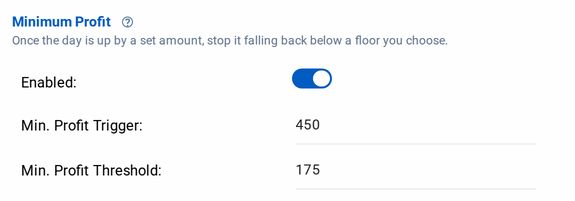
- Enabled (On/Off Switch): Off by default.
- Minimum Profit Trigger (Activation Point):
- Purpose: This sets the profit level that must be achieved before MPD starts actively monitoring.
- Units: The account's base currency (e.g., USD).
- How to Use: Choose a profit amount that, once reached, you'd like to start protecting. For example, if you want to start protecting profits after making $500, set this to 500.00.
- Important Note: Setting this to 0 means MPD will start monitoring immediately at the start of the trading session, as the P&L will always be greater than or equal to 0.
- Minimum Profit Threshold (Protection Level):
- Purpose: This sets the level to which the session P&L can fall after the Minimum Profit Trigger has been hit, before the system takes action.
- Units: The account's base currency.
- How to Use: Choose a P&L level that represents the minimum profit you want to keep for the session. For example, if you've triggered monitoring at $500 profit and want to ensure you keep at least $200, set this to 200.00. The threshold can't be negative.
- Important Note: Although not enforced, it's generally recommended to set this lower than the Minimum Profit Trigger. Setting it higher would mean the Action Stage could be triggered before the Monitoring Stage, which defeats the purpose.
- Triggered Action: The same position and alert actions as the daily thresholds: Flatten account or Do nothing for positions, and Disable alerts, Allow closing only, or Do nothing for alerts. See Profit/Loss Thresholds.
Example Scenarios
Scenario 1: Protecting a Target Profit
- Minimum Profit Trigger: $500
- Minimum Profit Threshold: $250
- Triggered Action: Flatten
- The trader starts the day. MPD is initially inactive.
- The trader has a good morning, and the session P&L reaches $600. This crosses the Minimum Profit Trigger, and MPD moves to the Monitoring Stage.
- The market reverses slightly. The session P&L drops to $400. MPD is still in the Monitoring Stage, as the P&L is above the threshold.
- The market continues to decline. The session P&L drops to $240. This is below the Minimum Profit Threshold.
- MPD triggers the "Flatten" action. All orders are canceled, and all positions are closed at the market. The trader's profit for the session is locked in, close to $250.
Scenario 2: Used in tandem with a Profit Threshold
- Full Profit Threshold: $1,200
- (MPD) Minimum Profit Trigger: $1,000
- (MPD) Minimum Profit Threshold: $100
- Triggered Action: Flatten
This example assumes we've set a full Profit Threshold on the account for $1,200, meaning our account will be flattened if the session P&L meets or exceeds that threshold. Note how the full Profit Threshold is slightly above the Minimum Profit Trigger.
- The trader starts the day. MPD is initially inactive.
- The trader has a great start, reaching a session P&L of $1,100. MPD enters the Monitoring Stage and we are just shy of a Full Profit.
- The market experiences a significant downturn. The session P&L falls to $200, but has still not been stopped out. MPD remains in the Monitoring Stage.
- The P&L continues to rise again $1,250. This is above the Full Profit Threshold.
- The "Flatten" Action is triggered, capturing full profit. This is the best case scenario, but we are still comforted by the fact that we would have kept a small profit if the market continued to turn against us.