Profit/Loss Thresholds
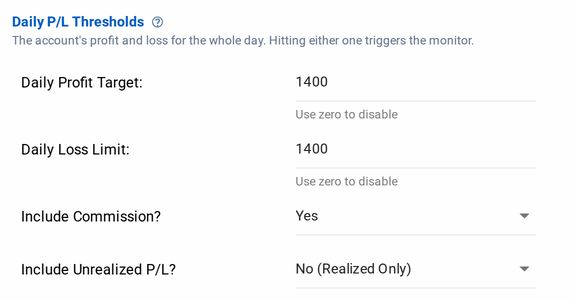
Each monitor includes both a profit and a loss threshold, configurable as a positive or negative dollar amount. When an account’s real-time P/L breaches either threshold, configured actions such as account flattening and modifications to alert settings will be triggered.
Users can specify if calculations should consider commission and/or unrealized P/L in addition to realized profit/loss. Thresholds with zero can be specified to disable the threshold monitoring of a profit or a loss value separately, without deactivating the monitor.
Profit and loss thresholds work the same way on Tradovate, including using zero to disable one side, and the Position Management and Order Management options below apply there too. Two differences: there is no include-commission option, because Tradovate evaluation reads a cash-balance snapshot that carries no per-fill fee data, and you choose a P/L Basis of Total, Realized, or Unrealized instead. Tradovate Account Manager covers how flattening works there.
Position Management
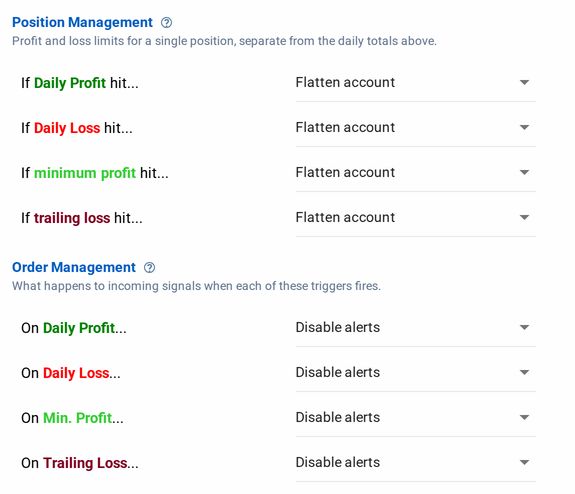
When a profit or loss threshold is reached, Account Manager allows for configurable responses to the trigger. Upon hitting a target, the user can configure either of two actions on each profit/loss target independently:
- Flatten account
- Do nothing
When a Flatten is triggered, CrossTrade cancels the account's working orders and closes each open position with a market order.
If you'd prefer CrossTrade to take no action on the position, select Do Nothing. This is useful if you're only interested in modifying Alert behavior.
Position management actions run once, at the moment of the breach, and can't be undone. Fills can slip in fast markets; see How It Works.
Order Management
Additionally, configurable alerts can also be set to be triggered when either a profit or loss target is hit (independent of a position management action), including:
- Disable alerts
- Allow closing only
- Do nothing
Disable Alerts
This is very similar to how the master "Kill Switch" works in Master Controls at the global level, except this option will only disable alerts for the specific account whose profit/loss target was hit.
CrossTrade will block all inbound webhooks when disable alerts is engaged.
To let alerts through again after the monitor has triggered, turn the monitor off or restart it.
Closing Only
Shown as Allow closing only in the editor. Like the global Closing Only switch, but for one account: closing order webhook commands pass through (including flatten_first flags) while opening actions are blocked.
Do Nothing
If you choose to do nothing when a profit or loss target is hit, then no modifications will be made to alter filtering. All alerts will still pass through to NT8.