Trailing Drawdown
Trailing Drawdown (TD) follows the highest P&L (or Net Liq) the session reaches and acts when the account gives back more than the amount you set from that high. Unlike a fixed stop, its level rises as the session's gains grow.
Trailing Drawdown is available on Tradovate with the Enabled switch, the Minimum Profit Trigger, and the "Trail high watermark by..." amount as a percentage or a dollar figure. One setting does not carry over: Tradovate has no Based on... selector, so there is no Net Liq option and the Net Liq warning further down this page applies to NinjaTrader 8 only. Tradovate trailing always works from the trigger you set. See Tradovate Account Manager.
Functionality
Trailing Drawdown has the same three stages as Minimum Profit Drawdown:
- Inactive Stage (Waiting): At the start of a trading session, or when disabled, the TD is dormant. It waits for the initial activation condition to be met.
- Monitoring Stage (Tracking): This stage begins once the selected metric (either Session P&L or Net Liquidation Value) reaches or exceeds the "Minimum Profit Trigger." The TD then records the highest value reached by the chosen metric during the session (the "High Watermark"). The protection level is calculated by subtracting a specified amount (either a percentage or a fixed dollar amount) from this High Watermark.
- Action Stage (Protecting): If, after the Monitoring Stage has begun, the chosen metric (Session P&L or Net Liq) falls below the calculated trailing protection level, the TD feature takes the predefined action. This action is designed to limit further losses and secure a portion of the accumulated gains. In Unrealized Mode, TD then resets to the Inactive Stage; in Standard and Hybrid Mode, the trip stops the monitor for the rest of the session.
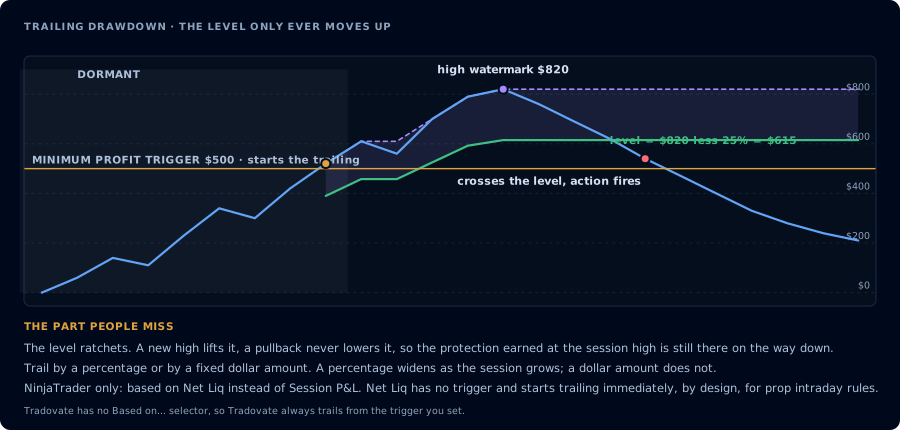
The level lifts with each new high and never falls back.
Key Concepts
- Net Liquidation Value (Net Liq): The current total value of the account if all positions were closed immediately at the current market prices. This includes both realized and unrealized profits and losses.
- High Watermark: The highest value reached by the selected metric (Session P&L or Net Liq) after the Monitoring Stage has been activated. This value is continuously updated as the metric increases.
- Trailing Protection Level: The dynamically calculated level below which the Action Stage is triggered. It's calculated as: High Watermark - Trailing Amount. The Trailing Amount is determined by the "Trail high watermark by..." setting.
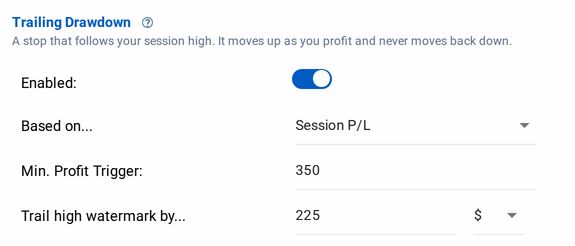
Settings
- Enabled (On/Off Switch): Off by default.
- Based on... (Metric Selection):
- Session P&L: The trailing drawdown will be based on the total profit and loss for the current trading session.
- Net Liq: The trailing drawdown will be based on the account's Net Liquidation Value. This provides a more comprehensive view of the account's overall value, including unrealized gains and losses.
Net Liq does not have an activation trigger, it begins trailing the high watermark by the selected amount immediately. This functionality was chosen because many prop firms have strict, intraday trailing drawdown rules for disqualification and % of Net Liq needs to be monitored from wherever the intraday high exists.
- Minimum Profit Trigger (Activation Point):
- Purpose: This sets the level that the selected metric (Session P&L or Net Liq) must reach before the TD feature starts actively monitoring and trailing.
- Units: Account's base currency (e.g., USD).
- How to Use: Choose a value that represents a meaningful profit level at which you want protection to begin.
- Important Note: Setting this to 0 is valid, meaning monitoring starts immediately.
- Trail high watermark by... (Trailing Amount):
- Purpose: This defines how the trailing protection level is calculated relative to the High Watermark.
- Options:
- X% (Percentage): The protection level will be X% below the High Watermark. For example, if set to 10%, and the High Watermark is $1000, the protection level will be 900 (1000 - 10% of $1000).
- $X (Fixed Amount): The protection level will be $X below the High Watermark. For example, if set to $200, and the High Watermark is $1000, the protection level will be 800 (1000 - $200).
- Triggered Action: The same position and alert actions as the daily thresholds: Flatten account or Do nothing for positions, and Disable alerts, Allow closing only, or Do nothing for alerts. See Profit/Loss Thresholds.
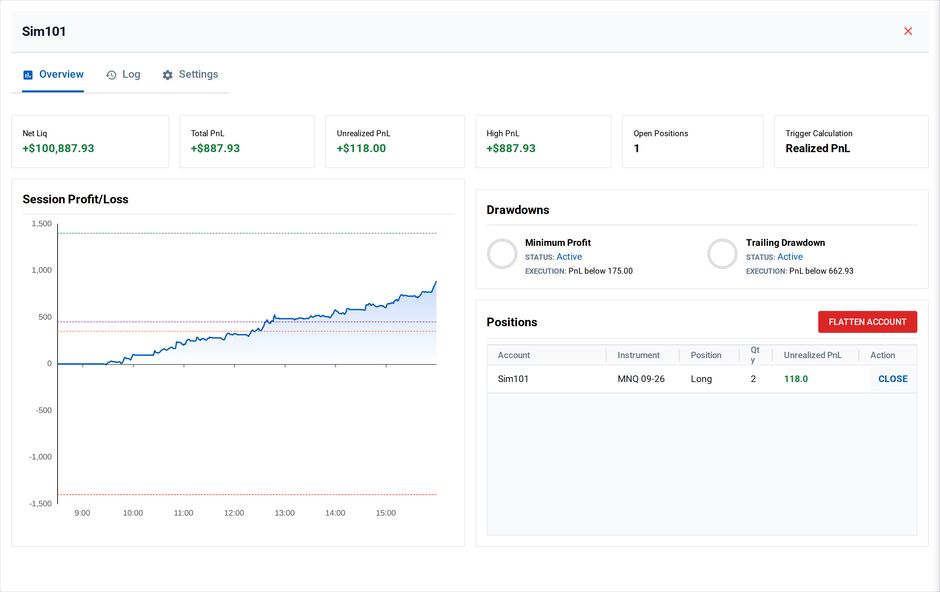
Trailing Drawdown activated: 50% trail off session high $105.19, executed flatten below $52.59
Example Scenarios
Scenario 1: Percentage-Based Trailing (Session P&L)
- Based on...: Session P&L
- Minimum Profit Trigger: $200
- Trail high watermark by...: 10%
- Triggered Action: Flatten
- The trader starts. TD is inactive.
- Session P&L reaches $250. TD enters Monitoring. The High Watermark is now $250. The protection level is 225 (250 - 10% of $250).
- P&L increases to $400. The High Watermark updates to $400. The protection level is now 360.00 (400 - 10% of $400).
- The market reverses. P&L drops to $350. Session P&L is now below the current protection level (360.00).
- TD triggers the "Flatten" action. The account is flattened, securing a profit near $350.
Scenario 2: Fixed Amount Trailing (Net Liq)
- Based on...: Net Liq
- Trail high watermark by...: $1,000
- Triggered Action: Flatten
- The trader starts. TD is immediately activated because the Net Liq option does not have a profit-based trigger.
- The Net Liq reaches a $10,200 high. TD continues Monitoring. The protection level is now $9,200 ($10,200 - $1,000).
- Net Liq increases to $10,800.00 and the High Watermark updates to $10,800. The protection level is now $9,800.00 ($10,800 - $1,000).
- Net Liq falls to $9,750. This is below the current protection level ($9,800).
- TD triggers, and the account is flattened.