NinjaTrader and Tradovate Account Manager
The Account Manager watches each managed account's intraday profit and loss and acts when a threshold you set is reached, flattening positions and locking out further signals. On NinjaTrader 8 it runs inside the CrossTrade NT8 Add-On; on Tradovate it runs on CrossTrade's servers.
You reach it from Account Manager in the dashboard sidebar, which follows the platform you have selected.
Start with one account and one rule
Choose the account you want to monitor, select the P/L basis and enter the threshold and supported action. A daily loss limit, trailing drawdown and account floor measure different conditions. Decide which rule you are implementing before copying a number from a firm dashboard.
Test the configuration in simulation, starting the session flat, and check the actual account state and management log after a trigger. Account-level monitoring does not replace a protective stop on each trade. For copier followers, review Tandem Mode so that copying follows the intended monitor state.
The Account Manager product page explains the available controls. For direct cloud accounts, continue with Tradovate Account Manager; NT8 monitors require the connected desktop add-on.
Each managed account is associated with a "Monitor", which tracks its P/L and triggers predefined actions when configurable thresholds are reached. Monitors are uniquely identified by their associated account and store user configuration parameters, including profit and loss targets, alert preferences, and end-of-day flattening times.
Monitors evaluate each account every 2.5 seconds and run the actions you configured as soon as a threshold is crossed.
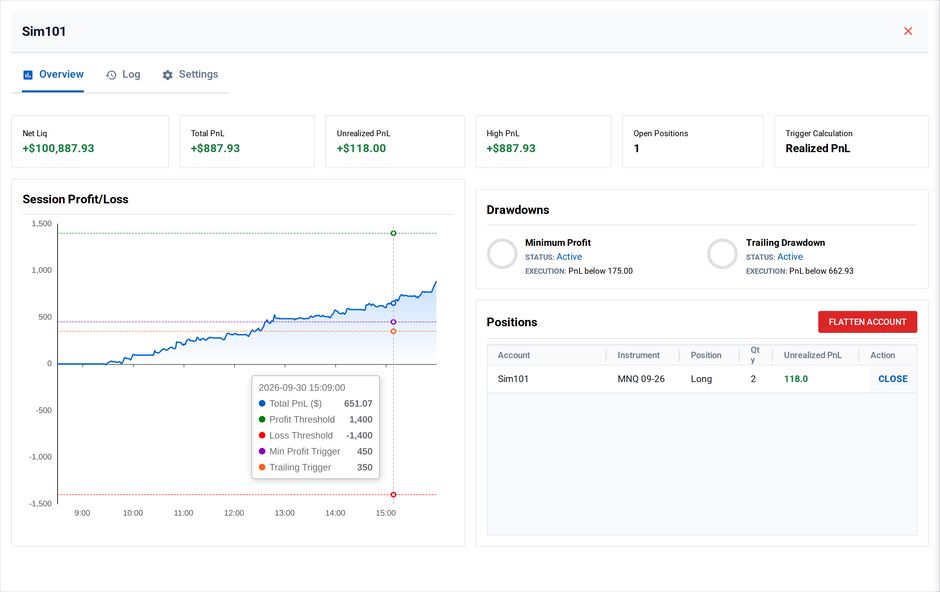
Account Overview inside Account Manager
Important Notes
- The Account Manager is designed for intraday management; it is not compatible with accounts holding overnight positions. A flat account at session open is required for the Account Manager.
- The "session" resets at 6 PM ET every day
- NinjaTrader accounts need the CrossTrade NT8 Add-On installed and connected. Keep it current: Outlier Protection needs v1.12.0 or later. Tradovate accounts need no Add-On at all
- The Account Manager is only available with a Pro plan or above
- It is a risk tool, not a guarantee. Automated actions depend on a stable connection, and you remain responsible for monitoring each account and configuring its parameters.
Tradovate accounts
The Account Manager also covers linked Tradovate accounts. For Tradovate it runs entirely from CrossTrade's cloud: NinjaTrader and the Add-On aren't required, and nothing needs to stay running on your machine. You get the same daily thresholds, minimum profit floor, trailing drawdown, and scheduled flattening, evaluated server-side instead of inside NinjaTrader.
See Tradovate Account Manager for how it evaluates, what happens on a trigger, and a full feature-by-feature comparison against the NT8 Account Manager.