How It Works
The NT8 Account Manager automates control of your NinjaTrader accounts. The CrossTrade NT8 Add-On reports each account's P/L and positions to CrossTrade, where your rules are evaluated; daily profit and loss thresholds are also checked inside the add-on itself. Actions such as flattening are carried out through the add-on.
This page describes the NinjaTrader 8 implementation: the Add-On dependency, the 2.5-second polling loop, the four monitor states, and the 6 PM ET clean-session reset are all specific to it. Tradovate monitors reach the same outcomes from CrossTrade servers instead, with no Add-On in the path. See Tradovate Account Manager.
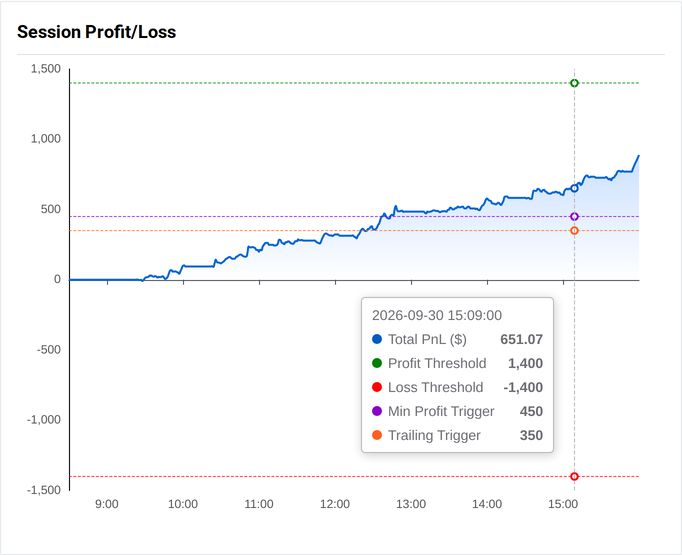
Session Profit/Loss graph showing active risk levels
Core Components
- Monitor Objects:
- One-to-One Relationship: A single Account Manager monitor is associated with each trading account in the NT8 platform.
- Independent Configuration: Each monitor has its own settings.
- Real-Time Polling Mechanism:
- Polling Frequency: Monitors are scanned every 2.5 seconds.
- Configurable Profit/Loss (P/L) Thresholds
- Dollar Value Parameters: The P/L threshold settings use dollar values as a numerical trigger parameter. Users may configure positive (profit) and negative (loss) threshold values.
- Evaluation Scope: Users choose if and how commission and unrealized P/L will be factored in the P/L calculations.
- Disabled Threshold Parameters: Setting either a P/L threshold parameter to zero will disable specific P/L breach scanning, but will not affect other triggers.
- Action Trigger: When actual P/L values (realized or total as per configuration) exceed thresholds, automated actions are triggered, described below.
- Actions: When a threshold is hit, a monitor can flatten the account or do nothing, and separately disable alerts, allow closing orders only, or leave alerts alone, all per account. See Profit/Loss Thresholds.
- End-of-Day Flattening: Optional, at a time you set. See Auto-Flattening.
- Session Start Definition and Requirements:
- Session Reset: The Account Manager session resets at 6:00 PM US/Eastern time daily.
- Flat Account Requirement: Managed accounts must be flat at session start (6:00PM ET, no open positions or pending orders). A monitor with pre-existing open positions will be assigned an INACTIVE status at the start of session and must be manually re-activated and reset by an end-user.
- Dynamic Configuration and Monitor States:
- Dashboard Controls: Monitors are created, edited, and deleted on the Account Manager dashboard, and saved changes reach the add-on right away.
- Monitor States: Account Manager monitors operate within four states: ACTIVE (scanning active); INACTIVE (disabled by a position at session start, and must be manually re-started); STOPPED (triggered threshold reached or explicitly stopped); PAUSED (manually disabled by the end-user).
- Activity Logging: Every monitor event is recorded in the Management Log.
Operational Specifications
- Intraday Application: The Account Manager is optimized specifically for intraday management. Holding overnight positions is unsupported at this time.
- Client Dependency: Operation depends on an active CrossTrade NT8 add-on client connection, and all automation is vulnerable when an active connection cannot be achieved or maintained between a user's trading environment and the backend servers.
- Market Slippage: Users should be aware that, due to order executions of market inverse matching order systems, slippage is always possible in fast-moving market environments during a flatten function, which also includes any flatten order triggered by automated systems like Account Manager. CrossTrade does not guarantee a given fill value, in such instances.
Non-Guaranteed Operations: The Account Manager is not intended to replace personal trading responsibility and should not be considered a means of guaranteed profit or a perfect risk management system. End users should independently assess risk configurations for every account under their management and take responsibility for the actions generated from those settings and from the state of their trading environment.