AI-Assisted Development
If you're using an AI coding assistant (Claude Code, Cursor, GitHub Copilot, Continue, Cline, Aider) to build against the CrossTrade API, this page is your starting point.
This page is for developers building against the REST, WebSocket, and MCP APIs. If you just want AI help wiring a TradingView strategy or indicator to CrossTrade webhooks (no coding involved), use the dedicated automate-tradingview.md file: paste it into any AI chat along with your Pine Script and it will build your alert settings and payload.
The short version, today:
- Best path (Elite tier): point your client at the hosted MCP server. One URL, OAuth-authorized, every tool typed.
- For non-MCP IDEs: point the assistant at the OpenAPI spec or endpoint catalog before it writes code.
- For chat-only contexts: paste
llms-full.txt(or its URL) so the AI has the entire API surface in one fetch. - At minimum: drop the
CLAUDE.mdtemplate into your project root so the AI knows the path conventions.
If your AI gets endpoints wrong (/api/order instead of /v1/api/accounts/{account}/orders/place), it's because nothing in the conversation taught it our path scheme. Each tool below fixes that in a different way.
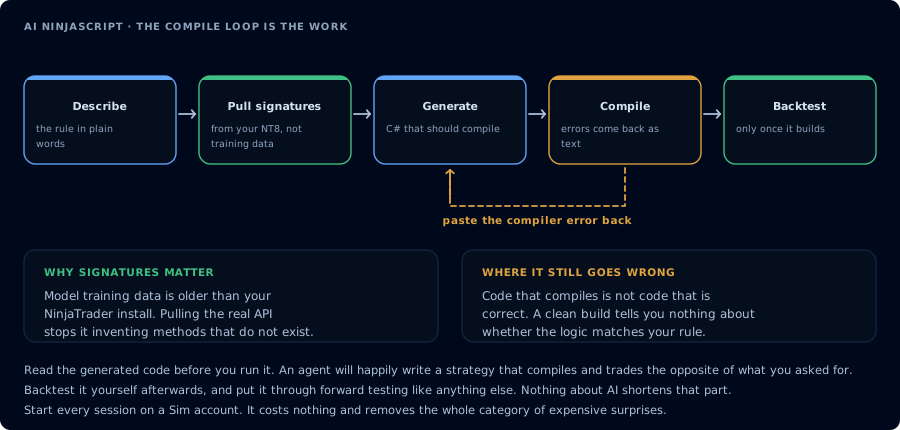
Pull the real signatures, generate, compile, feed the errors back.
MCP server
The hosted MCP server is available exclusively on the Elite subscription tier. NT8-backed tools require CrossTrade NT8 Add-On v1.13.0 or higher and NinjaTrader running. Tv_* tools use the linked Tradovate cloud connection and do not require the user's Add-On or NinjaTrader. OAuth tokens are still issued to non-Elite accounts, but tool calls return HTTP 403 until the account is upgraded.
The REST API and WebSocket API remain available on the Pro tier. Only the MCP transport is Elite-gated.
For the MCP capability map, tool reference, and safe automation patterns, see the dedicated MCP Trading API section.
For trader-facing prompt examples, see MCP Trading with AI.
The CrossTrade Model Context Protocol server is live at:
https://app.crosstrade.io/v1/api/mcp
Streamable HTTP transport, OAuth 2.1 with PKCE and dynamic client registration (RFC 7591). Most clients only need the URL. They discover everything else automatically:
- Client POSTs to
/v1/api/mcpwithout auth. - Server returns
401withWWW-Authenticate: Bearer resource_metadata="https://app.crosstrade.io/.well-known/oauth-protected-resource". - Client GETs that URL, finds the authorization server.
- Client self-registers, opens the user's browser to the consent screen.
- User clicks Allow, client gets an access token, calls tools.
Client config
Claude Desktop, Claude Code, Cursor, and most other MCP clients accept the same shape:
{
  "mcpServers": {
    "crosstrade": {
      "url": "https://app.crosstrade.io/v1/api/mcp"
    }
  }
}
Drop that into:
- Claude Desktop: Settings > Developer > Edit Config.
- Claude Code:
claude mcp add --transport http crosstrade https://app.crosstrade.io/v1/api/mcp. - Cursor: Settings > Features > MCP > Add MCP Server.
Once connected:
You:  Flatten everything in Sim101 and tell me what's left.
AI:   [calls FlattenEverything]
       [calls GetAllPositions account=Sim101]
       Done. Sim101 is flat. Last close: ES 12-26 short -2 @ 4521.25.
Scopes
Tokens are issued with one of two scopes:
mcp:read: quotes, bars, accounts, positions, orders, executions, and other read-only inspection.mcp:trade: order placement, strategy deployment, NinjaScript compile/write operations, and other write-capable tools.
Manage tokens and consent grants at app.crosstrade.io/user/my-account?tab=ai-clients.
What's exposed
The MCP surface is a superset of the REST surface. Every public REST endpoint is an MCP tool of the same PascalCase name, such as PlaceOrder, FlattenEverything, and GetBars. Additionally, MCP clients have access to Elite-tier tools that are not on REST or WebSocket:
- NinjaScript authoring: compile, write, read, list, delete
- Strategy backtest engine (NT8 Strategy Analyzer parity) with parameter-sweep optimization
- Strategy deployment registry with live-state verification
- Indicator value queries
- Drawing CRUD on charts
- Workspace load / save
- Alert create / list / remove
- MCP-originated alert relay through your configured destinations
Discovery
For AI agents trying to find this server cold from crosstrade.io:
- crosstrade.io/.well-known/mcp/server-card.json: pointer card on the marketing domain.
- app.crosstrade.io/.well-known/mcp/server-card.json: canonical server card.
- HTML
<link rel="mcp_server">in the head of every crosstrade.io page. - HTTP
Link: <...>; rel="mcp_server"headers on the homepage. info.x-mcp-endpointin the OpenAPI spec.
OpenAPI spec
Machine-readable surface, fed live from the deployed API:
- JSON: https://app.crosstrade.io/v1/api/openapi.json
- YAML: https://app.crosstrade.io/v1/api/openapi.yaml
- Static YAML download: openapi.yaml
Drop the URL into Postman, Insomnia, or any OpenAPI-aware editor for schema-aware request building and a request explorer.
Endpoint catalog
A flatter alternative to the full OpenAPI spec, one row per endpoint with method, path, parameters, and the underlying RPC name. Useful when you just want the AI to know "what endpoints exist":
GET https://app.crosstrade.io/v1/api/_endpoints
This is also the URL that the smart 404 (see below) points AI tools at when they guess wrong.
llms.txt and llms-full.txt
The llms.txt convention is an emerging standard for AI-readable single-file documentation. Both files are served live:
- Short index: https://app.crosstrade.io/v1/api/llms.txt
- Full reference: https://app.crosstrade.io/v1/api/llms-full.txt
The full version contains every endpoint, parameters, body shapes, and runnable examples in a single Markdown file you can paste (or link) into any AI chat. For chat-only contexts where you can't install an MCP client, this is the closest thing to giving an AI the entire API surface in one shot.
Smart 404 responses
When an AI tool guesses a wrong endpoint (/api/order, /v1/api/orders, /api/v1/place), the API doesn't just return an empty 404. It returns:
{
  "success": false,
  "error": "unknown_endpoint",
  "detail": "No route matches POST /api/order.",
  "request": {
    "method": "POST",
    "path": "/api/order"
  },
  "did_you_mean": [
    "POST /v1/api/accounts/{account}/orders/place",
    "POST /v1/api/accounts/{account}/orders/flatplace",
    "POST /v1/api/orders/cancelall"
  ],
  "discovery": {
    "endpoints_catalog": "https://app.crosstrade.io/v1/api/_endpoints",
    "openapi_json": "https://app.crosstrade.io/v1/api/openapi.json",
    "llms_full_txt": "https://app.crosstrade.io/v1/api/llms-full.txt",
    "mcp_endpoint": "https://app.crosstrade.io/v1/api/mcp",
    "mcp_server_card": "https://app.crosstrade.io/.well-known/mcp/server-card.json",
    "documentation": "https://crosstrade.io/docs/api/overview"
  }
}
Most AI agents read error response bodies and self-correct on the next call. You usually don't need to do anything, but if you're debugging, the did_you_mean array is the fastest way to find the right path.
Drop-in rules template
Dropping a rules file in your project root teaches the AI the conventions before it generates any code. Three flavors:
- CLAUDE.md for Claude Code, Cursor (when reading
CLAUDE.md), Aider, Continue. - AGENTS.md universal, picked up by most AGENTS-aware tools.
.cursorrulesCursor-specific (rename to.cursorrules).
Each one captures the must-know rules: base path, auth, response shape, instrument formats, common gotchas (e.g. POST/PUT bodies are JSON, NT8 must be connected, the order ID path param is {id} but the body field for change/replace is orderId).
Pasting context into a chat
If you just want to drop a single URL into a chat to give the AI the whole API surface:
https://app.crosstrade.io/v1/api/llms-full.txt
That's the everything-file. Every public endpoint, every parameter, every example, in one fetchable document.
Choosing the right approach
| Tool | Tier | Setup | Power | Maintenance |
|---|---|---|---|---|
| MCP server | Elite | One-line client config + OAuth | Highest, AI calls the API directly | Auto-syncs with live spec |
| OpenAPI spec | Pro | Paste URL into editor | Medium, schema-aware requests | Auto-syncs with live spec |
| llms-full.txt | Pro | Paste URL into chat | Medium, AI gets full surface, no integration | Auto-syncs with live spec |
| Drop-in rules | Pro | Save file in project root | Low, prevents path mistakes | Update if conventions change |
Use as many as fit your workflow. They're complementary: MCP lets the AI call tools directly, the rules file keeps generated code on-convention, and llms-full.txt gives chat-only contexts the entire API surface in one paste.
When something doesn't work
- AI hits 401:
XTRADE_TOKENmissing or wrong, or the user doesn't have a Pro subscription. Token is at app.crosstrade.io/user/my-account. - MCP client hits 403 with
"MCP requires an Elite subscription": the OAuth flow succeeded but the underlying account isn't on Elite. Upgrade at app.crosstrade.io/user/subscriptions. Existing OAuth grants and tokens stay valid through the upgrade, no need to re-authorize. - AI hits 408: NinjaTrader isn't running with the add-on connected. The user needs to fix that. No amount of retrying will help.
- AI keeps inventing endpoints: the rules file isn't being read. Verify it's in the project root, not a subdirectory. Some tools cache, restart the client. If it keeps happening, also paste
llms-full.txtinto the conversation. - AI's request body doesn't match what the endpoint expects: point it at
/v1/api/openapi.json, or have it re-read the endpoint's section inllms-full.txt. The spec is the source of truth.
For anything else, ping Discord.