Authentication
Authenticating to the CrossTrade API is simple and uses Bearer token authentication to protect your account and your data.
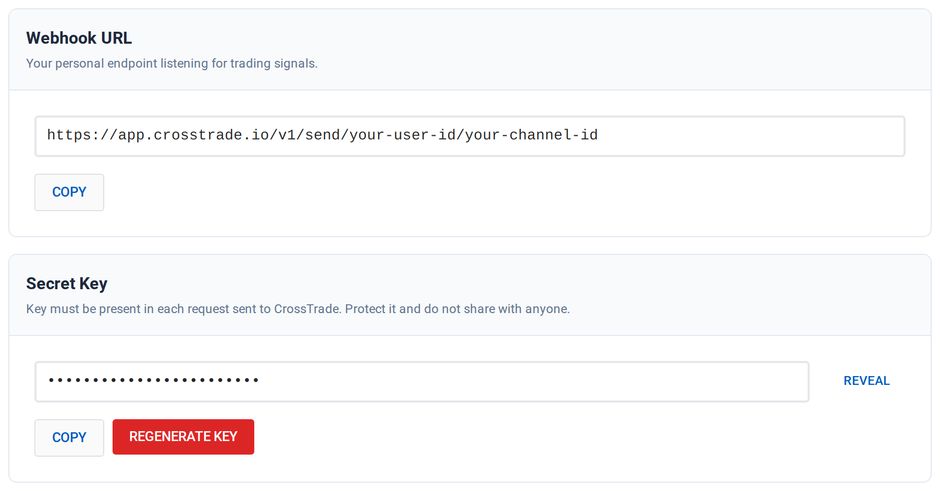
Each user account has a single active Bearer token that is used for both webhook requests as a secret key in the key field from TradingView (example) and as the Bearer token in API requests. It is secret and should not be shared with anyone.
You can rotate your token from the Security tab of My Account by selecting Regenerate Key. Regenerating the key immediately invalidates the old key and disconnects active CrossTrade NT8 add-on sessions. Your webhook URL does not change. Reconnect the add-on and replace the old key in every TradingView alert and API integration that uses it.
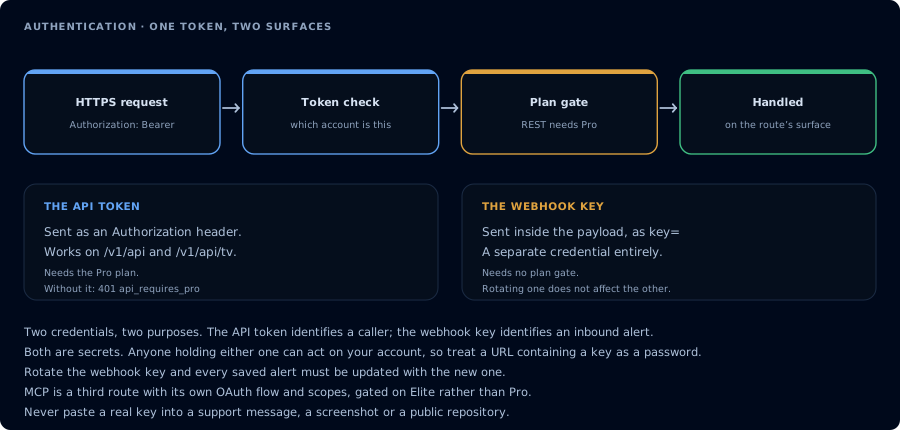
Two credentials, two purposes. Rotating one does not affect the other.
About Bearer Authentication
Bearer authentication (also called token authentication) is an HTTP authentication scheme that involves security tokens called bearer tokens. The name “Bearer authentication” can be understood as “give access to the bearer of this token.” The bearer token is a cryptic string, usually generated by the server in response to a login request. The client must send this token in the Authorization header when making requests to protected resources:
Authorization: Bearer <token>
The Bearer authentication scheme was originally created as part of OAuth 2.0 in RFC 6750, but is sometimes also used on its own. Similarly to Basic authentication, Bearer authentication should only be used over HTTPS (SSL).
Bearer Tokens in the CrossTrade API
On each subsequent page in these API documents you will see the following required headers needed to implement Bearer Authorization.
Headers
| Name | Value |
|---|---|
| Content-Type | application/json |
| Authorization | Bearer <token> |
The same Bearer token also authenticates the Tradovate endpoints at /v1/api/tv. Those routes additionally require a linked Tradovate account; without one they return 403 with "error": "tradovate_not_linked".
Finding Your Bearer Token
On the Security tab of My Account, select Reveal to view your secret key. This is your Bearer token. You can also select Regenerate Key to rotate it.