MCP Setup for AI Clients
This page covers the exact configuration each common MCP client needs to reach https://app.crosstrade.io/v1/api/mcp. Discovery, OAuth, and dynamic client registration are handled by the server. Most clients only need the URL.
For the architecture, scopes, and tool reference, start at the MCP Trading API overview. For trader-facing workflow examples, see the Learn pages.
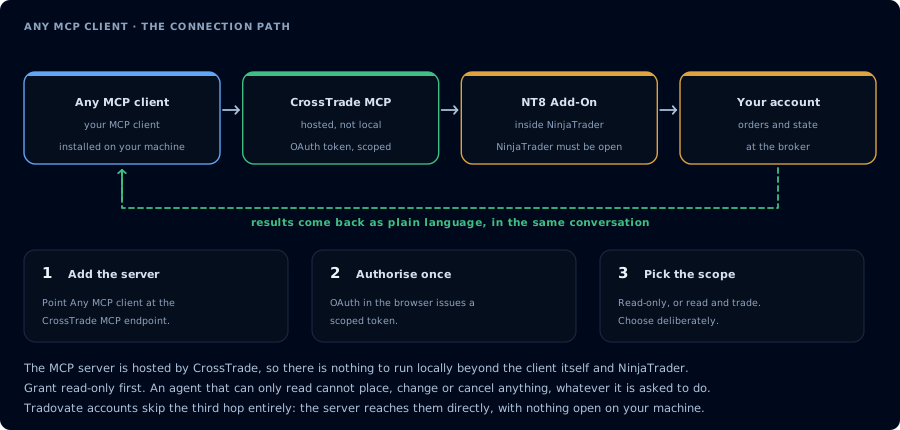
Add the server, authorise once, then pick the scope deliberately.
Requirements
| Requirement | Value |
|---|---|
| Subscription | CrossTrade Elite. Non-Elite accounts can authenticate but tools/call returns HTTP 403. |
| Add-on | CrossTrade NT8 Add-On v1.13.0 or newer for NT8-backed tools. Not required for Tv_* Tradovate tools. |
| NinjaTrader | Must be running for add-on-backed tools. Not required for linked Tradovate tools. |
| Browser | Required once during initial OAuth consent. |
| Network | The MCP client needs outbound HTTPS to app.crosstrade.io. |
Server URL
https://app.crosstrade.io/v1/api/mcp
Streamable HTTP transport. OAuth 2.1 with PKCE. Dynamic client registration per RFC 7591. Tokens are issued with either mcp:read or mcp:trade scope.
Claude Desktop
- Open Claude Desktop.
- Settings → Developer → Edit Config.
- Add the CrossTrade entry:
{
  "mcpServers": {
    "crosstrade": {
      "url": "https://app.crosstrade.io/v1/api/mcp"
    }
  }
}
- Save and quit Claude Desktop. Reopen it.
- On the next message that mentions CrossTrade tools, Claude opens a browser tab to the CrossTrade consent screen. Approve
mcp:readormcp:tradeand return to the app. - Verify the connection by typing:
List my CrossTrade tools and call GetMcpCapabilities.
Claude Code
claude mcp add --transport http crosstrade https://app.crosstrade.io/v1/api/mcp
On the first tool call Claude Code prompts you to open the OAuth consent URL. After consent, the token is stored in Claude Code's keychain.
When to use Claude Code vs Claude Desktop:
- Use Claude Desktop for interactive trading sessions, journal review, and quick prompts.
- Use Claude Code for repository-style workflows: editing NinjaScript files in your NT8 user directory, running compile/backtest loops, and committing changes alongside other code.
Cursor
- Open Cursor.
- Settings → Features → MCP → Add MCP Server.
- Paste:
{
  "crosstrade": {
    "url": "https://app.crosstrade.io/v1/api/mcp"
  }
}
- Reload the MCP servers list. Cursor will prompt for OAuth on the next call.
Continue and Cline
Both clients accept a standard MCP config block. Add CrossTrade to the mcpServers map and reload. The first tool call triggers the consent flow.
ChatGPT custom connectors
ChatGPT Pro and Team accounts that have access to remote MCP connectors can register CrossTrade. Use the URL above. Availability changes by plan and region. If your account does not list a remote MCP connector option, this path is not yet enabled for you.
For the full walkthrough, use How to Connect ChatGPT to NinjaTrader 8.
OpenAI API remote MCP
For agents built against the OpenAI API, pass the CrossTrade URL as the remote MCP connector. The exact SDK parameter shape changes over time, but the connection still uses the same hosted URL and OAuth flow.
# Pseudocode pattern. Check the current OpenAI SDK for the exact API.
agent.add_mcp_server(
    name="crosstrade",
    url="https://app.crosstrade.io/v1/api/mcp",
)
Client-specific tutorials
Custom HTTP clients
For agents written against the MCP spec directly:
- Transport: Streamable HTTP per the MCP spec.
- Auth: Bearer token. If absent, the server returns
401with aWWW-Authenticate: Bearer resource_metadata=...header pointing tohttps://app.crosstrade.io/.well-known/oauth-protected-resource. - Dynamic registration: POST to the registration endpoint announced in OAuth discovery. RFC 7591 compliant.
- PKCE: required for the auth code flow.
First connection test
For an NT8-backed workflow, run a capability check after OAuth consent:
You: Call GetMcpCapabilities and then McpSelfTest. Summarize my add-on version,
     backtest engine availability, and any feature flags. Do not call any other tools.
The agent should return the Add-On version, the backtest_engine block, the enabled features list, and any warnings. If the Add-On is below v1.13.0, upgrade before calling NT8-backed tools. Tv_* tools do not use this version check; verify the Tradovate link instead.
Common setup errors
| Symptom | Likely cause | Fix |
|---|---|---|
Client reports no tools listed | OAuth consent not completed, or scope rejected. | Reauthorize from your CrossTrade account page. |
HTTP 403 MCP requires an Elite subscription | Account is on Standard or Pro. | Upgrade to Elite at app.crosstrade.io/user/subscriptions. |
Add-on version too old warning in GetMcpCapabilities | CrossTrade NT8 add-on is below v1.13.0. | Update the CrossTrade NT8 Add-On inside NT8. |
| NT8-backed tools time out | NT8 is not running or the Add-On is disconnected. | Open NinjaTrader and ensure the CrossTrade NT8 Add-On panel shows connected. Check Tv_* failures against Tradovate link status instead. |
| OAuth completes but tools 401 | Token expired or revoked. | Reauthorize. Tokens can be revoked from the CrossTrade AI Clients page. |
Next steps
- Authentication and OAuth details: Authentication
- Scopes and permission model: Scopes
- Capability and self-test calls: Capabilities
- Safe agent loops: Workflows and Safety
- Trader-facing prompts: Learn: MCP Trading