MCP Trading API for AI Agents
CrossTrade exposes a hosted Model Context Protocol (MCP) server at /v1/api/mcp. It gives AI agents a typed way to read account state, place trades, run analysis, author NinjaScript, backtest through NT8's actual Strategy Analyzer engine, deploy strategies, and operate selected NinjaTrader 8 add-on features.
Use this section when you want an AI agent (Claude, ChatGPT, Cursor, or any MCP-compatible client) to call CrossTrade directly. For client setup, OAuth discovery, and assistant configuration, start with AI-Assisted Development.
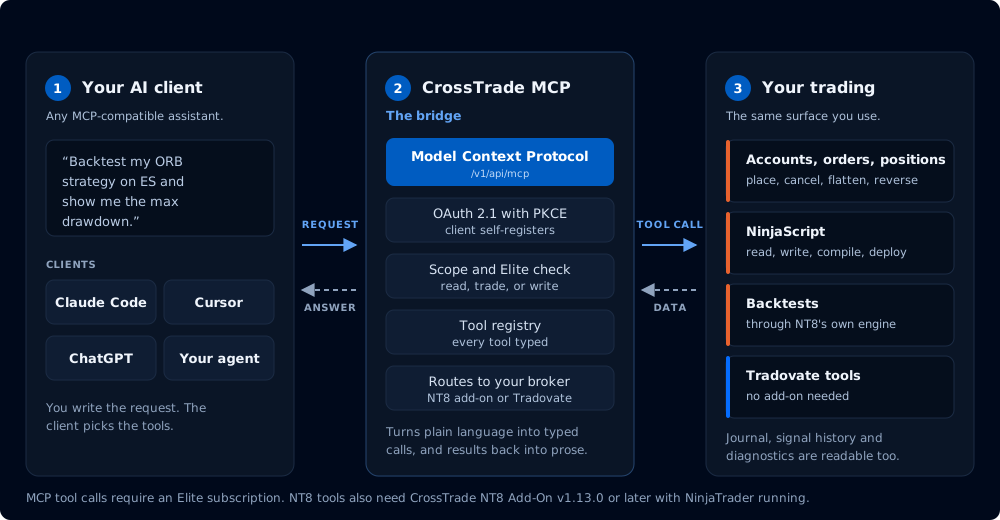
Where an agent's request goes, and what it is allowed to reach
If you want copy-ready trader prompts for AI trading agents instead of tool specs, see MCP Trading with AI Agents in the Learn section.
MCP tool calls require an Elite subscription. NT8 tools additionally require CrossTrade NT8 Add-On v1.13.0 or higher; the Tv_* Tradovate tools need only a linked Tradovate account and no add-on. OAuth discovery still works for non-Elite accounts, but tools/call returns HTTP 403 with "MCP requires an Elite subscription" until the account is upgraded.
REST and WebSocket access remain available on Pro. The Elite gate applies to the MCP transport.
What MCP Adds
MCP includes the public REST trading surface and adds tools that are only practical through an agent-controlled tool interface.
| Capability | What it covers | Start here |
|---|---|---|
| Public API tools | Accounts, orders, positions, executions, quotes, bars, market info, and strategy lifecycle operations. | CrossTrade API Overview |
| Tradovate tools | Read and trade linked Tradovate accounts (Tv_* tools), no CrossTrade NT8 add-on required. | Tradovate Tools |
| Environment checks | Add-on version, feature flags, self-tests, async job status, and NT8 connection state. | Capabilities |
| NinjaScript automation | Read, generate, compile, write, and inspect NinjaScript against the user's actual NT8 install. | NinjaScript and Strategies |
| Strategy backtesting | Run the user's compiled NinjaScript through NT8's actual Strategy Analyzer engine. Single backtests are bit-identical to NT8's UI. Optional parameter sweeps return a ranked grid. | Backtesting and Optimization |
| Strategy deployment | Deploy compiled strategies, verify live state, stop deployments, and reopen charts. | NinjaScript and Strategies |
| Alert relay | Surface MCP-originated alerts through the user's in-app, email, Discord, or Telegram channels. | Platform Tools |
| Journal and diagnostics | Read the user's matched-trade journal, webhook signal history, and add-on activity log. | Journal and Diagnostics |
| Guardrails | Version checks, permission boundaries, and safe tool sequences for AI trading agents. | Workflows and Safety |
Recommended First Calls
Call these before allowing an agent to trade or deploy code:
GetMcpCapabilities
McpSelfTest
ListAccounts
GetConnections
GetAllPositions
GetAllOrders
GetMcpCapabilities confirms the add-on version and enabled feature set. McpSelfTest checks the transport and tool categories. The account, connection, position, and order calls establish current risk before any write operation.
MCP can place orders and mutate the running add-on. Before an autonomous agent workflow sends a trading or deployment command, it should verify the account, connection, open positions, working orders, and any account-level risk limits that matter to the strategy.
The Agent Loop
The end-to-end workflow MCP is designed for. Every step is one or more typed tool calls.
inspect      → GetMcpCapabilities, McpSelfTest, ListAccounts, GetConnections,
               GetAccountSummary, GetWatermarks, ListPositions, ListOrders
research     → GetQuote, MarketInfo, GetBars, GetVolumeProfile
author       → GetNinjaScriptHelp, SearchNinjaScriptSymbols,
               LookupNinjaScriptSymbol
compile      → CompileNinjaScript(in_memory: true), GetMcpJob
write        → WriteNinjaScriptFile(overwrite: true)
backtest     → RunStrategyBacktest, GetMcpJob
optimize     → RunStrategyBacktest(optimization: { parameters_sweep, fitness })
deploy       → DeployStrategy
verify       → GetDeployedStrategyState (trust the live block)
notify       → EmitMcpAlert
close        → StopStrategy, RemoveAlert
Section Map
- Capabilities: requirements, scopes, tool categories, and version checks.
- Core Tools: discovery, jobs, market state, and connection control.
- Tradovate Tools: read and trade linked Tradovate accounts without the CrossTrade NT8 add-on.
- NinjaScript and Strategies: source authoring, compile loops, deployment, and live strategy verification.
- Backtesting and Optimization: drive NT8's Strategy Analyzer engine through MCP for single backtests and parameter sweeps.
- Platform Tools: alert relay.
- Journal and Diagnostics: read the matched-trade journal, webhook signal history, and add-on activity log.
- Workflows and Safety: safe automation patterns and operational limits for trading agents.
- MCP Trading with AI Agents: practical prompts for real trading workflows.