MCP Capabilities
The MCP server is for AI trading agents and other MCP clients that need a typed tool surface instead of hand-built HTTP requests. It sits beside the REST and WebSocket APIs, but it is not a replacement for normal app integrations.
Endpoint: https://app.crosstrade.io/v1/api/mcp
Transport: Streamable HTTP with OAuth 2.1, PKCE, and dynamic client registration.
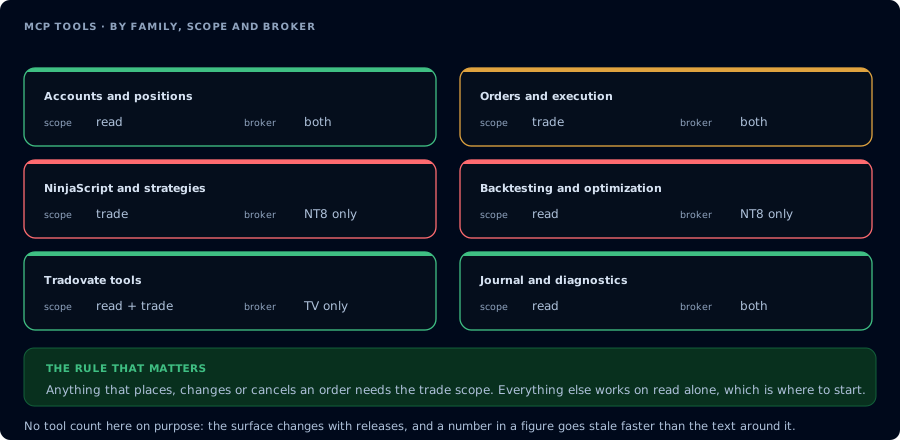
What the surface covers, by family rather than by tool.
Requirements
| Requirement | Details |
|---|---|
| Subscription | Elite tier. Non-Elite accounts can complete OAuth, but tool calls return HTTP 403. |
| Add-on | CrossTrade NT8 Add-On v1.13.0 or newer for NT8-backed tools. Not required for Tv_* Tradovate tools. |
| NinjaTrader | Must be running for add-on-backed tools. Not required for linked Tradovate tools. |
| Permissions | Token scope controls whether the client can read only or also trade. |
Scopes
| Scope | Allows |
|---|---|
mcp:read | Quotes, bars, accounts, positions, orders, executions, and other read-only inspection. |
mcp:trade | Trading commands, strategy deployment, NinjaScript compile/write operations, and other write-capable tools. |
Manage MCP grants at app.crosstrade.io/user/my-account?tab=ai-clients.
Tool Groups
| Group | Tools and use cases |
|---|---|
| Public API tools | Every public REST endpoint is exposed to MCP clients as a PascalCase tool, such as PlaceOrder, CancelOrder, FlattenEverything, GetQuote, and ListAccounts. |
| Capability checks | GetMcpCapabilities, McpSelfTest, GetConnections. |
| Async jobs | GetMcpJob, ListMcpJobs, CancelMcpJob, GetCompileResult. |
| NinjaScript | GetNinjaScriptHelp, SearchNinjaScriptSymbols, LookupNinjaScriptSymbol, CompileNinjaScript, WriteNinjaScriptFile, ReadNinjaScriptFile, ListNinjaScriptFiles. |
| Strategy deployment | DeployStrategy, ListDeployedStrategies, GetDeployedStrategyState, StopStrategy, GetStrategyState, OpenChart. |
| Backtesting | RunStrategyBacktest drives NT8's Strategy Analyzer engine over a compiled strategy class. Supports single backtests (bit-identical to NT8 SA UI) and optional parameter sweeps. |
| Alerts | EmitMcpAlert relays an MCP-originated alert through the user's configured in-app, email, Discord, or Telegram preferences. |
Backtest Engine Availability
GetMcpCapabilities returns a backtest_engine block alongside features. AI clients should read this before attempting RunStrategyBacktest:
{
  "features": ["compile", "strategy_state", "alert_relay", "backtest"],
  "backtest_engine": {
    "available": true,
    "engine": "nt8_strategy_analyzer",
    "nt8_version": "8.1.6.3",
    "fingerprint": "sha256:...",
    "supports_optimization": true,
    "supported_optimizers": [
      "NinjaTrader.NinjaScript.Optimizers.DefaultOptimizer",
      "NinjaTrader.NinjaScript.Optimizers.GeneticOptimizer",
      "NinjaTrader.NinjaScript.Optimizers.StrategyGenerator"
    ],
    "supported_fitness": ["MaxNetProfit", "MaxSharpeRatio", "MaxSortinoRatio", "..."]
  }
}
When backtest_engine.available is false, the response includes reason, detail, and missing_symbols. The user's NT8 build is missing one of the reflection targets the addon needs. Ask the user to update NT8 to a supported build instead of attempting the call.
Version Check
Start every NT8-backed session with GetMcpCapabilities.
{
  "tool": "GetMcpCapabilities",
  "expect": {
    "addon_version": "v1.13.0 or higher"
  }
}
If the Add-On version is older than v1.13.0, do not call NT8-backed MCP-only tools. Ask the user to update the Add-On first. Tv_* tools are server-side and require a linked Tradovate account instead.
The MCP server does not invent NinjaTrader state. If the add-on is offline, add-on-backed tools return a transport or add-on error. Fix the connection before retrying.