NinjaScript AI Workflow: Prompt, Compile, Backtest, and Review
This page documents the recommended CrossTrade MCP workflow for AI-generated NinjaScript development, sometimes described informally as vibe coding. The workflow turns a plain-English strategy idea into a NinjaScript draft that compiles inside NinjaTrader 8, repairs itself with tool feedback, runs Strategy Analyzer backtests with parity to the NT8 UI, and stops at the doors that matter until a human confirms.
For the trader-facing version, see Vibe Coding NinjaScript Strategies with CrossTrade MCP and the Learn tutorial.
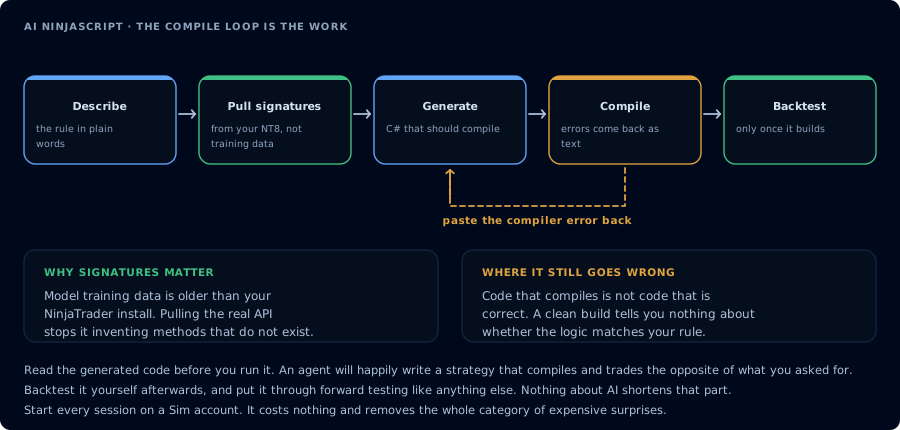
The first attempt rarely compiles. The error text is the useful part.
Overview
The workflow has six phases:
- Ground the model in your NT8 surface.
- Draft the strategy source.
- Compile in memory.
- Repair on failure.
- Write the file, backtest, sweep parameters, review.
- Deploy with confirmation gates and state verification.
Every phase is one or more typed MCP tool calls. The user is in the loop on every irreversible action.
Required subscription and add-on version
| Requirement | Detail |
|---|---|
| Subscription | CrossTrade Elite |
| Add-on | CrossTrade NT8 Add-On v1.13.0 or higher |
| NinjaTrader 8 | Running, add-on connected |
| MCP client | Any client that supports remote MCP |
Required scopes
| Tool group | Scope |
|---|---|
Ground (GetNinjaScriptHelp, SearchNinjaScriptSymbols, LookupNinjaScriptSymbol) | mcp:read |
Compile and write (CompileNinjaScript, WriteNinjaScriptFile) | mcp:trade |
Backtest (RunStrategyBacktest) | mcp:trade |
Deploy (DeployStrategy, StopStrategy) | mcp:trade |
Verification (GetDeployedStrategyState, GetMcpJob) | mcp:read |
The compile loop and any deployment require mcp:trade. Inspection-only research can run on mcp:read.
Recommended first calls
Before any vibe coding session:
GetMcpCapabilities
McpSelfTest
ListAccounts
GetConnections
Confirm the add-on version, the backtest engine availability, and at least one connected account. If any precondition fails, stop and report.
Safe workflow for generated NinjaScript
The recommended sequence:
- Capture the strategy spec in plain English.
- Plan: agent calls
GetNinjaScriptHelpon each NT8 type and method it intends to use; restates the plan. - Draft: agent writes source.
- In-memory compile:
CompileNinjaScript(in_memory: true). - Repair: on compile failure,
LookupNinjaScriptSymbolon unresolved identifiers; rewrite; recompile. - Confirmation: user approves the file write.
- Write:
WriteNinjaScriptFile. Readcompile_enginein the response. The reflection-based recompile trigger is best-effort, so if it comes backfile_onlythe file is on disk but NT8 has not rebuiltNinjaTrader.Custom.dll. Have the user press F5 in the NinjaScript Editor or restart NT8 before backtesting. - Backtest:
RunStrategyBacktestwith realistic commission and slippage. - Apply gates: profit factor, max drawdown, trade count. Stop if any fail.
- Optional sweep: bounded parameter sweep. Re-run a single backtest on the winner.
- Risk review: agent argues against the strategy; user reads.
- Deploy on Sim101 only after explicit confirmation.
- Verify:
GetDeployedStrategyStateshowsis_trading: true.
Tool sequence
The full per-step tool list:
GetMcpCapabilities                       // confirm backtest_engine.available
McpSelfTest
ListAccounts
GetConnections

GetNinjaScriptHelp                       // for each intended symbol
SearchNinjaScriptSymbols                 // when the name is uncertain
LookupNinjaScriptSymbol                  // for each chosen symbol

CompileNinjaScript(in_memory: true)      // initial compile
GetMcpJob                                // poll if needed

[on compile failure]
LookupNinjaScriptSymbol(unresolved)      // for each diagnostic
CompileNinjaScript(in_memory: true)      // recompile
... repeat until green ...

[user confirms]
WriteNinjaScriptFile                     // persist to NT8 user directory (best-effort recompile; check compile_engine, F5 if file_only)
CompileNinjaScript(in_memory: false)     // optional, against disk

RunStrategyBacktest                      // single backtest
GetMcpJob                                // poll until completed
[optional]
RunStrategyBacktest(optimization: { ... }) // parameter sweep
RunStrategyBacktest                      // re-run single on winner

[user confirms]
DeployStrategy
GetDeployedStrategyState                 // verify is_trading: true
EmitMcpAlert                             // notify user
State checks
Required state reads before any write that affects the account:
| Action | Required state reads |
|---|---|
WriteNinjaScriptFile | A green CompileNinjaScript(in_memory: true) result. |
RunStrategyBacktest | A compiled class. |
DeployStrategy | ListAccounts, GetConnections, GetAccountSummary, GetWatermarks. |
StopStrategy | GetDeployedStrategyState. |
| Any order placement (rare in vibe coding) | ListPositions, ListOrders, GetAccountSummary, GetWatermarks. |
If any read fails, stop and report.
Confirmation requirements
The recommended prompt requires explicit user confirmation before:
WriteNinjaScriptFileDeployStrategyStopStrategyif it would leave an open position- Any order-placement tool
The agent must restate the proposed tool name and arguments before each. The user types confirm (or your chosen word). The agent must not auto-confirm or interpret a prior approval as standing approval.
Example prompt
Vibe code a NinjaScript strategy called OpeningRangeMES for MES 06-26.

Behavior: long on break above first 15-minute range high after the regular
session open. ATR-based trailing stop, multiplier 2.0. One contract. Max two
trades per session. Trade only between 09:30 and 11:00 ET.

1. Before writing, GetNinjaScriptHelp on TimeFilter, ATR, EnterLong,
   SetTrailStop. Restate the plan.
2. Draft. CompileNinjaScript(in_memory: true). On failure, LookupNinjaScriptSymbol
   on each unresolved identifier and recompile until green.
3. Wait for my "confirm" before WriteNinjaScriptFile.
4. RunStrategyBacktest on Sim101, last 30 trading days, 5-minute bars,
   commission $1.27 per round-trip, slippage 1 tick. Apply gates: profit
   factor > 1.25, max drawdown < $500, trade count > 40.
5. If gates pass, sweep ATR multiplier 1.5 to 3.0 step 0.25 with fitness
   NetProfit. Show top three. Re-run a single backtest on the winner.
6. Risk review: list five reasons not to deploy this live.
7. Wait for my "confirm" before DeployStrategy on Sim101.
8. After deploy, GetDeployedStrategyState. Confirm is_trading: true.
   EmitMcpAlert subtype deployment_started.
Example tool call sequence
The agent will issue dozens of tool calls. A representative path:
GetMcpCapabilities                                          → addon 1.13.0, backtest available
McpSelfTest                                                 → ok
ListAccounts                                                → [Sim101, ...]
GetConnections                                              → Sim101 Connected

GetNinjaScriptHelp(topic: "TimeFilter")
GetNinjaScriptHelp(topic: "ATR")
GetNinjaScriptHelp(topic: "EnterLong")
GetNinjaScriptHelp(topic: "SetTrailStop")

CompileNinjaScript(in_memory: true, class_name: "OpeningRangeMES", source: "...")
  → success: false, errors: ["unresolved 'OpenRange'"]

SearchNinjaScriptSymbols(query: "range high session")
LookupNinjaScriptSymbol(name: "GetSessionHigh")

CompileNinjaScript(in_memory: true, ...) → success: true

[user confirms]
WriteNinjaScriptFile(path: "Strategies/OpeningRangeMES.cs", source: "...", overwrite: true)

RunStrategyBacktest({
  strategy: "OpeningRangeMES",
  instrument: "MES 06-26",
  from: "2026-04-17", to: "2026-05-16",
  bars_period: { type: "Minute", value: 5 },
  account: "Sim101",
  commission: "1.27", slippage_ticks: 1
})
  → job_id: b-9101
GetMcpJob(job_id: "b-9101") → status: completed
  → metrics: { NetProfit, ProfitFactor, MaxDrawdown, TradeCount, Sharpe }

RunStrategyBacktest({ ..., optimization: { parameters_sweep: [...] } })
  → ranked grid with `best` block
RunStrategyBacktest({ ..., parameters: <winner> }) → full single backtest

[user confirms]
DeployStrategy({ ..., account: "Sim101", quantity: 1 })
GetDeployedStrategyState({ deployment_id: "d-7001" })
  → is_trading: true

EmitMcpAlert({ subtype: "deployment_started", title: "...", body: "..." })
Failure modes
| Failure | Likely cause | Resolution |
|---|---|---|
| Compile keeps failing on the same identifier | Model is not calling LookupNinjaScriptSymbol. | Force a SearchNinjaScriptSymbols on a synonym. |
Backtest returns data_not_available | Historical data not downloaded. | Download in NT8 or shorten the range. |
| Sweep takes too long | Cartesian range too wide. | Narrow the parameter range. |
Deploy returns is_trading: false | Compile/instrument mismatch, chart dependency, or account state. | Read GetDeployedStrategyState.errors. |
| Strategy deploys but the trade list never matches the spec | Generated code does not implement the spec correctly. | Iterate the prompt before iterating the parameters. |
Troubleshooting
addon_disconnected: open NinjaTrader 8 and the CrossTrade NT8 Add-On panel.addon_version_too_old: update tov1.13.0or higher.insufficient_scope: reauthorize atmcp:tradefor the compile and backtest tools.account_disconnected: ensure the target account is connected before deployment.
For broader symptom/fix tables, see MCP Troubleshooting.