MCP Scopes: mcp:read and mcp:trade
CrossTrade MCP issues tokens with one of two scopes. The scope determines which tools the agent can call. Pick the smallest scope that works for the workflow.
For the auth flow that issues these tokens, see Authentication.
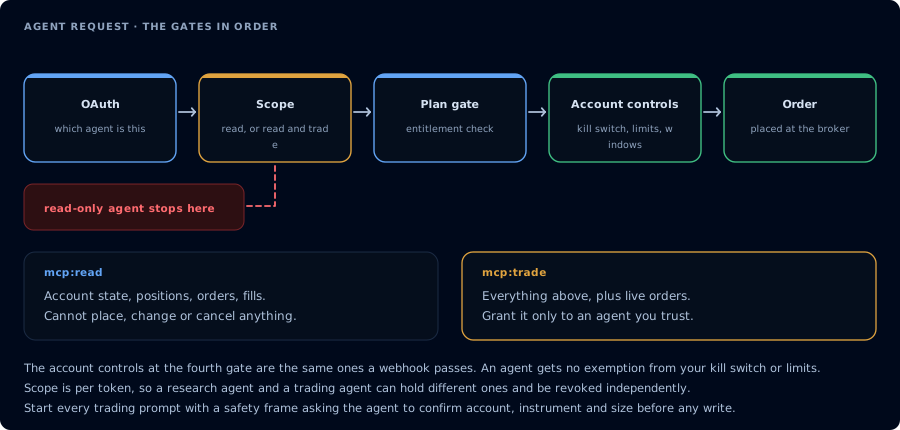
Four gates before an order. A read-only agent never reaches the third.
Why scopes matter
An AI trading agent can interleave reads and writes in a single conversation. If the token allows writes, a single confused tool call can place, cancel, or flatten in production. Scope is the first line of defense before approval gates and prompt design.
Use mcp:read for:
- Journal analysis
- Account inspection
- Risk briefs
- Webhook signal debugging
- Trade copier diagnostics
- Strategy and order audits
Upgrade to mcp:trade only when the workflow needs to:
- Place, cancel, or modify orders
- Flatten positions or reverse
- Deploy or stop strategies
- Compile or write NinjaScript files
- Create or remove drawings
- Save or load workspaces
mcp:read
Includes:
- Account, position, order, and execution inspection
- Quote, bar, market info, and volume profile reads
- Connection state and capability checks
- Add-on activity, webhook signal history, journal reads
- NinjaScript help, symbol search, and source-file reads
- Backtest result retrieval (not new backtest jobs)
- Deployment registry reads, deployed-strategy state reads
- Watermark and account summary reads
- Job inspection (
GetMcpJob,ListMcpJobs)
Does not include:
- Any order action
- Strategy deployment
- File write or compile
- Cancel, flatten, reverse
- Workspace load or save
- Alert emission
mcp:trade
Includes everything in mcp:read plus:
- Order placement, cancellation, replacement, and bracket changes
- Flatten and reverse, including
FlattenEverything - Strategy deployment, stop, and removal
CompileNinjaScript,WriteNinjaScriptFile,DeleteCompiledSnippetRunStrategyBacktest(creates a new backtest job)DeployStrategy,StopStrategy,CloseStrategyOpenChart,SaveWorkspace,LoadWorkspace- Drawing CRUD:
AddDrawing,RemoveDrawing EmitMcpAlert,CreateAlert,RemoveAlertUpdateConfigurationon writable add-on options
Tool permission table
| Category | Tool | Required scope |
|---|---|---|
| Discovery | GetMcpCapabilities, McpSelfTest | mcp:read |
| Accounts | ListAccounts, GetAccount, GetAccountSummary, GetWatermarks | mcp:read |
| Connections | GetConnections | mcp:read |
| Positions | ListPositions, GetPosition, GetAllPositions | mcp:read |
| Orders | ListOrders, GetOrder, GetOrderStatus, GetAllOrders, ListExecutions, GetExecution, GetExecutionsByOrderId | mcp:read |
| Market data | GetQuote, GetBars, MarketInfo, GetVolumeProfile, GetOrderFlow, GetIndicatorValue | mcp:read |
| Diagnostics | GetActivityLog, GetSignalHistory, GetJournalTrades | mcp:read |
| NinjaScript reads | GetNinjaScriptHelp, SearchNinjaScriptSymbols, LookupNinjaScriptSymbol, ListNinjaScriptFiles, ReadNinjaScriptFile, ListCompiledSnippets | mcp:read |
| Backtest reads | GetBacktestResult, GetCompileResult, GetMcpJob, ListMcpJobs | mcp:read |
| Strategy reads | ListAllStrategies, ListStrategies, GetStrategy, GetStrategyState, ListDeployedStrategies, GetDeployedStrategyState | mcp:read |
| Workspace reads | ListWorkspaces | mcp:read |
| Order writes | PlaceOrder, Change, CancelReplace, Cancel, CancelOrders, CancelAllOrders, CancelAndBracket, FlatPlace | mcp:trade |
| Position writes | ClosePosition, Reverse, ReversePosition, Flatten, FlattenEverything | mcp:trade |
| NinjaScript writes | CompileNinjaScript, WriteNinjaScriptFile, DeleteCompiledSnippet | mcp:trade |
| Backtest jobs | RunStrategyBacktest, RunBacktest, CancelMcpJob | mcp:trade |
| Strategy writes | DeployStrategy, StartStrategy, StopStrategy, CloseStrategy, EnableStrategy, DisableStrategy | mcp:trade |
| Workspace writes | SaveWorkspace, LoadWorkspace, OpenChart | mcp:trade |
| Drawing writes | AddDrawing, RemoveDrawing | mcp:trade |
| Alerts | EmitMcpAlert, CreateAlert, RemoveAlert, ListAlerts | mcp:trade for write actions, mcp:read for ListAlerts |
| Connections | Connect, Disconnect, EnsureReplayConnection | mcp:trade |
| Configuration | UpdateConfiguration | mcp:trade |
This table reflects the production permission model. If a tool you expect is rejected with a scope error, the token is too narrow for that tool category.
How tools/list is filtered
When a client calls tools/list, CrossTrade only returns tools the token can call. A mcp:read token sees the read-only inventory. A mcp:trade token sees read tools plus write tools.
This means a read-only agent usually does not even see write-capable tools, which removes a class of accidental order, file-write, and deployment attempts.
Why there are only two scopes
CrossTrade keeps the scope set intentionally small. mcp:read and mcp:trade are easy to reason about, easy to revoke, and hard to misconfigure.
Finer control should live in the agent prompt and workflow gates. The token says what the agent can call. State checks, confirmation gates, and account rules decide what the agent is allowed to do in the current session.
Recommended default by workflow
| Workflow | Recommended scope | Rationale |
|---|---|---|
| Journal review and end-of-day analysis | mcp:read | No write needed. |
| Pre-trade risk brief | mcp:read | The agent reports; the human decides. |
| Webhook signal debugging | mcp:read | Read history, do not replay. |
| Trade copier diagnostics | mcp:read | The fix happens elsewhere. |
| NinjaScript research and compile loop | mcp:trade | Compile and file write require it. |
| Strategy Analyzer backtest only | mcp:trade | RunStrategyBacktest is a job creator. |
| Strategy deployment | mcp:trade with approval gates | The agent must confirm before deploying. |
| Order placement with human confirmation | mcp:trade with explicit per-action approval | Treat each order as a one-time confirmed action. |
| Funded account autonomous trading | Not recommended at any scope | See firm rules. Use mcp:read for inspection only. |
Approval recommendations
Even when the token allows trade actions, the agent prompt should require:
- A state check (
ListAccounts,GetConnections,ListPositions,ListOrders,GetAccountSummary,GetWatermarks) before any write. - A natural-language confirmation step before
PlaceOrder,Cancel*,Flatten*,DeployStrategy,StopStrategy, orWriteNinjaScriptFile. - An explicit summary of the action with account, instrument, side, and quantity.
- A refusal path if the account is in a state that violates risk rules.
The token says what the agent can do. The prompt says what the agent should do. The user says what the agent will do.
Scope errors
| Error | Cause | Resolution |
|---|---|---|
HTTP 403 with insufficient_scope | Token is mcp:read but the tool requires mcp:trade. | Reauthorize at mcp:trade if the workflow needs write access. |
Tool not listed in tools/list | Tool is gated behind a scope the token does not hold. | Reauthorize at the required scope. |
HTTP 403 MCP requires an Elite subscription | The account is below Elite. | Upgrade. Scope is independent of tier; tier is the prerequisite. |
Examples
Read-only journal review:
You: You have mcp:read only. Summarize my last 20 trades on Sim101 with realized
     P&L, instrument breakdown, and the three biggest losers. Do not attempt any
     write tools.
Trade-scoped strategy compile loop with explicit gates:
You: You have mcp:trade. Compile a 9/21 EMA cross strategy for MES, in memory.
     If compile fails, fix and recompile. Only WriteNinjaScriptFile once compile
     is green. Do not deploy or run a backtest unless I confirm separately.
Read-only pre-trade brief on a funded account:
You: I'm trading a $50k prop-firm evaluation. You have mcp:read only. Give me a
     pre-trade brief: open positions, working orders, executions today, account
     summary, daily watermark, and remaining loss room against $1,500 trailing
     drawdown. Do not place anything.