Overview
Choose Your Platform
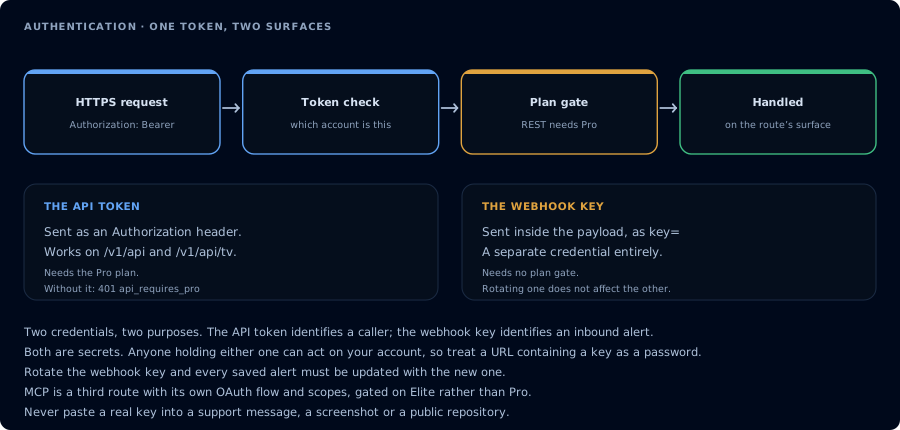
One bearer token, two route prefixes, two very different execution paths.
CrossTrade exposes two REST surfaces. They use the same Bearer token, but they reach different execution platforms and are not interchangeable.
| Platform | REST route prefix | How it executes | WebSocket support |
|---|---|---|---|
| NinjaTrader 8 | /v1/api | Requests pass through the CrossTrade NT8 Add-On in your running NT8 desktop instance. | Yes. Use the WebSocket API for RPC calls and live streams. |
| Tradovate | /v1/api/tv | Requests execute server-side against a linked Tradovate identity. NT8 does not need to be open. | Yes, with "origin": "tradovate": order, fill and position events, account P&L, and Tv_* RPC. No market data. See Tradovate over the WebSocket. |
Each endpoint page has an NT8 tab and a Tradovate tab. When one platform has no equivalent, its tab says so and points to the closest alternative.
What You Can Do
Shared REST resources cover accounts, positions, orders, executions or fills, and Account Manager watermarks. You can place and modify orders, flatten positions, and inspect account state on either platform.
NinjaScript strategies, NinjaTrader ATM templates, historical bars, session information, and NT8 data-feed quotes are NT8-only. The WebSocket API serves both platforms on one connection: persistent RPC calls, order and position events, and P&L streaming for each, plus live quotes for NT8.
Tradovate adds server-side identity status, cash balances, margin snapshots, contract lookup, and exchange reference endpoints. See the Tradovate API for its complete route catalog.
NinjaTrader 8 Setup
Every NT8 API request is forwarded to the CrossTrade NT8 add-on running inside your NinjaTrader instance. This means NT8 must be open and the add-on must be connected for NT8 API calls to reach your broker. The add-on executes the request on your local machine and returns the result.
To get started:
- Install and connect the CrossTrade NT8 add-on inside NinjaTrader
- Grab your Bearer token from the My Account page
- Include it as an
Authorization: Bearer <token>header on every request - Start making NT8 calls to
https://app.crosstrade.io/v1/api/
For Tradovate, link an identity under My Account, Brokers, then use routes beginning with https://app.crosstrade.io/v1/api/tv/. NinjaTrader and the CrossTrade NT8 Add-On are not required for those requests.
For authentication details, see Authentication. For rate limit specifics, see Rate Limiting.
NinjaTrader 8 Instrument Name Formats
For NT8 REST requests, WebSocket RPCs and subscriptions, and direct API/tool calls, supply the correct native NinjaTrader instrument name. For futures, include the intended contract month and year, for example "MNQ 12-26" or "ES 12-26". URL-encode spaces when placing the name in a URL.
Your integration is responsible for selecting the correct instrument and updating contract names for new trades as contracts roll. Keep existing positions, orders, and exits tied to their actual dated contract. Do not rely on bare futures roots such as "MNQ", continuous symbols such as "MNQ1!", or automatic format conversion in direct NT8 API calls. A bare symbol can also identify another asset, not the future you intended.
NT8 continuous-symbol translation is supported through webhook ingestion, not as part of the direct NT8 API contract. Tradovate has separate symbol handling, documented in the Tradovate API guide.
The warning Field in Responses
Some endpoints return a warning field alongside success: true. The request was processed, but an edge case was encountered: a position that went flat during a cancel window, say, or a flatten call with no open positions to close. Check for warning in addition to success if your integration needs to detect these cases.
Specs and Tooling for Developers
Machine-readable specs and AI-friendly resources, all served live from the API:
| Resource | URL | Format |
|---|---|---|
| OpenAPI 3.1 spec | /v1/api/openapi.json | JSON |
| OpenAPI 3.1 spec | /v1/api/openapi.yaml / download | YAML |
| Endpoint catalog | /v1/api/_endpoints | JSON |
| LLM index | /v1/api/llms.txt | Markdown |
| Full LLM reference | /v1/api/llms-full.txt | Markdown |
Drop the OpenAPI spec into Postman, Insomnia, or any OpenAPI-aware tool to get schema-aware request building and a request explorer for free. If you're using AI coding assistants such as Claude, Cursor or Continue, the AI-Assisted Development guide walks through the hosted MCP server (Elite tier), AI-readable references, and drop-in rules templates.
If you run into issues or have questions, reach out on Discord.