Rate Limiting
Overview
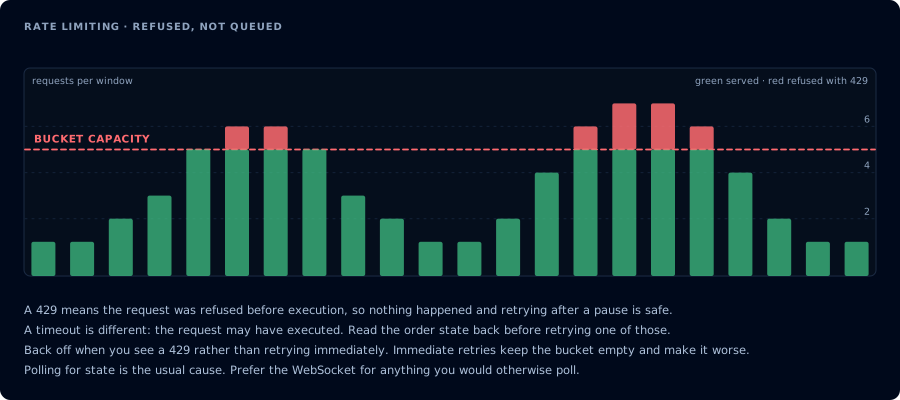
A 429 refused the request before execution, so retrying after a pause is safe.
All API requests, whether over HTTP or WebSocket, share a single rate-limit budget of 3 requests per second (180 per minute) per user, with a burst allowance of up to 20 requests allowed. This budget is shared across both protocols: using the HTTP API and WebSocket API simultaneously does not double your allowance.
How the Limit Works
Rate limiting uses a smooth, token-based algorithm rather than a hard window. Think of it as a bucket that holds up to 20 tokens and refills at a steady rate of 3 tokens per second.
Every request consumes one token. If the bucket is empty, the request is rejected. Since the bucket refills continuously, a brief pause is all you need to recover: you never have to wait for a full window to reset.
In practice, this means:
- Burst - if you haven't made a request recently, you can fire up to 20 requests as fast as you want.
- Sustained - after the burst is spent, you can make 1 request roughly every 330ms (3 per second).
- Recovery - pausing for about 7 seconds fully recharges the burst allowance. You do not need to wait a full minute.
HTTP API
HTTP requests (/v1/api/*) are rate-limited at two layers.
Edge protection enforces a per-IP request cap in front of CrossTrade's servers, set several times higher than the application-level allowance below, so a well-behaved integration never reaches it. It protects infrastructure and is not configurable. If you exceed it for any reason, our firewall blocks all requests from your IP address for an amount of time commensurate with the infraction.
The application enforces the per-user budget described above. When you exceed it, you'll receive a 429 HTTP response with a Retry-After header (whole seconds until the next request would be admitted) and a matching retryAfter field in the body. The body shape follows the surface you called:
/v1/api/*(NinjaTrader):{"error": "Rate limit exceeded", "retryAfter": 2}/v1/api/tv/*(Tradovate):{"success": false, "error": "rate_limited", "detail": "...", "retryAfter": 2}
Honor the Retry-After value instead of retrying immediately. Because the bucket refills continuously, the wait is usually only a second or two.
Tradovate Broker Rate Limits (Passthrough)
Tradovate enforces its own rate limits on top of CrossTrade's. On the /v1/api/tv/* surface CrossTrade passes them through as HTTP 429 with "error": "broker_rate_limited", separate from CrossTrade's public API limit. Honor the returned Retry-After value before trying again; it reflects the remaining Tradovate penalty time when CrossTrade knows it, and is a short flat hint otherwise.
Three conditions surface as broker_rate_limited, and the detail text names which one:
- A penalty ticket (
p-ticket). One Tradovate endpoint went over its hourly count. Tradovate answers with HTTP 200 and a body carrying ap-tickettoken, ap-time(seconds to wait, growing with every early retry), sometimesp-captcha, and ap-messagenaming the limit, for exampleRate limit exceeded: more than 1500 requests per houron order placement. CrossTrade turns that 200 into a 429 so your client cannot mistake it for success. - A user-level HTTP 429. The Tradovate login went over its published 5,000 requests per hour across all endpoints. Tradovate's guidance is to stop calling for an hour; every request during that hour restarts it.
- A penalty window CrossTrade already knows about. Once Tradovate has penalized the login, CrossTrade refuses further requests for it until the window runs out instead of sending them, because every early retry extends the penalty.
Retry-Aftercarries the remaining time.
CrossTrade paces the traffic it generates for your login itself (copier, Account Manager, sync) to stay clear of these limits. Requests you make on /v1/api/tv/* are never held or refused by that pacing: they are sent to Tradovate as they arrive and count toward the same per-login limits.
The full explanation of each penalty field, the 1,500 requests per hour order-placement limit, and how CrossTrade paces requests to stay clear of both is in Rate limits on Tradovate. Tradovate controls its limits and may change them; its own reference is the Penalty Tickets and Rate Limits pages of the partner documentation.
A separate HTTP 429, snapshot_refresh_pending, means another account balance refresh is still in progress. It returns Retry-After: 1 and retryAfter: 1. Retry after that delay; this is contention, not Tradovate's broker_rate_limited penalty or CrossTrade's inbound rate_limited budget.
WebSocket API
The WebSocket API (/ws/stream) applies the same per-user budget as HTTP, with additional protections specific to persistent connections.
RPC Messages
Every action: "rpc" message counts against the shared rate-limit budget. When a message is rejected, you receive an error response on that specific message rather than having your connection closed:
{"id": "your-request-id", "error": "Rate limit exceeded"}
Subscription Management
Subscription actions (subscribe, unsubscribe, streamPnl), including event subscriptions such as {"action": "subscribe", "events": ["orders"]}, have their own separate, tighter limit of approximately 20 per minute with a burst of 5. These actions trigger backend work on your trading platform and shouldn't need to be called frequently. Normal usage patterns (subscribing to a handful of instruments and event types on connect, toggling P&L streaming on or off) will never come close to this limit. Incoming frames never count against any budget.
Connection Limits
Each CrossTrade account is limited to 1 active WebSocket connection to /ws/stream. If a new connection appears, we will automatically close any open sockets.
The WebSocket handshake itself is rate-limited to 5 new connections per IP per minute. This prevents connection-storm abuse from rapid connect/disconnect cycles. Since the API enforces single-session per user (opening a new connection closes the previous one), legitimate usage should never hit this limit.
Abuse Detection and Disconnection
The WebSocket API includes a circuit breaker to protect against clients that ignore rate-limit errors and continue flooding messages.
Each time an RPC message is rejected for exceeding the rate limit, a violation counter increments. Each successful request decays the counter back toward zero, so occasional rate-limit hits during normal usage will not accumulate.
If a client accumulates more than 10 consecutive violations, the server closes the WebSocket connection with close code 1008 (Policy Violation) and the message "Rate limit abuse." This is intentionally aggressive: a well-behaved client that respects error responses will never trigger it.
To avoid disconnection:
- Check every response for rate-limit errors before sending the next message.
- Implement backoff when you receive a rate-limit error. A simple strategy: pause for 500ms after a rejection, then resume.
- Do not retry rate-limited requests immediately in a tight loop.
Message Size
Individual WebSocket messages are limited to 1 MB. Messages exceeding this size will cause the connection to close. All standard API payloads are well under this limit.
Egress Budgeting
The CrossTrade API provides positions, orders, executions, market data, and stored historical fills when a supported capture path has recorded them. Most endpoints return rich, detailed payloads, and we don't artificially truncate responses or gate data behind higher plan tiers.
That said, data transfer is not unlimited. Each API session (which resets daily at 6:00 PM ET, when the new trading session opens) tracks cumulative egress per user across all endpoints. Under normal usage you will never notice this. Pulling positions, placing orders, streaming quotes, syncing account state on a reasonable interval. All of this fits comfortably within the budget and always will.
Where limits come into play is sustained, high-volume data extraction: polling every endpoint every second across dozens of accounts, bulk-downloading full execution histories in a loop, or running scripts that re-fetch large datasets they've already received. If your integration is doing something like this, you'll want to rethink the approach. The WebSocket streaming API exists specifically so you don't need to poll: subscribe once and receive updates as they happen.
We reserve the right to impose per-endpoint egress limits on any user or endpoint without notice if we observe transfer patterns that are unreasonable or place undue load on infrastructure. If a limit is applied, affected requests will return a 429 status with the body {"error": "Data transfer limit exceeded for this endpoint"} until the next session opens at 6:00 PM ET. Note that this is the session open, not the 5:00 PM ET close.
These limits are rare, targeted, and only applied when usage is clearly outside normal operating patterns. If you believe a limit has been applied to your account in error, Contact Us or reach out on Discord.
Management API
The Elite Management API (/v1/api/manage) has its own budgets for reads and changes. Requests to it never use up the trading budget described on this page, and trading requests never use up its budgets. See Management API rate limits.
Partner API
Requests made with a Partner API member token get the per-user budget on this page, counted per member: each of a partner's members has their own 180 requests per minute with a burst of 20, and nothing a member does counts against the partner. The partner's own budget covers only its Partner API calls. GET /v1/api/partner/me returns a partner's current values. See Request budgets and token lifetime.