Strategies
NinjaTrader 8 only
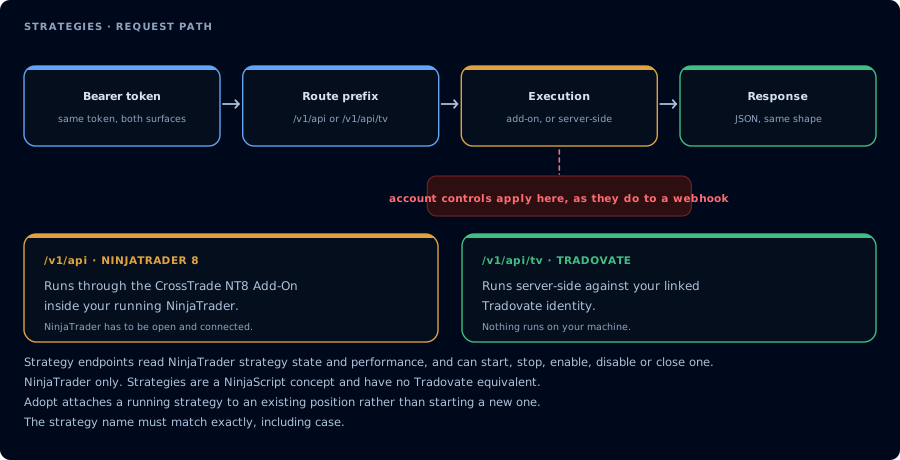
NinjaTrader only. Strategies are a NinjaScript concept with no Tradovate twin.
Strategy routes use /v1/api and run inside NinjaTrader through the CrossTrade NT8 Add-On. They can also be called through the NT8 WebSocket API. Tradovate has no NinjaScript strategy runtime, so these routes are not available under /v1/api/tv.
The endpoints in this section operate on NinjaScript strategies, full C# Strategy classes compiled into NinjaTrader.Custom.dll from .cs files under Documents\NinjaTrader 8\bin\Custom\Strategies\. They are not the same as ATM (Advanced Trade Management) strategies, which are predefined order management templates attached to individual orders. For ATM template management see GET ATM Templates under the Market resource.
- GET Strategies: Returns live NinjaScript strategies for one account.
- GET All Strategies: Returns live NinjaScript strategies across all accounts. Requires CrossTrade NT8 Add-On v1.13.0+.
- GET Strategy: Returns details for one NinjaScript strategy by its NT8 strategy ID.
- POST Start Strategy: Instantiates a NinjaScript strategy class from disk and attaches it to NT8 —
mode=accountfor headless ormode=chartto attach to a visible chart. Requires CrossTrade NT8 Add-On v1.13.0+. - POST Adopt Strategy: Brings a strategy that was attached manually in NT8's Strategies tab under CrossTrade lifecycle management by capturing its live configuration, with no redeploy. Requires CrossTrade NT8 Add-On v1.13.8+.
- POST Close Strategy: Terminates a NinjaScript strategy by ID, flattens all of its tagged positions and cancels open orders.
- POST Enable Strategy: Resumes a chart-attached strategy in place or recreates an account-hosted strategy from its saved deployment. Requires CrossTrade NT8 Add-On v1.13.0+.
- POST Disable Strategy: Pauses a chart-attached strategy or terminates an account-hosted strategy without automatically closing its position. Requires CrossTrade NT8 Add-On v1.13.0+.