Tradovate API
Which Tradovate API access do you need?
This guide documents CrossTrade's API for linked Tradovate accounts. It does not describe signing up for a separate native Tradovate developer account. CrossTrade API access requires Pro, a CrossTrade Bearer token and a linked Tradovate identity. See current CrossTrade pricing for the plan; broker, market-data and any direct Tradovate API arrangements are separate.
Begin with GET /v1/api/tv/status and GET /v1/api/tv/accounts. Confirm the linked environment and returned account names before trying an order request. These reads do not place a trade. NinjaTrader does not have to be installed or running for this cloud route.
If your goal is to send TradingView alerts rather than build a REST client, use Tradovate webhook automation and its setup guide. Webhook messages use a different authentication credential and interface from the REST examples here.
The /v1/api/tv surface exposes your linked Tradovate accounts through CrossTrade. It is separate from the NinjaTrader /v1/api surface:
| Platform | Route prefix | Runtime | WebSocket |
|---|---|---|---|
| Tradovate | /v1/api/tv | Server-side against your linked Tradovate identity. NT8 can be closed. | Supported: events, P&L, and RPC with origin: "tradovate". No market data. |
| NinjaTrader 8 | /v1/api | Through the CrossTrade NT8 Add-On in a running NT8 desktop instance. | Supported. |
Most Tradovate endpoints mirror an existing NinjaTrader endpoint. Those shared endpoints are documented on their existing reference pages, where a Tradovate tab sits beside the NT8 tab (for example POST Place Order, GET All Orders, and POST Close Position).
The pages in this Tradovate section are the endpoints unique to Tradovate, with no NT8 equivalent: link status, cash balances, margin snapshots, contract lookup and suggestions, current-session fills, durable fill history, and the exchange list.
The two tables below index the whole surface, shared and Tradovate-only, in one place.
Tradovate reads return account state such as positions, orders, fills, and balances. Order and fill lists mirror Tradovate's own API, which only tracks the current trading session: those lists reset at the daily session close (around 5:00 PM ET) and stay empty until the next open, including all weekend. For a durable record of executions, use GET Fill History, which is served from CrossTrade's continuous capture rather than Tradovate's session data. Mutations such as place, cancel, change, close, flatten, and reverse run server-side through the same validation and controls as a Tradovate webhook signal: field validation, Account Manager kill or closing-only checks, position gates, and Trade Copier fan-out all apply. Because these are direct REST calls rather than inbound webhook alerts, the webhook-only layers do not apply: there is no webhook secret or channel to validate, no Alert History entry, no news lockout, no webhook rate bucket, and no per-account/instrument webhook lock.
Tradovate-native REST routing, the API Playground, MCP Tv_* tools, and the CrossTrade-exclusive ATM layer (target-fill breakeven, profit-triggered trail activation, and durable trigger replay) are generally available.
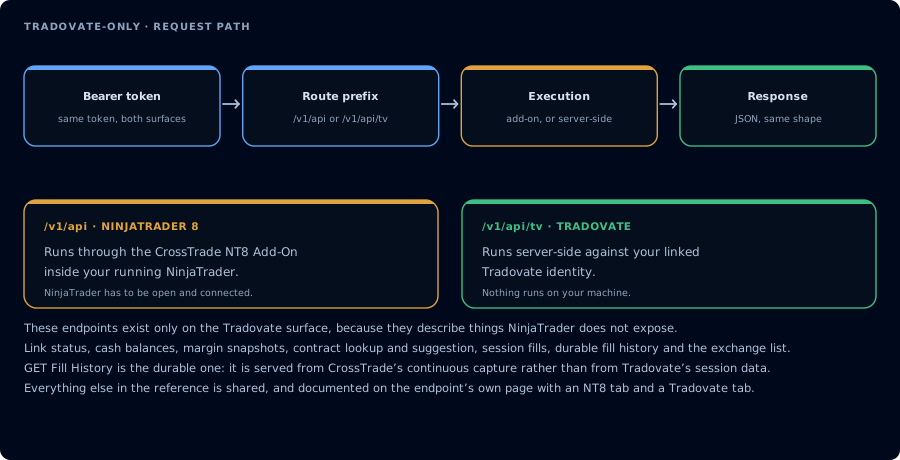
The endpoints that exist only on the Tradovate surface.
Native Tradovate vs. CrossTrade-exclusive
| Capability | Owner |
|---|---|
| Market/limit/stop/MIT/trailing orders, OSO/OCO brackets, multibracket targets and stops, continuous ATM trailing | Tradovate native |
| Reusable named Tradovate ATM configurations | CrossTrade webhook configuration; REST and MCP use inline atm* fields |
| Profit-triggered trail activation and durable restart replay | CrossTrade-exclusive for the tier's whole life: CrossTrade ratchets the ordinary stop, never converting it to a native Tradovate trailing stop |
| Target-fill breakeven | CrossTrade-exclusive; Tradovate AutoBracket has no breakeven field |
| Relative-price conversion, position marks, and managed trigger prices | Calculated by CrossTrade server-side from live market data |
CrossTrade does not use Tradovate market-data entitlements for quote-dependent behavior. It also does not fall back to one user's Add-On cache or direct GetQuote. No fresh pricing means fail closed; for a pending managed trail, the native fixed stop remains active.
Prerequisites
- Link a Tradovate account. Connect at least one Tradovate identity under My Account, Brokers tab. Requests for an unlinked user return
403 tradovate_not_linked. - API access on your plan. The same plan gate as
/v1/apiapplies (Pro). Requests without it return401 api_requires_pro. The webhook route (destination=tradovate;) is available on every plan. - A bearer token. Use the same token as the rest of the CrossTrade API. See Authentication.
Base URL and auth
All paths are under https://app.crosstrade.io. Every request carries a bearer token:
| Name | Value |
|---|---|
| Content-Type | application/json |
| Authorization | Bearer <token> |
The {account} path segment is the Tradovate account name (for example DEMO12345678), matched case-insensitively.
Response envelope
Most reads return {"success": true, "data": ...}. The accounts snapshot is the exception: it returns its snapshot object directly, including success, accounts, asOf, and counts. Mutations return the dispatcher envelope:
{
  "success": true,
  "destination": "tradovate",
  "api": "place_order",
  "account": "DEMO12345678",
  "instrument": "MES1!",
  "response": { "orderId": 123456789 },
  "durationMs": 214
}
A bracketed placement (takeProfit and/or stopLoss) is one Tradovate placeOSO call, and response carries all three native ids: orderId is the entry, oso1Id and oso2Id are the children in the order they were sent (take-profit, then stop-loss; a single-leg bracket only has oso1Id), and osoChildIds repeats the child ids as an array. An inline ATM placement returns orderStrategyId instead of orderId, without a resolved child-order map. Public REST and MCP do not expose a strategy-child lookup.
{
  "success": true,
  "destination": "tradovate",
  "api": "place_with_brackets",
  "account": "DEMO12345678",
  "instrument": "MES1!",
  "response": { "orderId": 123456789, "oso1Id": 123456790, "oso2Id": 123456791, "osoChildIds": [123456790, 123456791] },
  "durationMs": 231
}
An id in the response means Tradovate accepted the order. It does not mean the order is resting or filled: see Late rejections below.
Validation and account-lock failures use {"success": false, "error": "<message>"}. Failures after dispatch begins may also include dispatcher context such as destination, api, account, instrument, and durationMs. These failures use a 400 status unless an authentication or rate-limit status below applies.
Read endpoints
Shared endpoints link to their NinjaTrader twin page, which carries a Tradovate section. Tradovate-only endpoints link to their own pages.
| Method | Path | Description |
|---|---|---|
GET | /v1/api/tv/status | Token and connection status for your Tradovate identities. |
GET | /v1/api/tv/accounts | List your linked Tradovate accounts. |
GET | /v1/api/tv/accounts/snapshot | Live per-account P&L, positions, and working orders in one call. |
GET | /v1/api/tv/accounts/{account} | One account plus a cash-balance snapshot. |
GET | /v1/api/tv/positions | Open positions across all linked accounts. |
GET | /v1/api/tv/accounts/{account}/positions | Open positions on one account. |
GET | /v1/api/tv/accounts/{account}/position?instrument= | Single net position for one account and instrument. netPos is signed; 0 means flat. Raw Tradovate row: can lag a fill by tens of seconds. Use the account's /positions read for a live net. |
GET | /v1/api/tv/orders | Every current-session order across all linked accounts. |
GET | /v1/api/tv/accounts/{account}/orders | Working orders on one account. |
GET | /v1/api/tv/accounts/{account}/orders/{id} | One order by Tradovate order id. |
GET | /v1/api/tv/accounts/{account}/orders/{id}/status | Slim order status: id, status, action, contract, timestamp. |
GET | /v1/api/tv/accounts/{account}/orders/{id}/lifecycle | Order audit trail: order, version, commands, and command reports (with reject reasons). |
GET | /v1/api/tv/fills | Current-session fills across linked accounts. |
GET | /v1/api/tv/fills/history | Durable fill history captured by the CrossTrade journal; survives the daily session reset. |
GET | /v1/api/tv/fills/order/{orderId} | Current-session fills for one Tradovate order id. |
GET | /v1/api/tv/accounts/{account}/fills | Current-session fills for one account's identity. |
GET | /v1/api/tv/accounts/{account}/watermarks | P&L high-water marks tracked by the Account Manager monitor engine. |
GET | /v1/api/tv/cashbalances | Cash-balance snapshots. |
GET | /v1/api/tv/marginsnapshots | Margin snapshots. |
GET | /v1/api/tv/contracts/find?name= | Resolve a contract by exact symbol. |
GET | /v1/api/tv/contracts/suggest?text= | Contract search suggestions; resolves the active front month. |
GET | /v1/api/tv/exchanges | Exchange reference list. |
Trading endpoints
| Method | Path | Description |
|---|---|---|
POST | /v1/api/tv/accounts/{account}/orders/place | Place an order, including native OSO/OCO and multibracket orders plus CrossTrade-exclusive managed ATM enhancements. |
POST | /v1/api/tv/accounts/{account}/orders/{id}/cancel | Cancel one order. |
PUT | /v1/api/tv/accounts/{account}/orders/{id}/change | Change one order. Supports partial changes with required live fields restored before submission. POST is still accepted for backward compatibility. |
POST | /v1/api/tv/accounts/{account}/orders/{id}/replace | Durably cancel and replace one order on the same account and contract. |
POST | /v1/api/tv/accounts/{account}/orders/cancel | Cancel working orders on the account. |
POST | /v1/api/tv/orders/cancelall | Cancel all working orders. |
POST | /v1/api/tv/accounts/{account}/orders/cancel_and_bracket | Cancel all working orders on the account/instrument, then protect the current position with a bracket. action is the protected position side. The hyphen form cancel-and-bracket is also accepted. |
POST | /v1/api/tv/accounts/{account}/orders/flatplace | Flatten the position and clear same-contract working orders, confirm settlement, then place a new order. |
POST | /v1/api/tv/accounts/{account}/positions/close | Close a position, full or partial by qty or percent. |
POST | /v1/api/tv/accounts/{account}/positions/flatten | Flatten one account. |
POST | /v1/api/tv/positions/flatten | Flatten every linked account. |
POST | /v1/api/tv/accounts/{account}/positions/reverse | Reverse the position. |
POST | /v1/api/tv/accounts/{account}/positions/reverseposition | Reverse the position (position-scoped variant). |
MCP tools
Elite subscribers can call this same surface through the hosted MCP server as Tv_* tools. Reads map to the endpoints above (for example Tv_ListAccounts, Tv_AccountSnapshot, Tv_GetPosition), and trades (for example Tv_PlaceOrder, Tv_ClosePosition, Tv_FlattenEverything) run through the same validation and controls, so Account Manager locks and Trade Copier fan-out apply there too. See Tradovate MCP tools.
Request fields
Mutation bodies use camelCase JSON keys, matching the NinjaTrader REST surface. The command and account come from the path, so a body only needs the trade fields. Common fields:
| Field | Example | Notes |
|---|---|---|
instrument | MES1! | Symbol. Continuous (MES1!), NT8 expiry (MES 12-26), or Tradovate contract (MESZ6) forms are accepted. |
action | buy / sell | Order side. |
qty | 1 | Quantity. quantity is also accepted. |
orderType | market / limit / stop | Required for entry endpoints. Stop-limit, MIT, and trailing variants are also supported. |
limitPrice | 5000.25 | Required for limit orders. |
stopPrice | 4995.00 | Required for stop orders. |
takeProfit | 5020.00 | Optional absolute bracket target. REST does not run webhook relative-price preprocessing. Sent as a GTC limit leg of a native OSO; the price is fixed at submission and never recalculated from the fill. |
stopLoss | 4990.00 | Optional absolute bracket stop. REST does not run webhook relative-price preprocessing. Sent as a GTC stop leg of the same OSO; with takeProfit the two legs are OCO-linked by Tradovate. |
orderId | entry-2026-09-06-001 | Optional tracking id you choose (up to 64 characters). For ordinary orders, remembered for seven days so later cancel, change, and replace calls can reference it, and forwarded as clOrdId unless you supply that separately. Inline ATM placement stores it as a strategy reference after acceptance, not as a broker client-order id. |
clOrdId | entry-2026-09-06-001 | Optional client order id sent to Tradovate for ordinary placement (up to 64 characters); not submitted for inline ATM placement. Tradovate does not reject a repeated clOrdId; it is a label for reconciliation, not an idempotency key. |
atmTargets | 20,40 | Tradovate native: per-tier target distances, in ticks by default or points with pt. |
atmStops | 15 | Tradovate native: one stop distance for all tiers or one per tier. |
atmQtys | 1,1 | Tradovate native: contracts per tier; must sum to qty. |
atmTrail | false,true | Tradovate native without a trigger: continuously trail selected tiers from entry. |
atmTrailTrigger | ,30 | CrossTrade-exclusive: profit distance, based on CrossTrade's own live pricing, that activates selected trailing tiers. Pair with atmTrailOffset. Day entries only. |
atmTrailOffset | ,10 | CrossTrade-managed activation, native handoff: native trail distance after confirmed conversion. |
atmBreakeven | 1 | CrossTrade-exclusive: target tier whose fill moves surviving stops to breakeven. Day entries only. |
atmBreakevenOffset | 2 | CrossTrade-exclusive: ticks or points past entry for the managed breakeven stop. |
percent | 0.5 | For positions/close, close half. Must be greater than 0 and at most 1. |
outOfSync | wait | With Strategy Sync, wait withholds this request's entry and returns. It never queues the order for later placement. |
See Destinations for Tradovate-specific requirements and guarantees. Shared field names do not imply identical broker sequencing.
Mutation safety
CANCELREPLACEis owner-fenced and durable. Concurrent operations on the same order are serialized, and staged recovery state is persisted before each broker mutation. The original order must belong to the{account}in the path, and the replacementinstrumentmust resolve to the same exact contract. CrossTrade confirms the leader cancellation and every mapped signal-copier follower cancellation before replacement fan-out. If a cancel or placement outcome is ambiguous, CrossTrade does not resend it and returnsreconciliation_required; reconcile the broker orders before starting a different replacement.- Partial
CHANGErequests restore broker-required fields. When omitted, CrossTrade reads and restores quantity, order type, the limit and/or stop price required by the final order type, and the trailing offset required by trailing orders. Copied followers restore those fields from each follower's own live order version before their modify request. CANCELANDBRACKETprotects an existing side.action=buymeans the live position being protected is long;action=sellmeans it is short. It is not the side of the exit orders. A flat position or side mismatch is rejected before cancellation.FLATPLACEfails closed on settlement. The entry is sent only after the same account and contract report a flat position and no nonterminal working orders. A timeout returns an error without placing the entry; mapped followers run their own settlement barrier.
Example: place a market order
POST /v1/api/tv/accounts/DEMO12345678/orders/place
TOKEN="my-secret-token"

curl -X POST "https://app.crosstrade.io/v1/api/tv/accounts/DEMO12345678/orders/place" \
  -H "Authorization: Bearer $TOKEN" \
  -H "Content-Type: application/json" \
  -d '{"instrument": "MES1!", "action": "buy", "qty": 1, "orderType": "market"}'
A limit order with a bracket looks like this:
curl -X POST "https://app.crosstrade.io/v1/api/tv/accounts/DEMO12345678/orders/place" \
  -H "Authorization: Bearer $TOKEN" \
  -H "Content-Type: application/json" \
  -d '{"instrument": "MES1!", "action": "buy", "qty": 2, "orderType": "limit", "limitPrice": 5000.25, "takeProfit": 5020.00, "stopLoss": 4990.00}'
A two-tier native multibracket with a CrossTrade-exclusive triggered runner:
curl -X POST "https://app.crosstrade.io/v1/api/tv/accounts/DEMO12345678/orders/place" \
  -H "Authorization: Bearer $TOKEN" \
  -H "Content-Type: application/json" \
  -d '{"instrument":"MES1!","action":"buy","qty":2,"orderType":"market","tif":"day","atmTargets":"20,40","atmStops":"15","atmQtys":"1,1","atmTrail":"false,true","atmTrailTrigger":"30","atmTrailOffset":"10"}'
Tradovate hosts the entry, targets, fixed stops, and OCO structure. CrossTrade records the highs and lows of its own live pricing and arms the runner only after the 30-tick trigger. From then on it keeps tightening the runner's ordinary stop to stay 10 ticks behind the best price, confirming each move with the broker; the stop is never converted to a native Tradovate trailing stop.
Locks and trade copier
Because mutations flow through the same validation and controls as a webhook signal, two behaviors are shared:
- Account locks apply. If the Tradovate Account Manager (or the account's own Block Signals switch) has locked the account, a blocked request returns
{"success": false, "error": "Signal blocked, kill switch engaged ..."}. Cancels, closes, and flattens still go through on a locked account. Order changes do not, because a change can loosen a stop as easily as tighten it. A closing-only lock rejects opening orders unless they carry flatten-first semantics. - Copiers fan out. If a signal-mode Trade Copier is configured on the account as a leader, an order placed here mirrors to its followers, exactly as a webhook would.
Master Controls are not account locks. The master Kill Switch, the global Closing Only switch, and the global Trading Window apply to webhook alerts only and do not block these API requests.
Errors
| Status | error | Meaning |
|---|---|---|
| 400 | tradovate_rejected | Tradovate rejected the request (invalid price, insufficient funds, and similar). detail carries the broker's reason. |
| 401 | invalid_bearer | Missing or invalid token. |
| 401 | inactive_subscription | Subscription is not active. |
| 401 | api_requires_pro | Your plan does not include API access. |
| 403 | tradovate_not_linked | No linked Tradovate identity on your account. |
| 403 | tradovate_session_expired | Your Tradovate session expired. Reconnect the account under My Account, Brokers. Retrying does not help: requests for that login keep failing until it is reconnected. |
| 403 | endpoint_not_available | Path is not part of the current /v1/api/tv surface. |
| 409 | account_ambiguous | The account name exists on more than one linked identity. Rename one so every linked account name is unique. |
| 429 | rate_limited | CrossTrade API request budget exceeded (180 requests/min per user). Includes a Retry-After header and retryAfter body field. |
| 429 | broker_rate_limited | Either Tradovate's own rate-limit penalty is active on your linked identity (a penalty ticket (p-ticket, p-time, p-message) on an endpoint, or Tradovate's user-level 429), or CrossTrade's own pacing of that login's budget refused the request before it was sent. The detail text names which. Not the CrossTrade API's inbound limit. Includes Retry-After and retryAfter. See Rate limits on Tradovate. |
| 429 | snapshot_refresh_pending | Another account balance refresh is still in progress. Includes Retry-After: 1 and retryAfter: 1; retry after that delay. This is contention, not a rate-limit penalty or broker outage. |
| 429 | egress_limited | Response egress budget exceeded. |
| 500 | internal_error | Unexpected server error. Reads are safe to retry once. For a mutation, reconcile first (below); contact support if it persists. |
| 502 | tradovate_unavailable | Tradovate did not respond within 30 seconds or returned a server error. Reads are safe to retry shortly. A mutation that gets this may still have reached Tradovate: CrossTrade never resends it, and neither should you until you have reconciled (below). |
| 503 | temporarily_disabled | The Tradovate API is paused by a kill switch. |
Distinguish 429 responses by error: rate_limited is CrossTrade's inbound request budget (see Rate Limiting), broker_rate_limited is the broker-side limit, and snapshot_refresh_pending means another balance refresh is still in progress. Honor the returned Retry-After header rather than treating these as the same condition. Mutations blocked by a broker penalty return broker_rate_limited along with the usual dispatcher context fields (destination, api, account, instrument, durationMs).
Reconciling an ambiguous placement
The client-order-id procedure below applies to ordinary placements, including simple OSO brackets, not inline ATM strategies. ATM placement does not submit clOrdId, and an orderStrategyId cannot be used with the order read endpoints. A missing local strategy reference does not prove an ambiguous ATM request failed; verify broker state before resubmitting.
A placement whose outcome you did not learn (a tradovate_unavailable or internal_error reply, or your own HTTP client timing out before CrossTrade answered) may or may not exist at the broker. Neither CrossTrade nor Tradovate deduplicates a plain placement: Tradovate accepts a repeated clOrdId, and CrossTrade's idempotency keys cover only its own composite commands (cancelreplace, copier fan-out). Resending blind can double your exposure. Instead:
- Put your own intent id on every placement (
orderIdorclOrdId, above). - After an ambiguous reply, read
GET /v1/api/tv/accounts/{account}/orders(working orders) andGET /v1/api/tv/orders(every order of the session), and narrow to the contract and side. - For each candidate,
GET /v1/api/tv/accounts/{account}/orders/{id}/lifecycle: theNewentry incommandscarries theclOrdIdyou sent. A match is your order; itsorder.ordStatusand thereportstell you what became of it. - Read
GET /v1/api/tv/accounts/{account}/positions(fill-reconciled) to learn whether anything filled meanwhile. - Place again only when no order carries your id.
Late rejections
Tradovate can accept a placement (HTTP 2xx with an id) and reject it at its risk layer about a second later; a price outside the product's exchange price bands (InvalidPrice) is the common case. CrossTrade re-reads every accepted order a few seconds after placement. If it was rejected, an order_rejected alert goes out through your configured alert channels with Tradovate's reason, and a webhook placement's Alert History row gains a warning. REST and MCP placements have no Alert History row, so a REST integration that needs the outcome synchronously should read GET .../orders/{id}/status (or the lifecycle) itself a few seconds after placing.
Freshness
These REST endpoints are request/response reads; the separate WebSocket event feed is described below. Plan for the following:
- Balances are cached briefly.
GET /v1/api/tv/accounts/{account}serves Tradovate's cash-balance snapshot cached for about four seconds per account;GET /v1/api/tv/accounts/snapshotis cached for three seconds and itsasOfis the retrieval time, so an identicalasOfon two calls means you received the cached payload.GET /v1/api/tv/cashbalancesreturns Tradovate's rows with Tradovate's owntimestampof the last change. - Positions: use the fill-reconciled read.
GET /v1/api/tv/accounts/{account}/positionsderives the live net from the fill stream.GET /v1/api/tv/positionsand the singularGET /v1/api/tv/accounts/{account}/positionreturn Tradovate's raw position rows, which can report the pre-fill state for tens of seconds after a fill. - Orders and fills are live but session-scoped.
GET .../ordersandGET .../fillsread Tradovate directly; row timestamps are Tradovate server timestamps. Both lists reset at the daily close.GET /v1/api/tv/fills/historyis CrossTrade's durable capture of the same fills, written periodically rather than in real time. - No quotes. There is no bid, ask, or last-trade endpoint on
/v1/api/tvand noTv_*quote tool. CrossTrade prices relative offsets and P&L from its own live pricing service, which is not exposed as a feed, and it does not relay Tradovate market data. The NinjaTrader quote endpoint requires the Add-On. Bring your own market data for dispatch decisions. - Event feed over the WebSocket. Order, fill, and position events plus account P&L stream on
/ws/streamwithorigin: "tradovate"; no polling budget is consumed by received frames. Market data is not streamed.
Limitations
- Orders placed manually in the Tradovate app, or from any other platform, never pass through CrossTrade, so Account Manager kill and closing-only locks cannot intercept them. The read endpoints above still return them (they are pass-throughs of Tradovate's own order, position, and fill lists), and Account Manager rules evaluate the whole account's broker state, so a rule can still flatten after the fact.
- Enforcement and live data run server-side, so flatten and lock latency is measured in seconds, not milliseconds.
- Tradovate's API does not expose a prop firm's trailing drawdown figure, and CrossTrade has no endpoint that returns one. The Account Manager enforces the daily loss and trailing drawdown rules you configure, against its own high-water marks (
GET .../watermarks). - The REST surface requires the Pro plan. The webhook
destination=tradovateroute is available on every plan.
Account names in this doc are placeholders (DEMO12345678); use your own.