WebSocket API
Stream contents and availability differ by broker. Tradovate REST API covers the Tradovate surface.
The CrossTrade WebSocket API serves two origins on one connection. nt8 streams pass through the CrossTrade NT8 Add-On in a running NT8 instance. tradovate streams come from your linked Tradovate accounts server-side, with NinjaTrader closed. See Tradovate over the WebSocket.
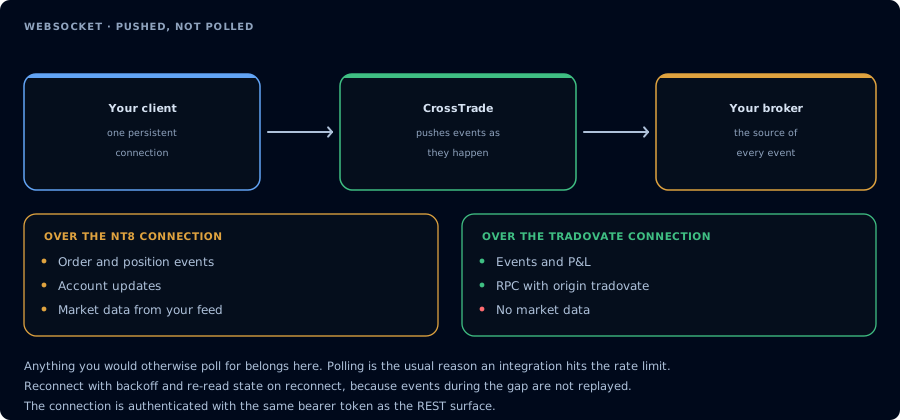
Pushed, not polled. Tradovate carries events and P and L, but no market data.
WebSocket Streaming API
What It Is
The REST API is request-response: you ask a question, you get an answer. The WebSocket API is a persistent connection that keeps the conversation open. You connect once, and from that point forward you can send commands and receive real-time data without the overhead of establishing a new HTTP connection for every interaction.
This makes it the right choice when you need streaming market data, live P&L updates, order and position events as they happen, or you're running an algo that sends frequent commands. Anything that would otherwise be a tight polling loop against the REST API is better served by the WebSocket.
The WebSocket API supports the NT8 RPC functions exposed by the /v1/api REST surface. NT8 endpoints documented under Accounts, Positions, Orders, Strategies, Executions, Market, Miscellaneous, and Quotes can be called through a WebSocket message instead of an HTTP request. The WebSocket also provides capabilities that REST does not offer: live NT8 market data, P&L updates, and order, execution, position, and connection events pushed directly to your connection.
Tradovate order, execution, and position events, account P&L, and RPC are available on this same endpoint with "origin": "tradovate". Market data is not. Details in Tradovate over the WebSocket.
GetOrderLifecycle is callable over the WebSocket API just like other order RPCs. It returns the durable add-on-side audit trail for a single order, useful for reconciling state when a real-time orderUpdate event was dropped or arrived out of order. See GET Order Lifecycle for the full schema. Requires CrossTrade NT8 Add-On v1.13.2 or later.
Connecting
The WebSocket endpoint is:
wss://app.crosstrade.io/ws/stream
Authentication works the same way as the REST API. Include your Bearer token in the request headers when establishing the connection:
Authorization: Bearer <your-secret-key>
Like the REST API, the WebSocket requires an active CrossTrade account with API access. An inactive account or an account without API access is rejected during the handshake with HTTP 401.
Python
import asyncio
import websockets
import json

async def connect():
    uri = "wss://app.crosstrade.io/ws/stream"
    headers = {"Authorization": "Bearer <your-secret-key>"}

    async with websockets.connect(uri, additional_headers=headers) as ws:
        # Subscribe to market data
        await ws.send(json.dumps({
            "action": "subscribe",
            "instruments": ["ES 12-26"]
        }))

        # Subscribe to order, execution, and position events
        await ws.send(json.dumps({
            "action": "subscribe",
            "events": ["orders", "executions", "positions"]
        }))

        # Listen for incoming data
        async for message in ws:
            data = json.loads(message)
            print(data)

asyncio.run(connect())
JavaScript / Node.js
const WebSocket = require("ws");

const ws = new WebSocket("wss://app.crosstrade.io/ws/stream", {
  headers: { Authorization: "Bearer <your-secret-key>" },
});

ws.on("open", () => {
  ws.send(JSON.stringify({ action: "subscribe", instruments: ["ES 12-26"] }));
  ws.send(JSON.stringify({ action: "subscribe", events: ["orders", "executions", "positions"] }));
});

ws.on("message", (data) => {
  const msg = JSON.parse(data);
  console.log(msg);
});
One Connection Per User
Only one WebSocket connection can be active per account at a time. If you open a second connection, the first one is immediately closed with a policy violation code and the message "Session active elsewhere."
This is enforced server-side and is not configurable. If you need to reconnect, close your existing connection cleanly first, or simply connect and let the server handle the swap. The server enforces a connection rate limit of 5 new WebSocket upgrades per IP per 60 seconds to prevent connection-storm abuse.
The origin Field
Every message you send may carry an optional origin field, and every message the server pushes carries one. It names where the data comes from:
origin | Source | Requires |
|---|---|---|
nt8 (default) | The CrossTrade NT8 Add-On running in your NinjaTrader | Add-on connected |
tradovate | Your linked Tradovate accounts, read server-side | A linked Tradovate account |
Omitting the field means nt8, so existing clients keep working unchanged. Subscriptions are tracked per origin: subscribing to orders on nt8 does not subscribe you to orders on tradovate. For rpc, the origin is inferred from the function name: names beginning with Tv_ are Tradovate, everything else is NT8.
Sending Messages
All messages sent to the server are JSON objects with an action field that determines what happens.
RPC Calls
The rpc action calls NT8 functions from the /v1/api REST surface, and Tv_-prefixed functions against your linked Tradovate accounts (see Tradovate over the WebSocket). Include an api field with the function name and an args object with the parameters. You can optionally include an id field to correlate the response back to your request. If you don't include one, the server generates one for you.
{
  "action": "rpc",
  "id": "order-1",
  "api": "PlaceOrder",
  "args": {
    "account": "Sim101",
    "instrument": "ES 12-26",
    "action": "Buy",
    "orderType": "Market",
    "quantity": 1,
    "timeInForce": "Gtc"
  }
}
The response comes back with your id so you can match it:
{
  "id": "order-1",
  "data": {
    "orderId": "abc123",
    "success": true
  }
}
The api field accepts the same function names used internally by the NT8 REST API: PlaceOrder, ListAccounts, GetPosition, CancelOrders, ClosePosition, GetQuote, and so on. The WebSocket API naming conventions are listed inside the docs for each NT8 endpoint. The args object accepts the same fields as the corresponding NT8 REST endpoint's request body or query parameters.
Subscribe to Market Data
The subscribe action with an instruments array tells the server to start streaming quotes for the specified instruments. Pass NinjaTrader instrument names.
{
  "action": "subscribe",
  "instruments": ["ES 12-26", "NQ 12-26"]
}
Once subscribed, you'll receive marketData events whenever new quotes arrive from your NT8 data feed, conflated to 1000ms (1 second). You can subscribe to additional instruments at any time by sending another subscribe message. Instruments accumulate across subscription calls.
Subscribe to Events
The subscribe action with an events array turns on real-time account events. Each event type is subscribed independently, so you receive only what you ask for.
{
  "action": "subscribe",
  "events": ["orders", "executions", "positions"]
}
| Event key | Frame you receive | What it is |
|---|---|---|
orders | orderUpdate | Every order state transition on every connected account (Submitted, Accepted, Working, Filled, Cancelled, Rejected, and so on). A single bracket order produces many frames. |
executions | executionUpdate | Every fill, partial or full. |
positions | positionUpdate | Every position change: opened, increased, reduced, reversed, closed. |
connections | connectionUpdate | NinjaTrader connection status changes (Connected, ConnectionLost, Disconnected, and so on) with the affected accounts. |
The whole events list is validated before anything is applied. An unknown key returns {"error": "unknown_event_type", ...} and nothing changes. A successful subscribe is acknowledged:
{"status": "subscribed", "events": ["orders", "executions", "positions"], "origin": "nt8"}
You may send instruments and events in the same subscribe message; each is acknowledged separately.
Unsubscribe
Remove instruments or event types. You stop receiving them immediately.
{"action": "unsubscribe", "instruments": ["NQ 12-26"]}
{"action": "unsubscribe", "events": ["positions"]}
Stream P&L
Toggle real-time P&L updates for your active accounts. When enabled, you'll receive account-level profit and loss data approximately every 1000ms (1 second) for the nt8 origin; Tradovate cadence is described under Tradovate over the WebSocket.
{
  "action": "streamPnl",
  "enabled": true
}
Set enabled to false to stop P&L streaming.
Receiving Messages
Every message the server pushes to you (as opposed to RPC responses and acknowledgements) carries four common fields:
| Field | Meaning |
|---|---|
type | Which kind of frame this is: marketData, pnlUpdate, orderUpdate, executionUpdate, positionUpdate, connectionUpdate, executionReportUpdate, status, or resync. |
origin | Where the data came from: nt8 or tradovate. |
seq | A counter that increases by one on every pushed frame for the life of your connection, across all frame types. A gap means frames were dropped. |
epoch | Milliseconds since the Unix epoch. For event frames this is the add-on's own timestamp for the event. For marketData it is the server send time. For Tradovate event frames it is the server receive time. |
A fifth field, dropped, appears only when it is greater than zero. It counts how many frames the server had to discard for your connection since the previous frame it delivered. Each connection has a bounded outgoing queue; if your client reads slowly during a burst, frames are dropped rather than buffered without limit, and the count may include frames for streams you were not subscribed to. When you see dropped or a gap in seq, re-pull the state you care about with an RPC call (see Keeping state in sync).
Market Data
When you've subscribed to instruments, you'll receive quote updates filtered to only the instruments you've subscribed to:
{
  "type": "marketData",
  "origin": "nt8",
  "seq": 12,
  "epoch": 1757260000000,
  "quotes": [
    {
      "instrument": "ES 12-26",
      "last": 5825.50,
      "bid": 5825.25,
      "ask": 5825.50,
      "volume": 142389,
      ...
    }
  ]
}
The quote data comes directly from your NinjaTrader data feed. If the add-on is streaming quotes for subscribed instruments, they're forwarded to your WebSocket connection in real time. The quotes array may contain updates for multiple instruments in a single message.
P&L Updates
When PnL streaming is enabled, you'll receive periodic account snapshots:
{
  "type": "pnlUpdate",
  "origin": "nt8",
  "seq": 13,
  "epoch": 1742310000000,
  "accounts": [
    {
      "name": "Sim101",
      "pnl": {
        "grossRealized": 0.0,
        "commission": 2.58,
        "netRealized": -2.58,
        "unrealized": -25.0,
        "totalNet": -27.58
      },
      ...
    }
  ]
}
Order Events
{
  "type": "orderUpdate",
  "origin": "nt8",
  "seq": 41,
  "epoch": 1757260000123,
  "account": "Sim101",
  "instrument": "ES 12-26",
  "order": {
    "id": "abc123",
    "name": "Entry",
    "orderState": "Working",
    "orderAction": "Buy",
    "orderType": "Limit",
    "quantity": 1,
    "filled": 0,
    "limitPrice": 5825.25,
    "stopPrice": 0.0,
    "averageFillPrice": 0.0,
    "timeInForce": "Gtc",
    "ocoId": "",
    "ownerStrategy": {"id": null, "name": null, "displayName": null},
    ...
  }
}
The order object is the add-on's native order record, the same shape returned by GET Order. NinjaTrader emits one event per state transition, so expect several frames per order.
Execution Events
{
  "type": "executionUpdate",
  "origin": "nt8",
  "seq": 42,
  "epoch": 1757260000456,
  "account": "Sim101",
  "instrument": "ES 12-26",
  "execution": {
    "id": "exec-1",
    "orderId": "abc123",
    "price": 5825.25,
    "quantity": 1,
    "marketPosition": "Long",
    "commission": "2.58",
    "isEntry": true,
    "isExit": false,
    ...
  }
}
The execution object matches GET Execution.
Position Events
{
  "type": "positionUpdate",
  "origin": "nt8",
  "seq": 43,
  "epoch": 1757260000460,
  "account": "Sim101",
  "instrument": "ES 12-26",
  "position": {
    "marketPosition": "Long",
    "quantity": 1,
    "averagePrice": 5825.25,
    "marketPrice": 5825.50,
    "unrealizedProfitLoss": 12.50,
    "tag": null,
    ...
  }
}
A position that closes arrives with marketPosition: "Flat" and quantity: 0. When an Account Management rule is about to flatten a position, the frame for that position carries action: "unrealexit" and a reason; the flat frame follows separately.
Connection Events
{
  "type": "connectionUpdate",
  "origin": "nt8",
  "seq": 44,
  "epoch": 1757260001000,
  "connection": {
    "name": "Sim",
    "status": "Connected",
    "error": null,
    "affectedAccounts": ["Sim101"],
    ...
  }
}
Status
{"type": "status", "origin": "nt8", "seq": 45, "epoch": 1757260002000, "state": "connected"}
state is connected when your add-on registers with CrossTrade and disconnected when its connection closes. If events stop arriving, this tells you whether the add-on is the reason. Status frames are delivered to any connection with an event subscription or P&L streaming for that origin. Your first event subscription for an origin also sends one status frame immediately with the add-on's current state, so you learn whether the add-on is connected without waiting for a change.
RPC Responses
Every RPC call you make gets a response, delivered asynchronously. The id matches what you sent (or was generated for you):
{
  "id": "order-1",
  "data": {
    "orderId": "abc123",
    "success": true
  }
}
If the RPC call fails, the data object will contain an error field instead:
{
  "id": "order-1",
  "data": {
    "error": "Account 'Sim101' not connected"
  }
}
Event Latency by Add-On Version
Event frames are available on every add-on version the WebSocket API supports (v1.12.0 and later). How quickly they arrive depends on the add-on:
| Add-On version | Delivery |
|---|---|
| v1.12.0 to v1.13.12 | Events are batched by the add-on and delivered within about three seconds. |
| v1.13.13 and later | Events are sent the moment NinjaTrader raises them, typically well under a second. |
No client change is needed; upgrading the add-on upgrades the latency. Market data and P&L streaming are unaffected.
Keeping State in Sync
The event stream is a live feed, not a durable log. Design your client around these rules:
- Subscribe first, then load current state with RPC (
GetAllOrders,GetAllPositionsfor NT8;Tv_ListOrders,Tv_ListPositionsfor Tradovate). Events that arrive while the pull is in flight may duplicate rows in the pull; apply them byid. - Watch
seq. On a gap, or whenever a frame carriesdropped, re-pull. - On
{"type": "status", "state": "disconnected"}, and again on"connected", re-pull. For Tradovate, do the same on anyresyncframe. - For the full history of one order, call
GetOrderLifecycleorTv_GetOrderLifecycle.
Tradovate over the WebSocket
Add "origin": "tradovate" to subscribe, unsubscribe, and streamPnl, and use Tv_-prefixed names with rpc. Your NinjaTrader does not need to be running. The connection requires an active CrossTrade account with API access (checked at the handshake) and a linked Tradovate identity; without a link, the first Tradovate action returns tradovate_not_linked.
{"action": "subscribe", "origin": "tradovate", "events": ["orders", "executions", "positions"]}
{"action": "streamPnl", "origin": "tradovate", "enabled": true}
{"action": "rpc", "id": "tv-1", "api": "Tv_ListPositions", "args": {}}
What you receive
| Event key | Frame | Notes |
|---|---|---|
orders | orderUpdate | order is Tradovate's Order entity; orderVersion is the latest received OrderVersion (quantity, type, prices). Either may be null briefly when Tradovate delivers one before the other. |
executions | executionUpdate | execution is Tradovate's Fill entity. account may be null if the fill arrives before its order. |
positions | positionUpdate | position is Tradovate's Position entity (netPos, netPrice, bought, sold). Emitted on every change. |
executionReports | executionReportUpdate | Tradovate's ExecutionReport entity, the broker's acknowledgement of each order command and the only real-time carrier of rejection reasons. Availability may vary; subscribe and treat absence as normal. |
Tradovate can emit an OrderVersion for a command it later rejects. Receiving orderVersion does not confirm a modification took effect; reconcile command outcomes through execution reports or the order lifecycle.
Tradovate frames carry three extra header fields: environment (demo or live), contractId, and eventType (Created, Updated, or Deleted). instrument is the Tradovate contract name (for example MESZ6). Briefly after a new contract first appears it may be the numeric contract id as a string until CrossTrade resolves the name.
{
  "type": "orderUpdate",
  "origin": "tradovate",
  "seq": 46,
  "epoch": 1757260003000,
  "account": "DEMO12345678",
  "environment": "demo",
  "instrument": "MESZ6",
  "contractId": 3547102,
  "eventType": "Updated",
  "order": {"id": 900000001, "accountId": 12345, "contractId": 3547102, "action": "Buy", "ordStatus": "Working", ...},
  "orderVersion": {"orderId": 900000001, "orderQty": 1, "orderType": "Limit", "price": 5825.5, ...}
}
P&L
streamPnl with origin: "tradovate" delivers pnlUpdate frames in the same shape as NT8, with positions and orders arrays per account. Cadence and content differ from NT8:
- Realized P&L, cash value, and Tradovate's own open P&L are read from Tradovate's account snapshot roughly every 8 to 10 seconds while you stream P&L. Net liquidation is computed by CrossTrade as cash value plus unrealized P&L. Expect a frame on every account change and at least every 10 seconds.
- P&L frames pause while any of your linked Tradovate identities is re-syncing; a
statusframe withstate: "syncing"precedes the pause andreadyfollows it. - Per-position
unrealizedProfitLossis computed by CrossTrade from its own live pricing. It isnullwhen a contract cannot be priced; the account-levelunrealizedthen falls back to Tradovate's own open P&L.
{
  "type": "pnlUpdate",
  "origin": "tradovate",
  "seq": 52,
  "epoch": 1757260006000,
  "accounts": [
    {
      "name": "DEMO12345678",
      "stats": {"pnl": -12.5},
      "pnl": {"unrealized": 25.0},
      "netLiquidation": 50012.5,
      "metadata": {"openPositions": 1},
      "positions": [{"instrument": "MESZ6", "marketPosition": "Long", "quantity": 1, "averagePrice": 5825.5, "unrealizedProfitLoss": 25.0}],
      "orders": []
    }
  ]
}
Status and resync
{"type": "status", "origin": "tradovate", "seq": 50, "epoch": 1757260004000, "environment": "demo", "state": "ready"}
{"type": "resync", "origin": "tradovate", "seq": 51, "epoch": 1757260005000, "environment": "demo", "accounts": ["DEMO12345678"]}
state is syncing while CrossTrade is establishing or re-establishing its connection to Tradovate for that environment, ready once live, stalled if it has been unable to sync for several minutes, and stopped when streaming for your account winds down. A resync frame means CrossTrade reloaded the full state for that environment; re-pull positions and orders with Tv_ListPositions and Tv_ListOrders rather than expecting replayed events.
What is not available
- Market data. No quotes or bars for Tradovate.
subscribewithinstrumentsandorigin: "tradovate"returnsmarket_data_unavailable. Bring your own market data. - History. Tradovate order and fill events cover the current trading session only, like the REST lists. Use GET Fill History for durable records.
Latency
Tradovate events are pushed the moment Tradovate reports them, independent of any add-on version.
Rate Limiting
The WebSocket API shares the same rate-limit budget as the REST API: 180 requests per minute (3 per second) with a burst allowance of 20. This budget is per user and is shared across both protocols. If you're sending 2 requests per second over HTTP and 1 per second over WebSocket, you're using your full 3/second allowance.
Only rpc messages count against this budget. Incoming streaming data (market quotes, P&L updates, events) does not consume rate-limit tokens.
Subscription management actions (subscribe, unsubscribe, streamPnl) have their own separate, tighter limit of approximately 20 total requests per minute. These actions trigger backend work on your NinjaTrader instance, so they're intentionally throttled.
When you exceed the rate limit on an RPC message, the server responds with an error on that specific message rather than closing your connection:
{
  "id": "your-request-id",
  "error": "Rate limit exceeded"
}
However, if you persistently exceed the limit (more than 10 consecutive violations without a successful request in between), the server will close your connection with a policy violation code. This is a safety measure to prevent runaway loops from consuming server resources.
For a detailed explanation of how the token bucket algorithm works and how it recovers, see the Rate Limiting page.
Error Handling and Reconnection
Your WebSocket connection can close for several reasons: the server shutting down, your add-on disconnecting, session takeover from another connection, or rate-limit abuse. Your client should always be prepared to reconnect.
A good reconnection strategy is exponential backoff: wait 1 second after the first disconnect, 2 seconds after the second, 4 after the third, and cap at around 30 seconds. Reset the backoff counter after a successful connection that stays open for more than a minute.
After reconnecting, you'll need to resubscribe to any instruments and events and re-enable P&L streaming. The server does not remember your previous session's subscriptions, and seq restarts at 1.
Errors on individual messages never close the connection. Machine-readable error codes you may see on subscribe, unsubscribe, or streamPnl:
error | Meaning |
|---|---|
unknown_event_type | An events value is not one of the documented keys. Nothing was applied. |
event_not_available | The key exists but not for the requested origin. |
origin_unknown | origin is not a recognised value. |
origin_disabled | That origin's streaming is temporarily paused server-side. |
market_data_unavailable | instruments were requested with origin: "tradovate", which has no market data. |
tradovate_not_linked | No Tradovate account is linked to your CrossTrade account. |
tradovate_unavailable | Link state could not be read; retry. |
tradovate_disabled | The Tradovate API is paused server-side. |
StreamPnl rate limit exceeded | The subscription-management budget was exhausted by streamPnl calls. |
Subscribe rate limit exceeded / Unsubscribe rate limit exceeded | The subscription-management budget was exhausted. |
Add-On Requirement
For the nt8 origin, just like the NT8 /v1/api REST surface, the WebSocket API requires your NinjaTrader instance to be running with the CrossTrade NT8 add-on connected. RPC calls are forwarded to the add-on in real time. If the add-on is not connected, RPC calls will return {"error": "Add-on not connected"}. Market data streaming and event delivery also depend on the add-on's connection. The tradovate origin has no add-on requirement.
The nt8 origin of the WebSocket API requires a minimum add-on version of v1.12.0+. The tradovate origin has no add-on requirement.