Dynamic Variables
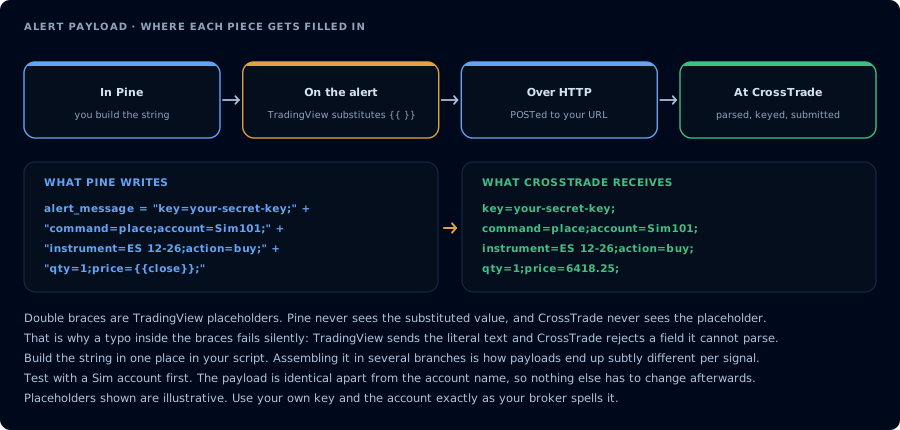
Double braces are filled in by TradingView, not by Pine or CrossTrade.
What Are Dynamic Strategy Variables?
Dynamic strategy variables are TradingView placeholders that fill in with values from the strategy through the alert.
TradingView: how to use a variable value in an alert
Which approach should I use?
There are two ways to wire dynamic values into a CrossTrade alert. Pick based on who controls the Pine Script:
- You're authoring your own Pine Script → use the
alert_messagepattern in section 3 below. When you write Pine yourself, this is how you trigger CrossTrade alerts: build the payload as a string in Pine and pass it viaalert_message=. It's the only approach that lets you compute per-signal values like calculated SL/TP or asymmetric long/short payloads. - You're using a script you didn't write (third-party strategy, built-in TradingView indicator, copy-pasted code you don't want to touch) → use the alert-dialog placeholder approach in section 1 below. Paste the CrossTrade payload directly in the alert message field with
{{strategy.order.action}}etc.; TradingView substitutes the placeholders at fire time.
How to Use Dynamic Strategy Variables in CrossTrade Alerts
1. Using Variables with the Alert Message Window
If your TradingView strategy generates dynamic variables for Action and Qty, you can integrate these into your CrossTrade alert. Here’s how:
Example:
If your strategy generates an alert with the following placeholders:
action={{strategy.order.action}};
qty={{strategy.order.contracts}};
TradingView replaces the placeholders with the actual action (buy, sell) and quantity before the alert reaches CrossTrade.
If you're trading futures, it's best to use the variable {{strategy.order.contracts}}.
2. Static Alerts for Indicators
Since indicators do not support dynamic variables specifically for the buy or qty fields, you must provide all required fields explicitly in the Message window. For example:
action=buy;
qty=10;
You can also use chart placeholders with indicators:
{{close}}→ The closing price of the current bar{{open}}→ The opening price of the current bar{{high}}→ The highest price of the current bar{{low}}→ The lowest price of the current bar
3. Customizing Alerts with Pine Script (the alert_message pattern)
If you're authoring your own Pine Script, this is the canonical pattern for firing CrossTrade alerts. Build the full CrossTrade payload as a string inside your script, pass it to strategy.entry() / strategy.exit() via the alert_message= parameter, and read it back in the TradingView alert dialog with {{strategy.order.alert_message}}. It's the only way to do per-signal customization (calculated SL/TP from tick math, different payloads for long vs. short, qty derived from ATR) — none of which is expressible from the alert dialog.
Steps:
-
Define the full CrossTrade payload in your Pine Script:
if longConditionstopLossPrice = math.round_to_mintick(close - stopLossTicks * syminfo.mintick)targetPrice = math.round_to_mintick(close + targetTicks * syminfo.mintick)alertMessage = 'key=your-secret-key;'alertMessage += 'command=place;'alertMessage += 'account=Sim101;'alertMessage += 'instrument=' + syminfo.ticker + ';'alertMessage += 'action=buy;'alertMessage += 'qty=1;'alertMessage += 'order_type=market;'alertMessage += 'tif=day;'alertMessage += 'flatten_first=true;'alertMessage += 'take_profit=' + str.tostring(targetPrice) + ';'alertMessage += 'stop_loss=' + str.tostring(stopLossPrice) + ';'strategy.entry("Long", strategy.long, alert_message=alertMessage) -
Call the payload in your alert configuration using the
{{strategy.order.alert_message}}placeholder.Build every value in Pine, as the example does with
syminfo.tickerandstr.tostring(). TradingView's manual notes that other placeholders such as{{ticker}}do not work insidealert_message; they are only filled in the alert dialog's Message field.
Example Alert:
{{strategy.order.alert_message}}
Key Points to Remember
{{strategy.*}}placeholders need a strategy alert.{{strategy.order.action}},{{strategy.order.contracts}}and the rest only resolve when the alert fires from a Pine strategy.- Chart placeholders work from either.
{{ticker}},{{close}}and similar resolve from indicator and strategy alerts alike. - Any field can carry a placeholder. TradingView substitutes the value before CrossTrade sees the message, so
instrument=,take_profit=and others accept them too.
More on automating TradingView strategies: Automating TradingView Strategies with CrossTrade.