XT Alert Builder
When working with TradingView’s native strategies, users often encounter a major limitation: the inability to differentiate multiple alert types as easily as they can with indicators. Unlike indicators, strategies don’t naturally support multiple distinct alerts, making it difficult to send different alert messages for separate trade events (e.g., one for a buy, another for a sell, and yet another for flat or close conditions).
The Advanced versions are Invite-Only, with access granted to CrossTrade subscribers.
The Free Version is still publicly available, but its functionality has changed and it no longer offers tick based Stops and Targets. Request access and browse the full script library on the TradingView Tools page in your CrossTrade account.
The XT Alert Builder strategy was developed to solve this limitation. Browse the full script library on TradingView Tools page in your account.
This enhanced tool allows traders to better manage their alerts and connect to their broker by generating CrossTrade compatible alerts using the {{strategy.order.alert_message}} variable. Every version in the family can route to NinjaTrader 8 or to a linked Tradovate account.
Limitations of TradingView Strategy alerts
A standard TradingView strategy can:
- Place trades (entries, exits, etc.)
- Backtest performance on historical data
- Send a single alert, which must capture all conditions
What it cannot easily do, by default, is:
- Generate multiple, individually selectable alerts (as
alertcondition()does in indicators) - Clearly distinguish between different signal types (buy, sell, close) within the default alert framework
- Create a variety of unique alerts without resorting to intricate message formatting or using an external indicator script
With the XT Alert Builder Strategy, these shortcomings are addressed by allowing users the ability to source signals from other indicators and package CrossTrade compatible alerts into the strategy's order variable. Let's dive deeper and expand on this functionality.
How Does the XT Alert Builder Strategy Work?
At its core, the XT Alert Builder Strategy is an attempt to combine the best of both worlds with the flexibility of indicator alerts and the convenience of the strategy.order.alert_message variable. This is done by providing input sources for Buy Signals and Sell Signals, as well as the accompanying exit signals for both. This structure allows full ultimate customization of both entries and exits with added checkboxes to make the strategy unidirectional if you need.
The first step is to simply add your indicators to the Superchart, and the Alert Builder will reference them inside of the source input:
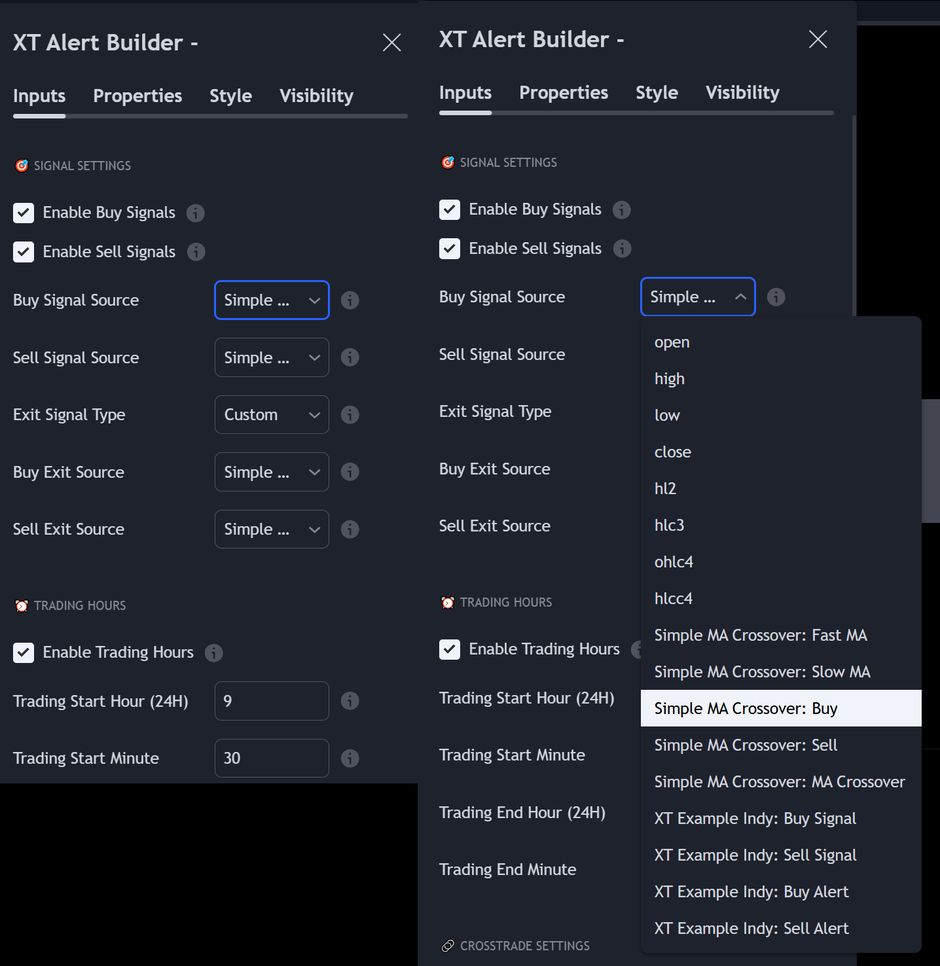
Custom Command Building for Alerts
When a buy or sell signal triggers, the strategy constructs a detailed XT Compatible command string encoded in the alert_message.
This message includes instructions like command=Place;account=...;instrument=...;action=buy; or action=sell;, along with optional fields for ATM strategies, stop losses, take profits, and additional parameters.
The inputs panel includes all of the necessary components for full CrossTrade compatibility:
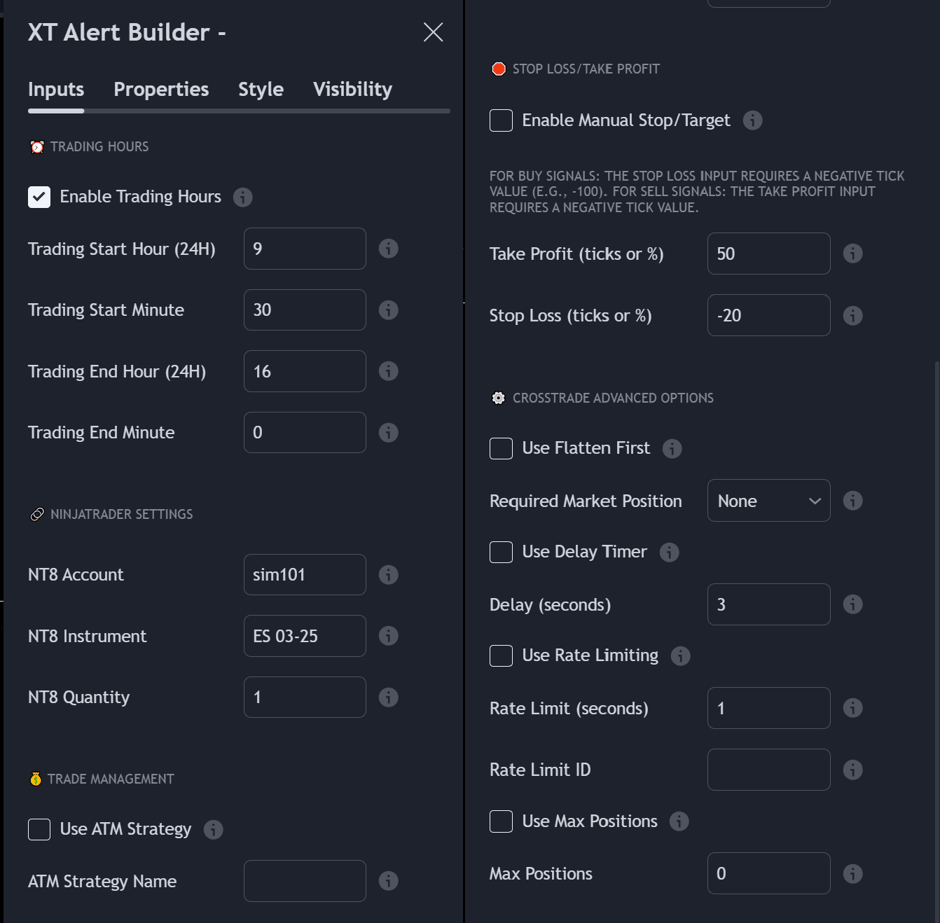
Trading Hours
Users can specify a trading session or time window to ensure signals only occur during desired hours. If you select the Session End option for the Exit Signal Type input, the strategy will send the Close Position command at the ending time you define in the Trading Hours.
Account Settings
These settings include the account, instrument and quantity for the trade.
Choosing the broker
Each builder has a Send to Tradovate checkbox. Tick it and the order is routed to your linked Tradovate account through CrossTrade Cloud, which needs no NinjaTrader install and nothing running on your machine. Leave it unticked and the order goes to NinjaTrader 8 through the CrossTrade NT8 Add-On, exactly as before.
The Custom Commands version works differently, because you write the payload yourself: add destination=tradovate; as a line in your payload instead.
The account value is whatever your broker calls it. On NinjaTrader that is the NT8 account name (Sim101, for example). On Tradovate it is the account name shown in My Account, Brokers tab after you link. See Destinations.
Trade Management
The option to trigger an ATM strategy template on NinjaTrader is also included, allowing for full automated trading capabilities with trailing stops and auto-breakeven rules.
ATM templates are a NinjaTrader concept. When you route to Tradovate, the equivalent is a CrossTrade ATM template configured in your account, covered in Tradovate ATM. Fixed stop loss and take profit levels work on either broker.
The quantity and ATM strategy name must be an exact match.
Stop Loss and Take Profit levels
In addition to the ability to include and utilize an ATM template, you also have the ability to set individual stop_loss and take_profit levels with either tick or percentage-based values.
Select only one management option: ATM template or take_profit and stop_loss levels.
CrossTrade Advanced Options
Include various Advanced Options like flatten_first, require_market_position, delay_timer, rate_limit, and max_positions for unique trading scenarios.
Alert Creation Instructions
In the Alert Message window, you will simply add your CrossTrade secret key and the dynamic strategy variable {{strategy.order.alert_message}}.
For example:
key=your-secret-key;
{{strategy.order.alert_message}}
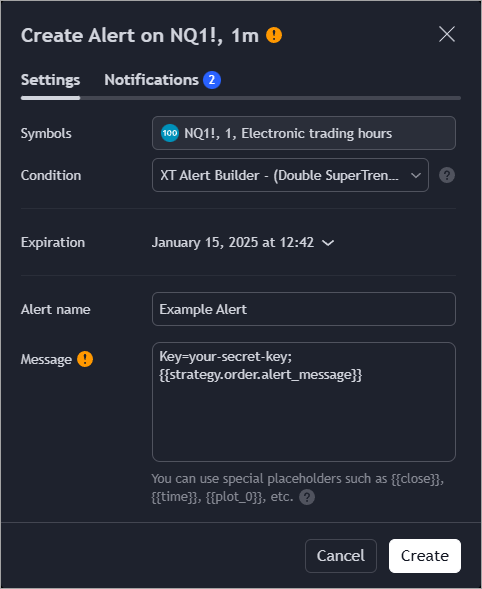
Example TradingView Alert
What you get
The XT Alert Builder strategy lets you build alerts that referencing external indicators it overcomes the default limitations imposed by Pine Script’s strategy alerts. Users can now:
- Define clear, condition-based entries and exits.
- Maintain compatibility with advanced order management features (such as ATM strategies on NinjaTrader).
Choosing a version
The Alert Builder is a family of strategies, not a single script. All six generate CrossTrade-compatible alerts, use the same {{strategy.order.alert_message}} variable, and route to either NinjaTrader 8 or Tradovate, so whatever you learn on one carries over to the rest. What changes is how much control you get over signals, exits, and the payload itself.
| Version | Tier | What it adds |
|---|---|---|
| XT Alert Builder | Free | Buy and sell signal sources, exits by custom signal or session end, and trade management through an NT8 ATM template or fixed stops and targets. No CrossTrade account required. |
| XT Alert Builder - Advanced | Standard | Dual signal sources with Single, AND, or OR logic. Adds RSI and moving average filters, three exit methods, and the CrossTrade advanced options as strategy inputs. |
| XT Alert Builder - FLEX | Standard | Four independent exit sources per side (stop, target 1, target 2, target 3), each wired to its own indicator plot. Whichever fires first closes the whole position. No fixed levels or ATM template. |
| XT Alert Builder - Custom Commands | Standard | Paste any CrossTrade command payload directly instead of building it from inputs. Suited to multi-step or multi-account flows. |
| XT Alert Builder - Single-Sided | Standard | Long-only or short-only strategies. Defers TradingView's required offsetting exit to the final bar of your trading window, so you can take several entries per session in one direction. |
| XT Alert Builder - Ultimate | Pro | Advanced, FLEX, and Custom Commands combined into a single indicator. |
For a feature-by-feature comparison, see the XT Alert Builder overview.
Getting access
The Free version is published openly on TradingView and needs no CrossTrade account. The other five are invite-only: the four Standard versions come with any paid subscription, and the Ultimate requires a Pro plan.
To request them, open the TradingView Tools page in your CrossTrade account, add your TradingView username, and select Request access. Once access is granted, the scripts show up in TradingView under Indicators → Invite-only.
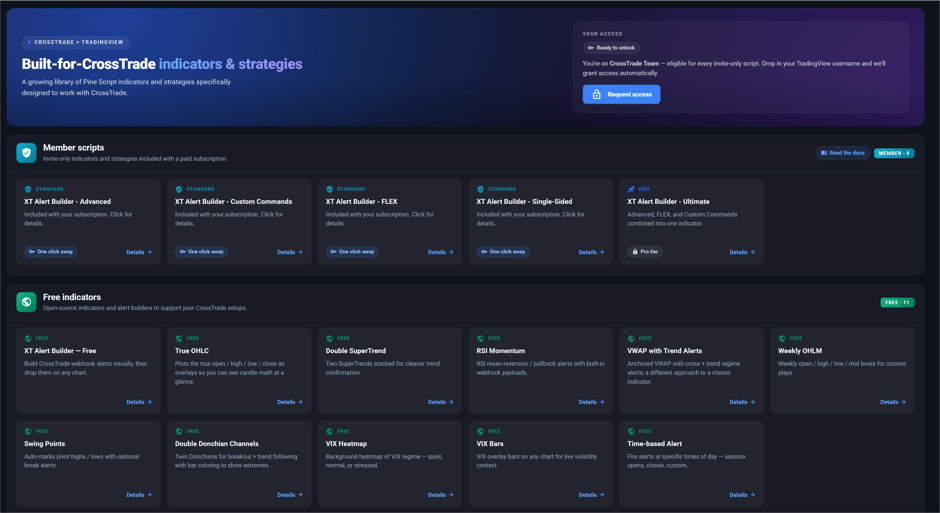
TradingView Tools in your CrossTrade account
The same page carries the rest of the CrossTrade script library, including free indicators like True OHLC, Double SuperTrend, and VIX Heatmap.