Managing Multiple Tradovate Accounts
Most traders end up here for one reason: prop firms. A couple of evaluations, a funded account or two, maybe a personal account on the side, and one strategy that should trade all of them. This guide covers the two ways to do that on Tradovate, and how to pick between them.
First: Link Everything
Each Tradovate identity (your personal login, each firm-issued login) links separately, and Live and Demo are separate environments. Link the identities you actively use. Same-environment copier pairs under one login are the validated configuration; cross-login and cross-environment copier pairs remain under validation. Prop firm logins belong on Link Demo, including funded/PA accounts. See Linking Your Tradovate Account if any of that is new.
One requirement to know up front: account names must be unique across everything you link. CrossTrade rejects an ambiguous name rather than guessing which identity you meant.
Two Approaches
Multi-account placement: the alert itself lists the accounts. Every account gets the same order at the same time. Zero extra configuration, but sizing is uniform and the account list lives inside your TradingView alerts.
The Tradovate Copier: the alert (or your manual trading) targets one leader account, and CrossTrade replays it to follower accounts with per-follower sizing, symbol replacement, inversion, and stealth. Configuration lives in CrossTrade, so changing followers never means editing alerts.
Rule of thumb: two or three accounts, same size, same contract → multi-account placement is fine. Anything more, or anything with per-account sizing (micros on the eval, minis on the funded account) → use the copier.
Multi-Account Placement
Give account a comma-separated list:
key=your-secret-key;
command=PLACE;
account=PROP1234,PROP1235;
instrument=ES 12-26;
action=BUY;
qty=1;
order_type=MARKET;
tif=DAY;
destination=tradovate;
Each account gets an independent execution through Tradovate's validation and dispatch, and each shows as its own Alert History row. Relative bracket prices are resolved once before fan-out, so every account uses the same quote basis.
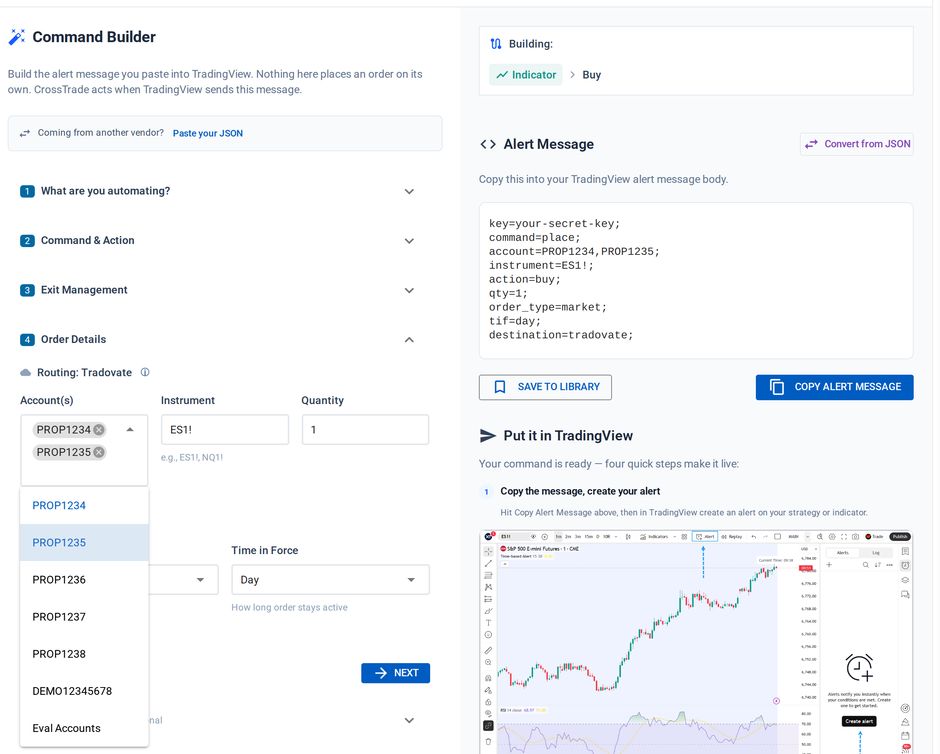
Cycling: add cycle_accounts=true; and each signal goes to one account from the list in rotation instead of all of them, useful for spreading eval trades. Accounts locked by an Account Manager monitor are skipped automatically.
The Tradovate Copier
The Tradovate Copier replicates a leader account's trades to followers, entirely server-side, in one of three modes:
- Signal mode replays CrossTrade webhook and API commands with order structure preserved (limits stay limits, brackets ride along). It does not see manual clicks inside Tradovate.
- Execution mode copies every leader fill, manual trades included, as a market order. Followers get no resting brackets of their own.
- Order mode (Beta) mirrors the leader's working orders, manual and TradingView-native trades included.
The Tradovate trade copier product page puts the mode chooser, four-step setup and pricing together. Use it to choose the workflow before configuring the detailed settings below.
Each follower gets its own sizing (ratio, fixed quantity, or a max position cap), symbol replacement, inversion, instrument filter, and stealth. Setup, the full settings table, and exactly what each mode copies are on the copier page. While you're ramping up, read the copy log (See Logs on the Tradovate Copier page) after every session.
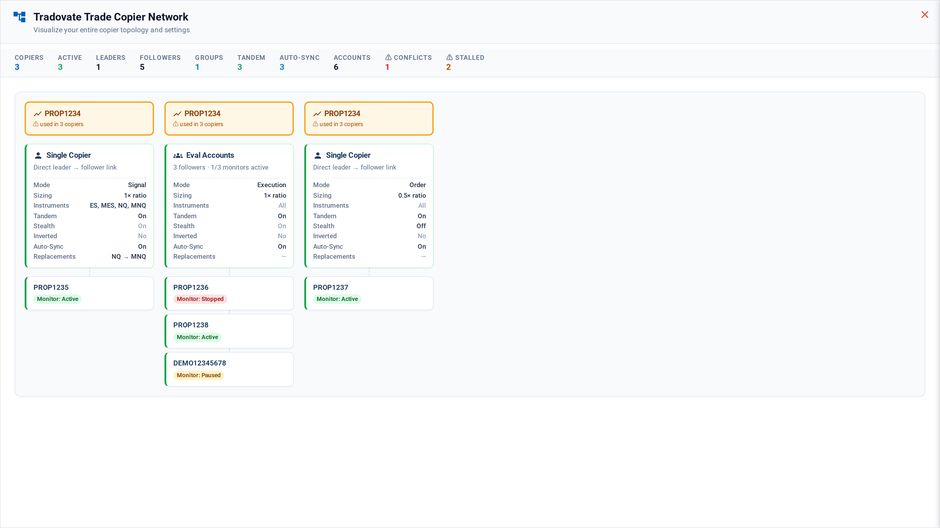
The network view maps every leader, copier and follower, with each monitor's status
The Prop-Firm Playbook
A typical setup that maps cleanly onto the copier:
- Leader: a Demo sim account (or your smallest eval) receives the webhook entries.
- Followers: each evaluation and funded account, linked per firm identity, with per-follower sizing: e.g. ratio 1x on evals,
ES=MESreplacement on accounts that should trade micros (replacements apply to unbracketed market entries only). - Signal mode for webhook-driven strategies, so brackets and cancels mirror with order-type fidelity, or order mode if you also work the leader by hand and want the same fidelity on those orders.
- Stealth on, if you prefer follower orders not to carry descriptive copy text.
Firm risk rules still live with the firm: daily loss limits and trailing drawdown are enforced on their side regardless of what the copier does. CrossTrade's webhook-side guardrails (require_market_position, max_positions, and trade windows; see the indicators guide) protect the named leader execution. They are not re-evaluated independently for copier followers, so use firm limits and an Account Manager monitor for follower-level risk.
What's Still NT8-Only
These NinjaTrader features have no Tradovate equivalent:
- Opposing Position Protection across accounts - a CrossTrade NT8 Add-On feature; not available on Tradovate. Server-side position gates and Strategy Sync still apply, but they are not a replacement for cross-account OPP.
- Hybrid and Unrealized monitor modes, and their position-level thresholds, remain NT8-only. The Tradovate Account Manager runs Standard mode, with P/L thresholds, trailing drawdown, scheduled flattening, trading windows, News Lockout, Monitor Lock, signal locks, closing-only mode, and cloud-side auto-close.
If your risk-management setup leans hard on those, the NT8 path (which can trade the same NinjaTrader-brokered accounts) may still be the better home; see Managing Multiple Accounts for that world.
Common Pitfalls
Duplicate account names across identities. Rename at the firm or unlink the identity you aren't trading; ambiguous names are rejected.
Unlinking one identity during automation. Unlink pauses every Tradovate copier and monitor because a copier group can span identities. Other credentials remain linked, but automation stays paused until you review and re-enable it.
For copier-specific behavior (orders moved inside Tradovate, execution-mode exits, offline gaps, fixed-quantity drift), see the mode sections on the copier page.
Related: Tradovate Copier reference · Multi-Account Placement · Destinations matrix · Prop Firm Connection Guide