User Account
Your CrossTrade account is platform-aware. A switcher at the top of the left navigation flips the dashboard between NinjaTrader 8 and Tradovate, and the platform tools follow that choice: Home, Webhooks and the rest load the version built for your broker. Tools that do not apply to the broker you picked are hidden rather than greyed out, so what you can click always matches what is actually available.
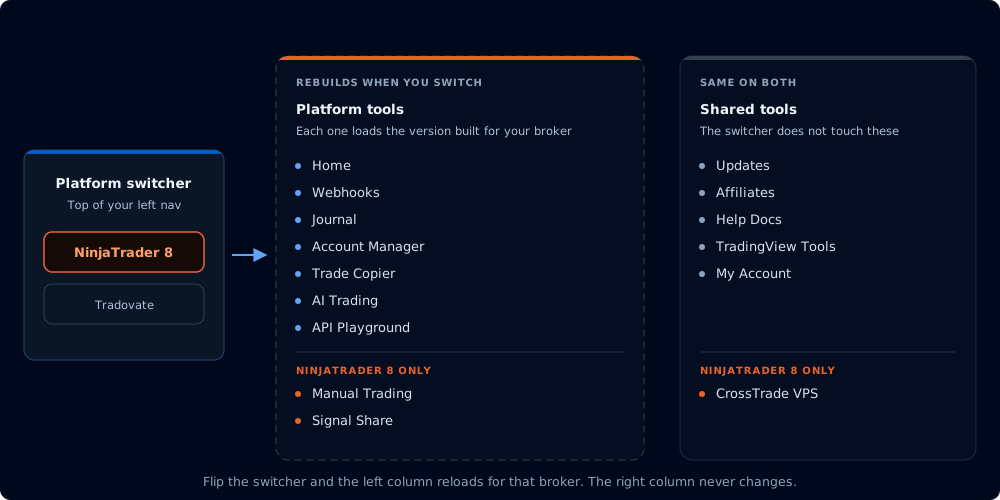
One switcher decides the top half of your nav. The bottom half never changes.
| Tool | NinjaTrader 8 | Tradovate |
|---|---|---|
| Home | ✅ | ✅ |
| Webhooks | ✅ | ✅ |
| Journal | ✅ | ✅ |
| Account Manager | ✅ | ✅ |
| Trade Copier | ✅ | ✅ |
| AI Trading | ✅ | ✅ |
| API Playground | ✅ | ✅ |
| Manual Trading | ✅ | — |
| Signal Share | ✅ | — |
| CrossTrade VPS | ✅ | — |
Signal Share rides the CrossTrade NT8 Add-On, and the VPS is a Windows machine whose whole purpose is running NinjaTrader, so neither has a place in Tradovate mode. Everything else below the platform section (Updates, Affiliates, Help Docs, TradingView Tools, My Account) is identical on both.
Home
Your account overview for the selected platform: open positions, active accounts, platform health, updates, and quick links into the docs.
Webhooks
A webhook routes to NinjaTrader 8 or Tradovate based on its destination, so this section is fully live on both. It holds Master Controls (kill switch, closing-only mode, trading window), the Webhook Trader for firing a command straight from the dashboard, ready-made Command Examples, Alert History, and the Command Builder.
Journal
Every fill from both brokers in one trade log, with the Tradovate side swept server-side from your linked accounts.
Account Manager
Profit and loss thresholds, trading windows, end-of-day auto-flattening, minimum profit threshold and trailing drawdown, applied per account by a monitor that watches it for you.
Trade Copier
Copies between your NinjaTrader 8 accounts, or between your Tradovate accounts. Pick a copy mode (Order or Execution on NinjaTrader 8; Signal, Execution or Order on Tradovate) and add Stealth Mode, Symbol Replacement or Trade Inversion.
My Account
Subscription and plan changes, your webhook URL, your Secret Key, broker links for Tradovate Live and Demo, and the trading safeguards: Auto-reconnect and Data Watchdog, Opposing Position Protection, and the account Visibility Manager.
CrossTrade VPS
A Chicago-based Windows VPS with NinjaTrader 8 and the add-on preinstalled. NinjaTrader only: Tradovate runs in the cloud, so it does not need one.
TradingView Tools
Free CrossTrade indicators and strategies for TradingView, including the alert builders that write CrossTrade commands for you.
Help Docs
These docs, embedded in the dashboard and opened on the hub for whichever platform you are in.
Affiliates
Earn recurring commissions for referring new customers. Manage your referral links, track conversions and view payouts from the Affiliates page.