Master Controls
Master Controls are three account-wide gates that run before any webhook reaches your broker: a Kill Switch, a Closing Only filter, and a Trading Window. They apply to every alert on the account, whichever destination it targets.
You will find them on the Webhooks page of your dashboard.
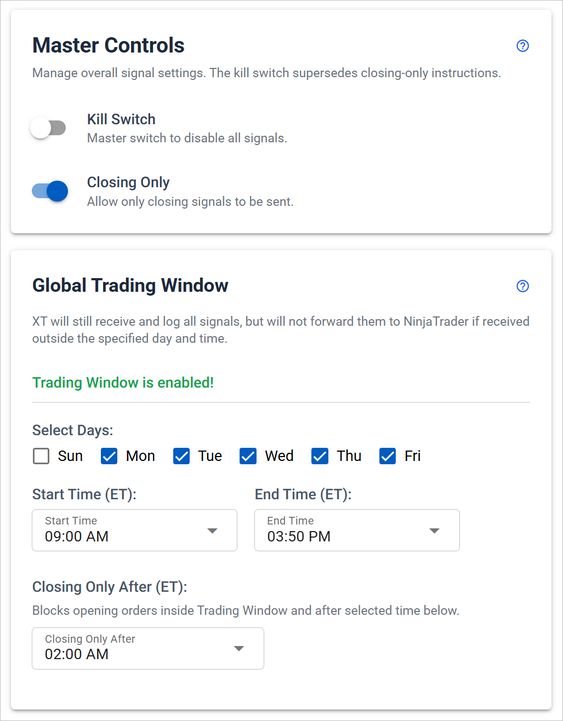
Key Features of Master Controls
Kill Switch
When enabled, the Kill Switch blocks every incoming signal before it is routed, on NinjaTrader 8 and Tradovate alike. Use it during market uncertainty, or to halt automation without cancelling alerts one by one.
It works from any browser, so you can stop all automated trading while away from the machine running your platform.
Closing Only Switch
Closing Only filters out every command except those that close a position. PLACE and REVERSEPOSITION commands are blocked, while exit signals still pass.
One exception: a PLACE carrying flatten_first creates a two-part order, and the closing half is still delivered. The opening half is blocked.
Trading Window
The Trading Window sets the exact times and days signals are accepted. Choose a start and end time in US/Eastern and tick the days you want active.
Allow closing-only orders after a specific time. Within your Trading Window you can set a Closing Only After time. An opening signal that arrives inside the window but after that time is blocked before it reaches your broker.
For finer control, you can also set a trading window per alert alongside the global setting.
How to Use Master Controls
- Activate the Kill Switch: toggle it on to disable all signals.
- Enable Closing Only: toggle it on to filter out everything but closing signals.
- Set the Trading Window: pick start and end times and tick the days you want to trade. The Trading Window stays off until at least one day is checked.