NinjaTrader 8 or Tradovate?
CrossTrade supports two brokers. Most of the platform works on both, a few tools exist on only one, and the difference comes from where the order executes.
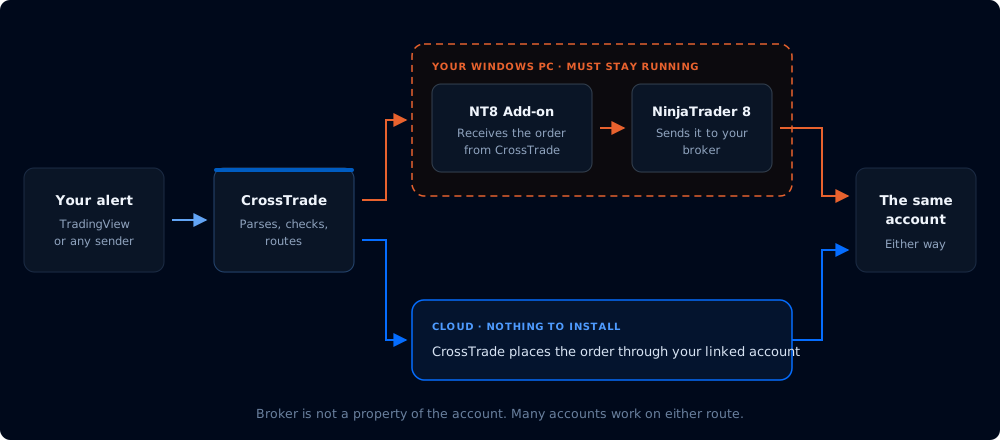
The same alert, two routes. Everything on this page follows from which route you take.
NinjaTrader 8 orders run through the CrossTrade NT8 Add-On inside your NinjaTrader install: everything NinjaTrader itself can do, as long as NinjaTrader is open and connected.
Tradovate orders go straight from CrossTrade to Tradovate's cloud API: nothing on your machine, no VPS to rent, and what Tradovate's API supports is what you get.
The short version
Trading Tradovate, including a Tradovate-based prop firm account? Everything you need for automation is there: webhooks, risk monitors, the copier, the journal, the API and AI agents. You will not have Signal Share, Manual Trading charts or the VPS.
Already running NinjaTrader, or want ATM strategies and NinjaScript? Stay on NinjaTrader 8. It is the larger surface.
Running both is fine and common. One CrossTrade account handles both, and the Journal merges them into one record.
What works where
| Tool | NinjaTrader 8 | Tradovate |
|---|---|---|
| Webhook automation | Yes | Yes |
| Command Builder and Alert History | Yes | Yes |
| XT Alert Builder (all versions) | Yes | Yes |
| Account Manager (monitors, drawdown, trading windows, auto-flatten) | Yes | Yes |
| Trade Copier | Yes | Yes |
| Trading Journal, Analytics, Insights, Econ Calendar | Yes | Yes |
| REST API | Yes | Yes |
| AI Trading agents (MCP) | Yes | Partly, see below |
| Manual Trading (order ticket and charts) | Yes | No |
| Signal Share | Yes | No |
| CrossTrade VPS | Yes | Not needed |
| ATM strategies | NinjaTrader templates | CrossTrade templates |
NinjaTrader only, and why
Signal Share. Signal Share copies your own trades between your separate NinjaTrader 8 installations. It exists because NinjaTrader 8 allows one Rithmic connection per instance, so traders with several Rithmic logins run several instances, often on different machines or VPSs. It needs the CrossTrade NT8 Add-On on every one of your installations, the broadcasting one and each receiving one. It is a NinjaTrader feature and there is no Tradovate version of it.
Manual Trading. The account, position and order panels are broker-aware, but the chart is not: it needs historical bars from a NinjaTrader data connection. Without a bars source on the Tradovate side, the page is hidden rather than shipped half-working.
CrossTrade VPS. A VPS is a Windows machine whose entire purpose is keeping NinjaTrader running around the clock. Tradovate orders execute in the cloud, so there is nothing for a VPS to host.
NinjaScript and ATM templates. NinjaScript strategies, the Strategy Analyzer, and NinjaTrader ATM templates belong to NinjaTrader. On Tradovate, CrossTrade provides its own ATM templates instead, with target-fill breakeven and profit-triggered trail activation that Tradovate's native brackets do not have.
AI agents, the strategy half. An agent can read and trade a Tradovate account through the Tv_ tools with nothing running on your machine. Writing NinjaScript, compiling, backtesting through the Strategy Analyzer and deploying strategies are NinjaTrader operations and have no Tradovate equivalent.
Tradovate only
No desktop software. The largest practical difference. Your automation keeps running with your computer off.
Order types NinjaTrader webhooks do not have. Native trailing stops (trailingstop, trailingstoplimit), market-if-touched (mit), iceberg orders (max_show), and good-til-date expiry, all handled broker-side. See Tradovate Webhooks.
Account reads NinjaTrader does not expose. Cash balances, margin snapshots, and contract lookup and suggestion endpoints.
One limitation worth knowing before you commit
NinjaTrader keeps its own execution history, so a missed Journal sync catches up on the next one. Tradovate's API returns only the current session, so CrossTrade has to capture each trading day while it is still visible. That sweep runs nightly for every linked Tradovate account while your subscription or trial is active.
If a day does slip through, export it from Tradovate (Account Reports → Fills → Download CSV) and import it from Journal Settings. Full detail in Importing Trades.
Plan requirements are the same on both
Plan gates follow the tool, not the broker. Webhook automation is on every plan. The Trade Copier, Account Manager and REST API need Pro. Broadcasting with Signal Share and AI Trading agents need Elite (receiving with Signal Share works on every plan). See pricing.
Where to go next
- Tradovate Guides - linking your account, your first automated trade, order types and exits
- NinjaTrader Guides - installing the add-on, your first automated trade, multi-account setups
- Destinations - how the
destination=field routes an alert, with a full command and option matrix per broker - Prop Firm Connection Guide - which link type a funded account needs