Econ Calendar
The Econ Calendar is the fourth page of the Journal. It lists scheduled economic releases with their impact rating, forecast and previous values, so when you review a day you can see what the market was reacting to.
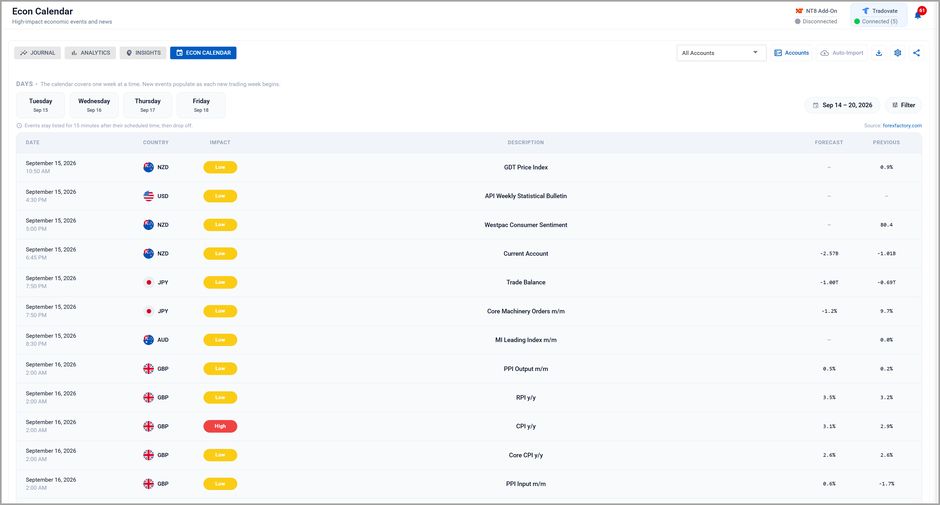
The Econ Calendar, reached from the Journal tab strip
What is on the page
| Column | What it holds |
|---|---|
| Date | The scheduled date and release time. Once a release fires, its actual figure appears here too. |
| Country | The currency the release belongs to, with its flag. |
| Impact | The feed's rating for the release, shown as a colored pill. |
| Description | The release name, for example CPI y/y or Core Machinery Orders m/m. |
| Forecast | The consensus expectation, where the feed publishes one. A dash means none was given. |
| Previous | The prior period's figure, for comparison. |
Above the table, day chips cover the days remaining in the week, and a Filter control narrows the list by impact and currency.
It covers one week at a time
The calendar shows the current trading week only, and new events populate as each new trading week begins. On a weekend it moves ahead to the coming week.
This is a limit of the upstream feed rather than a display choice. Events come from the Fair Economy ForexFactory feed, which publishes the current week and does not offer a next-week view.
If you need to see releases beyond this week, check the source calendar directly.
Events drop off shortly after they fire
An event stays listed for 15 minutes after its scheduled time, then drops off the page.
If you are reviewing an older session, the release that moved that day will no longer be listed here. Your trade detail and notes are where that context should be written down at the time.
The calendar shows; it does not act
This page is informational: it does not block signals or close positions. The control that acts on economic events is separate:
| Where it lives | What it does | |
|---|---|---|
| Econ Calendar | Journal | Shows you what is scheduled. Changes nothing. |
| Economic-Event Lockout | Master Controls, and per-monitor in the Account Manager | Refuses incoming signals inside a window around a release, and optionally flattens the account. |
The lockout works from the same feed, so what you see on this page is the set it is working from. By default the lockout considers high-impact USD events, which is a narrower set than everything listed here.