Importing Trades
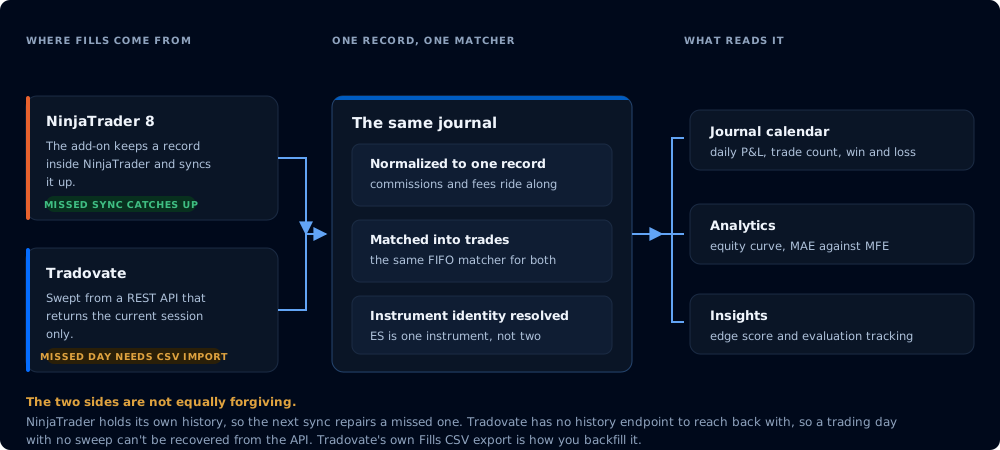
Both brokers land in one record, but only one of the two paths is forgiving.
NinjaTrader 8
Executions come from the CrossTrade NT8 Add-On, which keeps a local record inside NinjaTrader and syncs it up to CrossTrade. NinjaTrader holds its own history, so a missed sync is recoverable: the next one catches up.
Tradovate
Fills are swept from Tradovate's REST API: nightly for every linked account, and live as you trade.
Tradovate's standard API returns only the current session's fills. There is no history endpoint to reach back with. CrossTrade works around this by sweeping cumulatively: every sweep captures the whole visible session and de-duplicates, so as long as one sweep lands per trading day, nothing is missed. The nightly maintenance window runs between 5 and 6 PM ET, before the session reset, for exactly this reason.
The consequence: a trading day with no sweep cannot be recovered from the API. To fill it, import Tradovate's own Fills export; see Backfilling Tradovate history from CSV.
Import and sync
The Import / Sync button sits in the Journal header, and you can sync on demand from it at any time.
Daily Auto-Import, in Journal Settings, schedules the nightly import from the CrossTrade NT8 Add-On after the futures close. Tradovate doesn't depend on it: every linked Tradovate account is swept nightly either way, and its fills are also captured live as you trade.
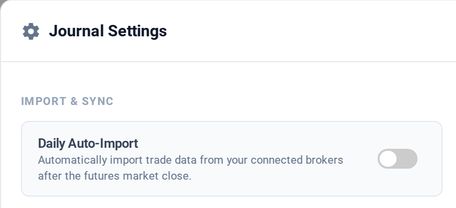
Daily Auto-Import is the first card in Journal Settings
Backfilling Tradovate history from CSV
Tradovate's web platform exports your full fill history, and the Journal imports it. In Journal Settings, use Import Trade Data CSV with Tradovate's Fills export (Account Reports → Fills → Download CSV). Use the Fills export specifically; the other exports do not carry the fill id the importer keys on.
The import shows what it found, which accounts it resolved, and how many rows are new before anything is written. Days the sync already captured are recognized as already imported rather than duplicated, and so are fills from a Tradovate account you traded through NinjaTrader.
First Tradovate sweep with a position already open
If an account's very first sweep happens while a position opened in an earlier, never-swept session is still open, the entry fills for it were never captured. Until that contract goes flat, its exits can read as opposite-side entries.
It is one-time, limited to that contract, and it corrects itself once the position closes.
What arrives with a fill
Commissions and fees come across with the fill rather than being estimated, and instrument identity is resolved so the same product buckets identically from either broker. That is why a combined ES record across NinjaTrader and Tradovate reports as one instrument rather than two.