Journal
NinjaTrader keeps its own execution history, so a missed sync catches up on the next one. Tradovate does not work that way: its standard API returns only the current session, so CrossTrade captures each trading day while it is still visible. That sweep runs nightly for every linked Tradovate account.
If a day does slip through, export it from Tradovate (Account Reports → Fills → Download CSV) and import it from Journal Settings. Full detail in Importing Trades.
The Journal turns your actual fills into a reviewable trading record: a P&L calendar, per-trade detail, tagging and notes, and performance breakdowns. It reads executions from your connected accounts on both brokers, so NinjaTrader 8 and Tradovate trades sit in the same journal and the same statistics.
You reach it from Journal in the sidebar. It has four pages.
| Page | What it is for |
|---|---|
| Journal | The month calendar. Daily P&L, trade count and win/loss per day, with weekly totals. Click any day or week for a detail modal with the trade list, charts, and notes. |
| Analytics | Performance breakdown by period: headline stats with a detailed trade, risk and execution breakdown, equity curve, MAE against MFE, and per-symbol performance. |
| Insights | Edge analysis and coaching, oriented around passing an evaluation. Edge Score, Win Quality, Consistency and Risk Control gauges, plus a what-if simulator and prop eval tracker. |
| Econ Calendar | Scheduled economic releases for the current week, so you can see what the market was reacting to around a trade. |
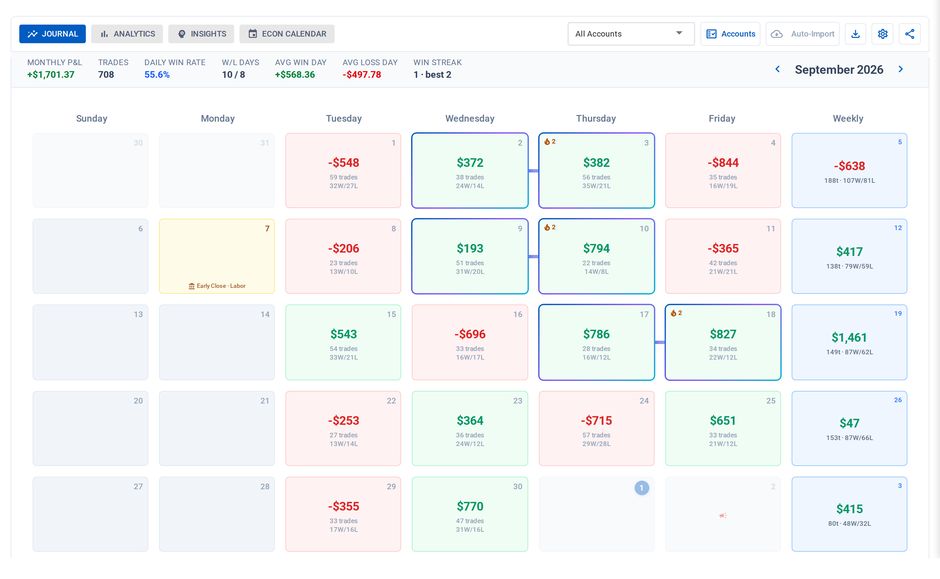
The Journal: one tile per trading day, weekly totals down the right
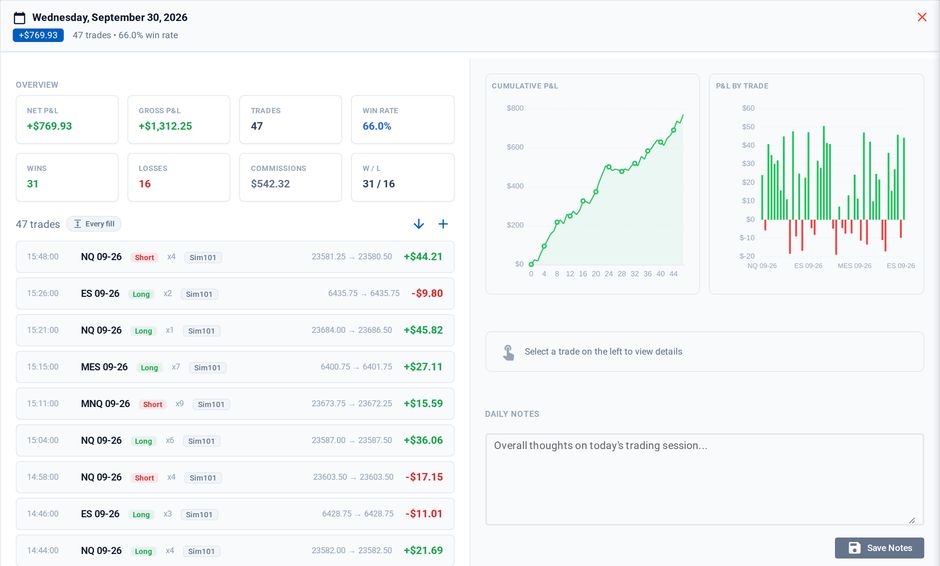
Click a day for every trade in it, with that day's charts and notes
One journal, both brokers
Fills from either broker are normalized into the same executions record and matched into trades by the same FIFO matcher. Everything downstream (notes, tags, account groups, Hide Sim) works the same regardless of where a fill came from, and an ES trade journaled from NinjaTrader buckets into the same instrument as one journaled from Tradovate.
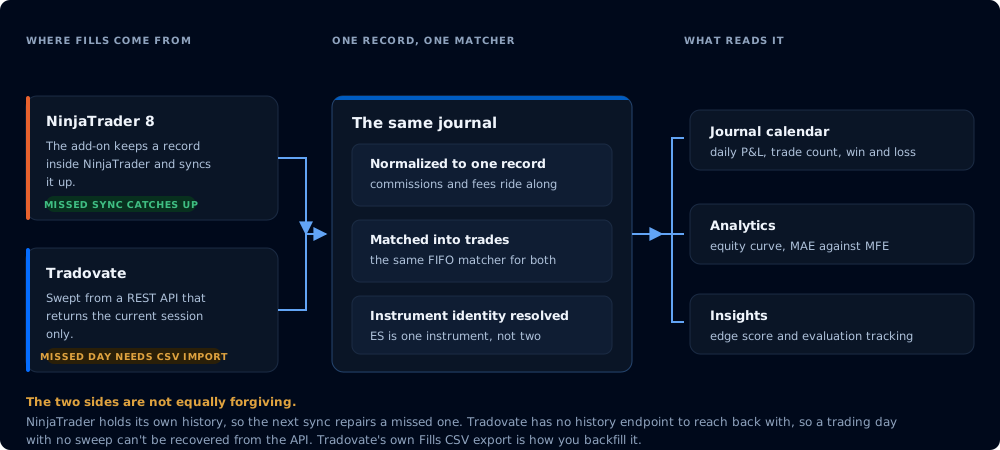
Both brokers land in the same record, but only one of the two paths is forgiving
Tagging and notes
Trades can be tagged with a strategy, and with manual tags across setup, session, mistake, and discipline categories. Both trade-level and daily notes save with the day, so a review written weeks later still has the reasoning attached.
This is what makes Analytics and Insights useful. With strategies and setups tagged, the performance breakdown can tell you which of them is actually carrying your account rather than just reporting a total.
If the numbers look wrong
Four settings change what the Journal shows without changing a single trade: which accounts are selected, whether Sim accounts are hidden, your time zone, and how a "day" is defined. Two of those move trades between days. Check them first. See Journal Settings.
Related
- Manage Accounts - account visibility, nicknames, and the Live/Sim tags the Journal reads
- Account Manager - daily P&L thresholds and risk monitors
- Tradovate Account Manager - the Tradovate side of monitors