Journal Settings
Four settings change the numbers on screen without changing a single trade. If the Journal does not match what you expect, check these before anything else.
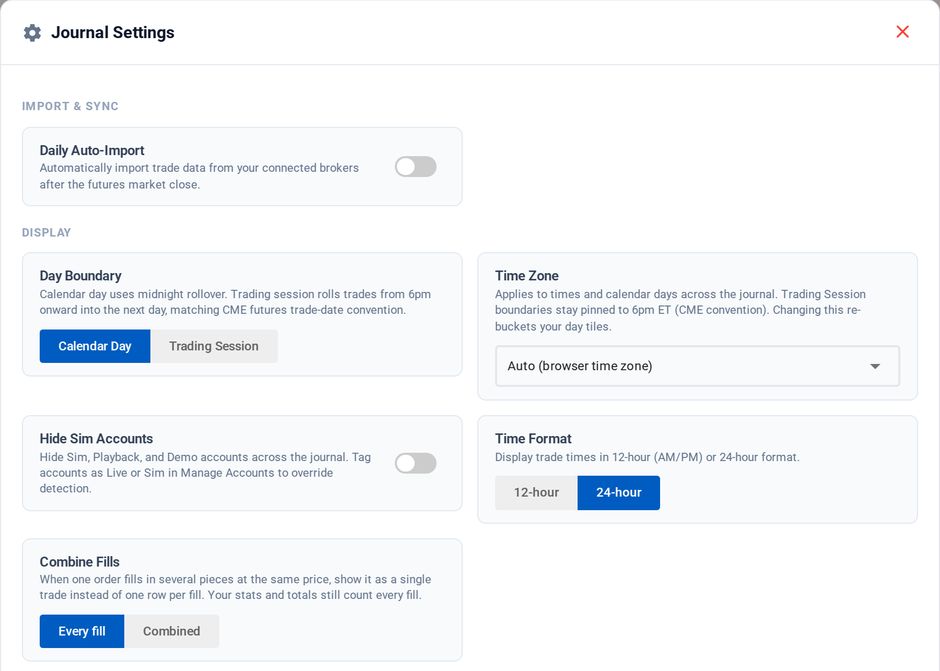
Journal Settings, opened from the gear in the Journal header
Accounts and account groups
The account selector filters the whole Journal. You can also save account groups: a named set of accounts, in any mix you like, selectable as one unit.
Three evaluation accounts can be reviewed as a single performance history, or a live account separated from everything else, without re-picking accounts every time.
Hide Sim
Sim and demo accounts can be excluded so practice fills do not distort your real statistics. Accounts are tagged Live or Sim automatically, and you can override the tag per account in Manage Accounts, opened from the Journal header.
Time zone
By default (Auto) the Journal renders in your browser's time zone. You can pin it explicitly to US Eastern, Central, Mountain or Pacific, UTC, London, Berlin / Frankfurt, Tokyo, Singapore, or Sydney.
The time zone decides which calendar day a trade lands on, so a 6:30 PM ET fill belongs to a different day depending on how the clock is read. Changing this setting moves trades between days and changes daily P&L.
Day boundary
Separately from the time zone, you choose how a "day" is defined.
| Option | How trades are grouped |
|---|---|
| Calendar Day | By the calendar date in your selected time zone. |
| Trading Session | By the futures session, so trades from 6 PM ET onward group with the following trading day instead of splitting at midnight. |
Pick the one that matches how you think about a trading day. Prop evaluations are usually judged on the session boundary, so if you are tracking against firm rules, Trading Session is the one that lines up.
Time zone and day boundary are independent, and both change day bucketing. If your daily P&L looks off by one day, it is almost always one of these two rather than a missing trade.
Daily Auto-Import
Also in Journal Settings, and covered in Importing Trades: it schedules the nightly import from the NT8 Add-On. Linked Tradovate accounts are journaled either way.