Auto-Sync Engine
On Tradovate, Auto-Sync runs as a post-trade drift check instead of a repeating timer. See Auto-Sync on Tradovate below.
Overview
Auto-Sync is the Trade Copier's continuous synchronization engine. It monitors follower positions against leader positions and automatically corrects any discrepancies it finds: partial fills, missed signals, connection drops, accidental manual closes, NT8 restarts, or anything else that breaks alignment.
How It Works
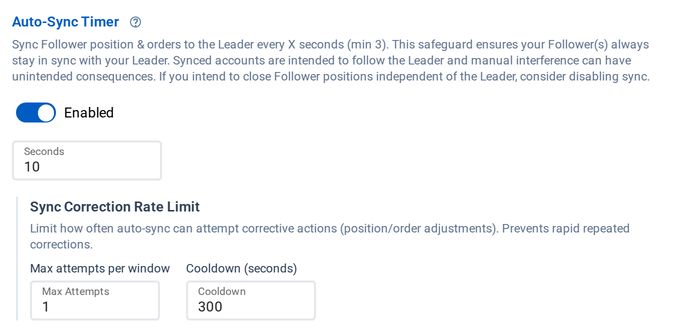
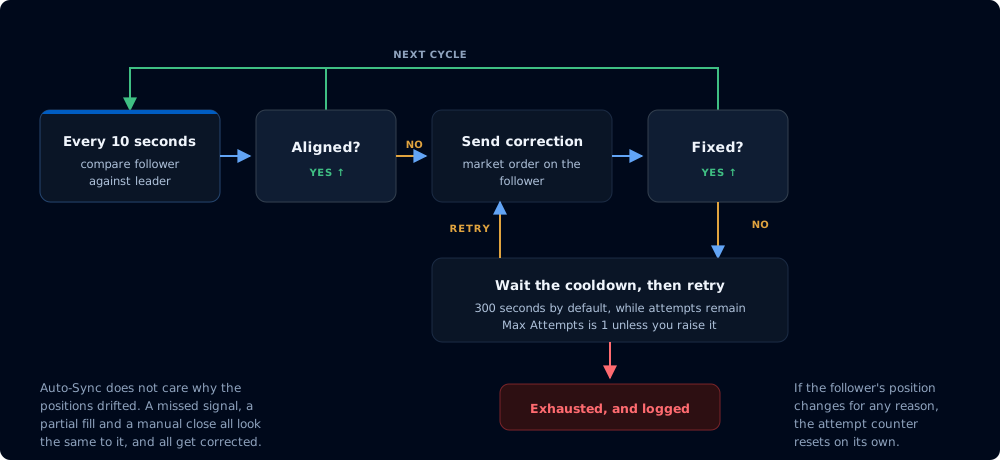
Auto-Sync runs on a continuous loop (every 10 seconds by default, configurable from 3 to 900 seconds). On each cycle, it compares the follower's actual position against what the leader's position says it should be, accounting for your copier's ratio and direction settings.
The cycle, and what happens when a correction does not take
If the positions match, nothing happens. If they don't, Auto-Sync submits a correction order on the follower to bring it back in line. This might be a market order to add contracts the follower is missing, a sell to trim excess, or a full flatten if the leader is flat and the follower isn't.
Auto-Sync resumes immediately after any disruption. If your connection drops and comes back, or NinjaTrader restarts, the very next sync cycle picks up where things left off and corrects whatever drifted while you were offline.
What It Handles
Auto-Sync doesn't care why positions are misaligned, only that they are, so it covers cases event-based copying alone can't:
- Partial fills that leave the follower under-allocated
- Signals that were missed entirely during a connection loss
- Positions that were accidentally closed manually on the follower
- State that needs to be restored after an NT8 restart or crash
- Rounding differences when position ratios don't divide evenly
Correction Limits
Sometimes a correction order gets blocked by Opposing Position Protection, prop firm rules, broker-side risk limits, or other constraints. Without safeguards, Auto-Sync would keep submitting the same blocked order every cycle, forever.
Correction limits cap how many times Auto-Sync will retry a failed correction before giving up, and the cooldown controls how long it waits between retries.
Settings
| Setting | Default | Description |
|---|---|---|
Max Attempts | 1 | How many times Auto-Sync will try to fix a specific mismatch before stopping. |
Cooldown | 300 | How long (in seconds) Auto-Sync waits between retries when a correction didn't work. |
How Corrections Are Tracked
- Auto-Sync detects a mismatch and places a correction order. This counts as attempt 1.
- If the correction worked (the follower's position changed), the system resets and goes back to normal monitoring.
- If the correction didn't work (position is still wrong after the order was submitted), Auto-Sync waits for the cooldown period before trying again. During the wait, periodic warnings appear in the log so you know it's still aware of the problem.
- After the cooldown expires, Auto-Sync checks whether it has any attempts left. If so, it tries again. If all attempts are used, it stops trying and logs an "Exhausted" message.
- If the follower's position changes for any reason (a manual trade, a different signal, a delayed fill), the attempt counter resets automatically, and Auto-Sync starts fresh.
Examples
Default settings (1 attempt, 300s cooldown): Auto-Sync tries once. If the correction is blocked, it waits 5 minutes, then gives up. It won't try again unless the follower's position changes on its own, at which point the counter resets and it starts over.
3 attempts, 60s cooldown: Auto-Sync tries up to 3 times, waiting 60 seconds between each. If all 3 fail, it gives up. That's a total window of about 2 minutes before exhaustion.
What "Exhausted" Means
When you see an "Auto-Sync Exhausted" warning, it means every correction order was blocked or rejected. Auto-Sync stops retrying to avoid spamming your account with rejected orders.
You have two options:
- Wait - if the underlying issue resolves itself (e.g., a conflicting position gets closed or a prop firm restriction lifts), Auto-Sync automatically resumes the next time the follower's position changes.
- Manual Sync - use Auto-Sync Followers in the copier's row menu to force a sync, which bypasses correction limits entirely.
Manual Sync
The Auto-Sync Followers action in the copier's row menu provides instant realignment on demand. It compares all follower positions against their leaders and submits correction orders for any mismatches, bypassing correction limits and cooldowns entirely.
Use Manual Sync when:
- You've made manual position adjustments on a follower and need to realign
- You've changed copier configuration and want to apply it immediately
- Auto-Sync is disabled and you want a one-time sync
- Auto-Sync has exhausted its correction attempts and you've resolved the underlying issue
Log Messages
| What You'll See | What It Means |
|---|---|
Mismatch detected | Auto-Sync found a difference and is placing a correction. |
Attempt N/M | A correction order was submitted (N out of M maximum). |
was sent, but the follower's position is still... | The last correction didn't work; waiting for cooldown to expire. |
Auto-Sync Exhausted | All attempts used up; Auto-Sync has stopped trying until something changes. |
Auto-Sync on Tradovate
The Tradovate Trade Copier includes Auto-Sync as well, implemented as a post-trade drift check rather than a fixed timer: Tradovate enforces aggressive API rate limits, so continuous timer-based polling is not feasible there. Instead, shortly after each copy, Auto-Sync compares the follower's position direction against the leader and writes a warning to the copier log when they disagree.
What happens next depends on the copier's mode:
- Signal mode - Auto-Sync is monitor-only. Mismatches are logged as warnings, and no correction orders are placed.
- Execution mode - Auto-Sync also places rate-limited correction orders, governed by the same Max Attempts and Cooldown settings described above, after each copy and when the copier reconnects after downtime.
- Order mode - Auto-Sync places its rate-limited correction orders in the catch-up pass when the copier reconnects after downtime. That pass is also what converges the accounts when the leader cancels an order after a partial fill, since the follower's whole remainder is canceled.
Interaction with Strategy Lock
When a follower account has positions managed by Strategy Lock, Auto-Sync respects the copier's Strategy Tag Behavior setting. With Skip, Auto-Sync will not attempt to correct tagged positions; they are left alone. With Override (the default), Auto-Sync removes the tag and corrects normally. See the Strategy Lock documentation for details on how each mode works.