Copy Modes
The modes described first on this page are the NinjaTrader ones. The Tradovate copier has its own three modes (Signal, Execution, and Order) that behave differently. See Copy Modes on Tradovate below.
Overview
On NinjaTrader, the Trade Copier supports two approaches to replication: Order Mode and Execution Mode. The right choice depends on your strategy, how much precision you need, and how fast you need fills on the follower.
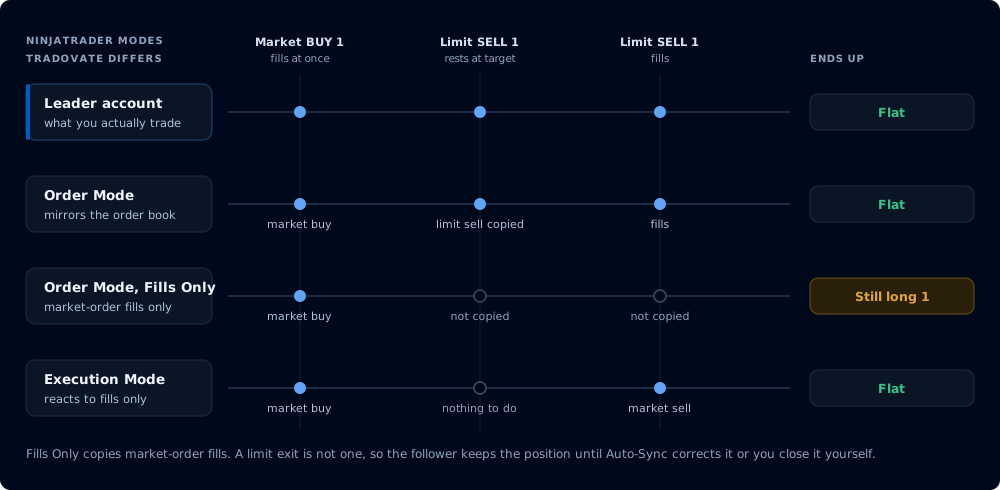
One leader sequence, two modes plus the Fills Only option, and the case where they diverge
Order Mode
Order Mode provides complete order replication: it mirrors every order action from the leader to the follower exactly as it happens. When the leader places a limit order, the follower gets a limit order. When the leader modifies a stop, the follower's stop is modified. When the leader cancels, the follower cancels.
This gives you precise strategy replication where the follower's order book looks identical to the leader's. Bracket structures, resting entries, and pending orders are all maintained.
Best for: Precise strategy replication, complex order management, strategies that rely on limit fills and bracket structures.
Fills Only
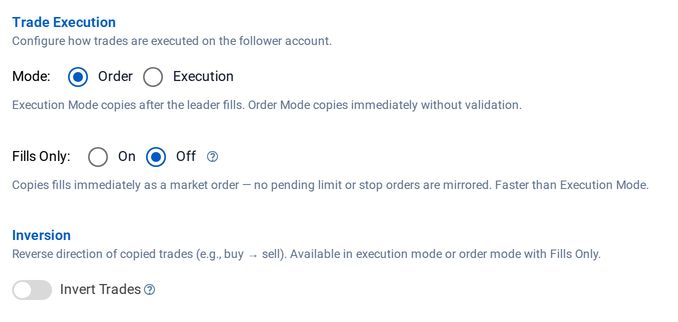
Fills Only is an option within Order Mode that changes what gets copied. When enabled, the copier still operates in order mode (reacting to order events in real time) but only replicates market order executions on fill. Limit orders, stop orders, and other pending order types on the leader are ignored; only actual market order fills trigger a copy to the follower.
Fills Only also enables trade inversion in order mode: because you're only copying discrete fill events rather than managing a mirrored order book, the copier can safely flip the direction on each fill without the complexity of inverting resting orders.
Fills Only requires CrossTrade NT8 Add-On v1.12.0 or later.
Important trade-off: If the leader uses limit orders for exits (take-profit targets), those exits are not copied. The follower's position stays open until auto-sync corrects it or you intervene manually.
If a leader limit order partially fills, the first partial fill is replicated as a market order on the follower. Subsequent fills on the same limit order are not copied. If exact partial fill replication is critical, use Execution Mode instead.
Execution Mode
Execution Mode takes a different approach. Instead of mirroring orders, it watches for actual trade fills on the leader and fires a market order on the follower to match. It doesn't care what order type the leader used or whether the order was modified three times before filling. It only reacts to the end result: a fill happened, so the follower needs to match it.
Best for: Leaders whose order types or order handling you don't need mirrored, where matching the leader's fills matters more than matching its order structure.
Execution mode is slower than Order mode by design. Execution mode is copying confirmed fills on the leader after the fact, whereas Order mode is copying the order intent as soon as it enters NT8's event system.
Trade Inversion
Trade inversion flips the direction of every copied trade on the follower. When the leader buys, the follower sells. When the leader sells short, the follower buys to cover. Position sizing and timing are preserved; only the direction changes.
This turns any follower account into a hedge against the leader's strategy.
Inversion is available in Execution Mode and in Order Mode with Fills Only enabled. Standard Order Mode (without Fills Only) does not support inversion because inverting a full order book (flipping resting limits, stops, and brackets while maintaining OCO relationships) would create unpredictable behavior.
Copy Modes on Tradovate
The Tradovate Trade Copier runs on CrossTrade's servers against the Tradovate API, and offers three modes: Signal Mode, Execution Mode, and Order Mode (Beta). The mode you choose decides what the copier watches on the leader account.
Order Mode is in beta and available to every Tradovate user as the third choice in the copier editor's Mode selector. Verify it on a Demo account before relying on it for a live, evaluation, or funded account.
| Signal | Execution | Order (Beta) | |
|---|---|---|---|
| What triggers a copy | CrossTrade webhook, API, and dashboard commands | Confirmed leader fills | Leader order events: placements, changes, and cancels |
| Manual Tradovate trades | Not seen, not copied | Copied at fill time, as market orders | Copied through the full order lifecycle |
| Do followers hold the leader's resting orders? | Yes, for orders sent through CrossTrade (limits copy as limits, brackets ride along) | No, followers enter and exit at market | Yes, working orders are mirrored and kept in step |
| Best for | Webhook-driven strategies traded through CrossTrade | Mirroring every fill, manual trading included, when followers can trade at market | Hand-traded or TradingView-native leaders, and strategies built on resting entries and brackets |
What each mode copies on Tradovate, including how Fills Only and inversion behave there, is covered in full on the Tradovate Copier page.