Reconnect Delay
Reconnect Delay is a NinjaTrader 8 feature and has no Tradovate equivalent. It exists because NinjaTrader replays a burst of order and position events when a broker connection is re-established. The Tradovate Copier holds a server-side connection with no such replay, so there is nothing to suppress. See Tradovate Copier.
Overview
When a leader account's broker connection drops and reconnects, NinjaTrader can fire a burst of order and position events as it re-syncs its internal state. Without protection, the Trade Copier would interpret these events as real trading activity and replicate them to followers, potentially causing duplicate entries or unwanted position changes.
The reconnect delay filter solves this by suppressing all copier activity for a configurable cooldown window after a leader account's connection is re-established. During this window, the copier ignores all events from that leader. Once the cooldown expires, normal copying resumes.
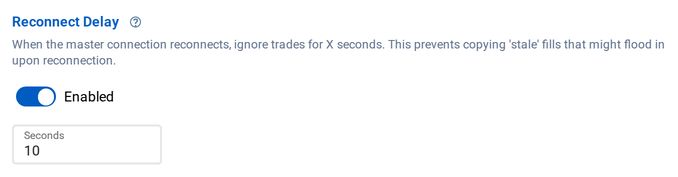
Reconnect Delay requires CrossTrade NT8 Add-On v1.12.0 or later. It is set per copier in the copier editor, and new copiers start with it on at 10 seconds.
How It Works
Reconnect Delay sets the post-reconnect part of the copier's connection quarantine. It is a plain time window: any leader event inside it is treated as a possible replay and ignored. Connection Resilience explains the whole mechanism, including the minimum quarantine that still applies with Reconnect Delay turned off.
Configuration
In the copier editor, under Account Settings, the Reconnect Delay section has an Enabled switch and a Seconds field. Turning it off asks you to confirm, because without it a brief disconnect can replay a batch of trades against your follower.
Choosing a Delay Value
- The default of 10 seconds is a reasonable starting point for most brokers.
- If you're using Auto-Reconnect with a fast reconnect delay, set the copier's delay to at least a few seconds longer than the typical reconnect burst duration for your broker.
- If you see the cooldown continuously active in the logs, your connection may be cycling rapidly — investigate the underlying connection stability.