Tandem Mode
Tandem Mode is available on both copiers. On Tradovate it binds copying to each follower's Tradovate Account Manager monitor; see Tandem Mode on Tradovate below for the details.
Tandem Mode binds copying to your Account Manager monitors. With it on, copying to a follower only runs while that follower's monitor is active. When the monitor stops on a daily loss or drawdown limit, copying to that follower stops at once, so the copier can't reopen positions the monitor just closed. It resumes once the monitor is active again. Auto-Sync respects the same block, and each blocked copy is written to the copier log.
On NinjaTrader 8, the copier editor won't save Tandem Mode until every follower has an Account Manager monitor. If a follower's monitor is active while Tandem is off, the copier list's Tandem pill turns amber, and switching the copier on offers to turn Tandem on for you.
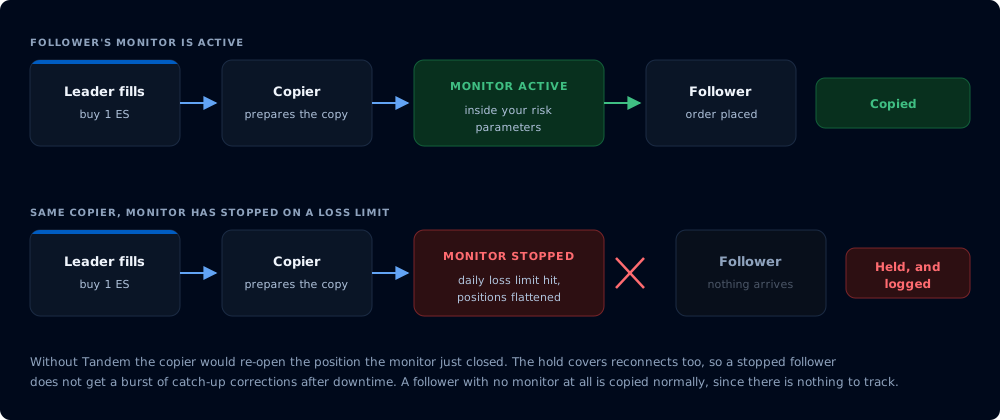
The same leader fill, with the follower monitor running and stopped
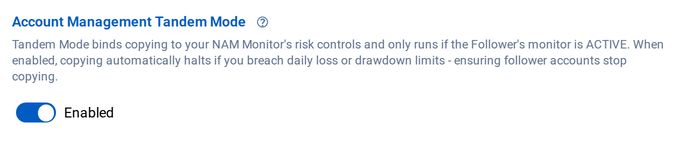
Tandem Mode on Tradovate
On the Tradovate Copier, Tandem Mode tracks each follower's Tradovate Account Manager monitor. With Tandem on, copying to a follower runs only while that follower's monitor is active: a monitor that stops on a daily loss or drawdown trigger halts copying to that account immediately, instead of the copier re-opening the positions the monitor just closed. The hold also covers reconnects, so the catch-up pass that runs after downtime does not send a stopped follower a burst of corrections.
Turn it on in the copier editor. A follower whose monitor is paused or stopped is not copied, while a follower with no monitor at all is copied normally, since there is nothing to track. The copier list's Tandem pill turns amber when a follower's monitor is active but Tandem is off. Blocked copies are written to the copier log with the reason.