Overview
The CrossTrade NT8 Trade Copier enables flexible, multi-directional trade copying between NinjaTrader 8 accounts. Unlike traditional "master-slave" copiers, this system supports complex copying networks where any account can follow any other account, with complete customization of execution modes, position sizing, and risk management.
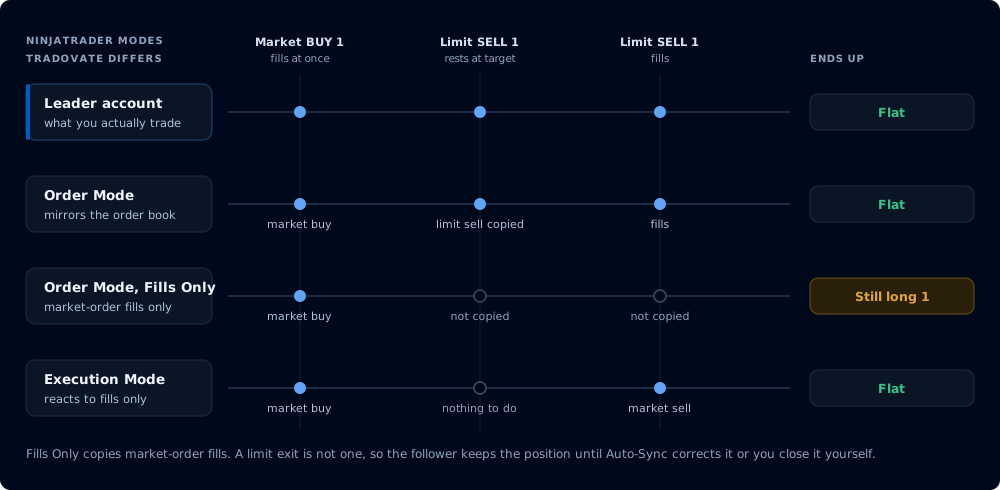
One leader sequence, two modes plus the Fills Only option, and the case where they diverge.
This section describes the NT8 Trade Copier, which runs inside NinjaTrader through the CrossTrade NT8 Add-On. Tradovate accounts are served by a separate cloud-side copier with no desktop software and nothing to keep running. See Tradovate Copier, which includes a full feature-by-feature parity table against this one.
The copier works independently of webhooks. You can trade and copy locally on NT8 or copy trades sent from external sources.
Key Capabilities
- Group Copiers: For unified copying based on account type or strategy
- Multi-directional copying: Any account can follow any other account
- Multi-leader / Multi-follower: Create any copy relationship you need
- Mixed environments: Copy between live, demo, sim, and prop accounts
- Symbol mapping: Trade different contract sizes automatically (ES to MES)
- Real-time synchronization: Auto-Sync engine maintains alignment as often as every 3 seconds (10 second default, configurable)
- Stealth Mode: copied NinjaTrader orders get neutral names instead of CrossTrade's tracking IDs
- Tandem Mode: sync your copy action with your Account Manager monitors, on both brokers
Copier Disclaimer
Do not run multiple trade copiers at once
CrossTrade's Trade Copier needs full visibility of the orders and positions it manages. A second copier tracks order state independently, so both act on an incomplete picture of the account: duplicate orders, missed exits, position mismatches, and uncontrolled risk.
Run CrossTrade as your only copier on any account where it is active. Support does not troubleshoot environments where a third-party copier is involved, including position sync errors, unexpected fills, and account discrepancies. If you are switching from another copier, disable and disconnect it before enabling CrossTrade on that account.
Additional disclaimers are in our Legal Section.