Signal Share
Signal Share is NinjaTrader 8 only, by design rather than as a gap: it rides the CrossTrade NT8 Add-On, which is what reads and reproduces order activity inside NinjaTrader. There is no Tradovate broadcaster or receiver. To place the same trades on your own Tradovate accounts, route the signals through CrossTrade webhooks instead, or use the Tradovate Copier between Tradovate accounts you own.
Signal Share carries every order placement, modification, and cancellation from the source account on your broadcasting installation to each of your receiving installations, where the account you mapped places the corresponding order.
Why it exists
NinjaTrader 8 allows one Rithmic connection per instance. If you hold several Rithmic logins (for example several prop firm accounts, or a prop account and a personal account), you have to run several NT8 instances, often on different machines or VPSs. The Trade Copier works inside one NT8 instance, so it cannot reach the accounts in your other instances. Signal Share carries your trades from one of your instances to your others.
How it is set up
Each of your NT8 installations signs in with its own CrossTrade login. One login broadcasts. Your other logins receive: the broadcasting login invites each of them by email, and each receiving login accepts the invite and picks the account on its NinjaTrader that should take the orders. A login cannot invite itself, which is why every installation needs its own login.
Signals always mirror the broadcasting account one-for-one. To trade a different contract size on a receiving account, see Scaling to a different contract size.
Every receiving account must be yours, owned and controlled by you. Signal Share is not for sending trades to other people, following other traders, or running a signal service, and no payments may pass between users. CrossTrade does not provide trade signals or recommend traders.
Prop firms prohibit copying trades between different people. Even when every account is yours, check your firm's copy-trading rules before you connect a prop account to Signal Share.
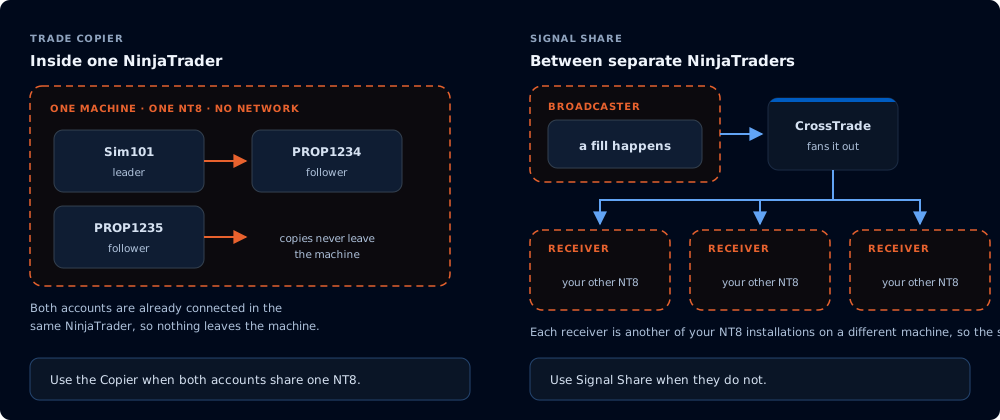
The copier stays on one machine; Signal Share crosses the network between your installations.
When to use Signal Share (and when not to)
Signal Share is the right tool when you need to mirror your order activity between your own separate NinjaTrader installations. Common cases:
- Your accounts need more than one Rithmic login, so NinjaTrader cannot hold them in one instance (for example, a prop firm account on one Rithmic login and your personal live account on another).
- Copying your trades from your NT8 instance on one machine or VPS to your NT8 instance on another.
- Bridging your accounts that sit behind different IP addresses, where the broker or prop firm requires the connection to originate from the platform that holds the account.
If both accounts run inside the same NinjaTrader instance, use the Trade Copier instead. The Copier is in-process, can read both accounts directly, and does not need to send anything between machines. Signal Share is the cross-instance tool.
What gets shared
Signal Share carries the broadcasting account's order events, not its positions. Each order event that matches the broadcast source's filters becomes a signal your receiving installations act on.
| Broadcast event | Receiver action |
|---|---|
| Order placed on broadcaster | Place the same order |
| Order price or quantity changed | Apply the change |
| Order cancelled | Cancel the order |
The receiving account owns the resulting order. Each receiving login picks the account the order lands on and the strategy-lock behavior, and the broadcasting login does not see any of that.
Plan tiers
| Capability | Standard | Pro | Elite |
|---|---|---|---|
| Receive signals | yes | yes | yes |
| Broadcast | no | no | yes |
Broadcasting requires the Elite plan on the broadcasting login. Receiving works on every plan.
Section guide
- How it works: a brief tour of the moving parts.
- Broadcaster configuration: every setting on a broadcast source, what it does, and when to flip it.
- Receiver configuration: accepting an invite on your receiving login, mapping an account, scaling via the Trade Copier, and pausing.
- Signal Share vs webhooks: how Signal Share differs from the webhook trigger path.
- Troubleshooting: common situations and what to do.
Signal Share places real orders on real accounts. When a receiving login accepts an invite, CrossTrade shows the Risk Release Agreement, and by accepting it you take full responsibility for every trade that lands on that account. The agreement is available from the Signal Share page at any time.