Tradovate Trade Copier
The Tradovate Copier replicates trades placed on a leader Tradovate account to one or more follower Tradovate accounts. It runs entirely in CrossTrade's cloud against Tradovate's API: there is no desktop software, and your computer can be off.
Before you start copying
Link the Tradovate identity under My Account, Brokers, then confirm that the intended accounts appear in the correct environment. Select the copying mode based on where your trades start: CrossTrade commands, broker fills or working orders. The detailed mode and bracket differences below are important when followers need their own protective orders.
Test an entry and full exit on Demo before adding more followers. Same-environment pairs under one login are the validated configuration; the setup section explains the validation limits for other pairings. The cloud Tradovate trade copier page provides a quick mode chooser, four-step setup and pricing. If your accounts are instead connected inside NT8, start with the NinjaTrader copier guide.
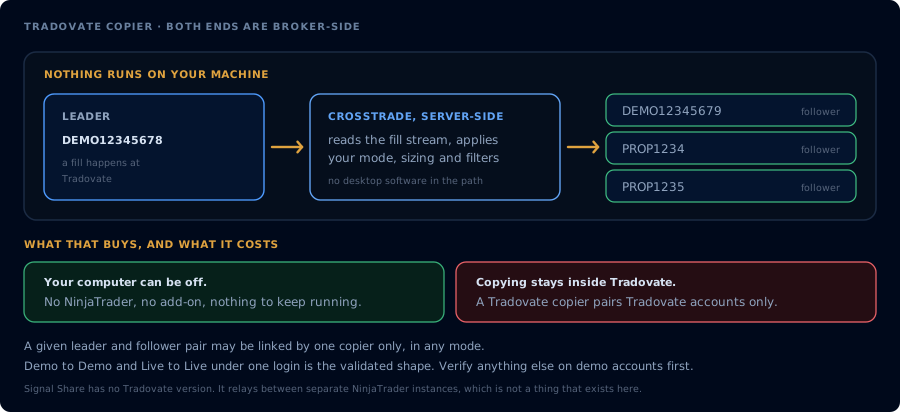
Both ends are broker-side, so a Tradovate copier pairs Tradovate accounts only.
Three copy modes
Each copier runs in one of three modes, chosen when you create it:
Signal mode pairs with the destination=tradovate webhook path, and is named for what it listens to: CrossTrade signals (webhook and API commands). Mapped entries, account-scoped closes, reverses, brackets, cancels, and changes are replayed to active followers with each follower's sizing and symbol rules. Order structure is preserved: limit entries copy as limits, brackets ride along as the same server-side OSO. Unscoped global sweeps and manual Tradovate clicks are not copied by signal mode.
Execution mode watches the leader account at the broker level over a persistent connection to Tradovate. Every leader fill is copied to followers as a market order, whatever produced it: webhook orders, manual clicks inside Tradovate, or ATM bracket legs. Order types are deliberately not preserved (a fill is a fill; followers enter and exit at market), and signed fractional sizing carries a remainder per copier/leader/contract so opposite fills cancel prior fractions and scaled entries and exits converge to flat.
Order mode also watches the leader at the broker level, but mirrors the leader's working orders rather than its fills: entries, stops, limits, changes, and cancels, manual Tradovate trades and TradingView-native trades included. Followers carry the same working orders as the leader, with brackets and OCO pairs placed as linked orders. See Copy Modes on Tradovate for a side-by-side comparison.
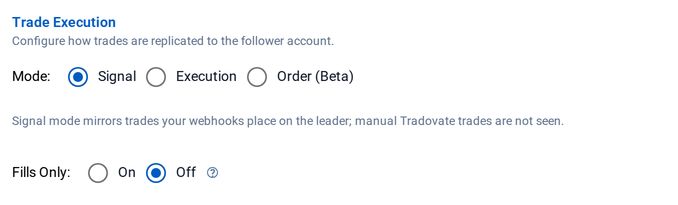
The copy mode is chosen per copier in the editor
A given leader/follower pair may be linked by one copier only, in any mode. Two copiers on the same pair would copy the same leader activity twice, so the app rejects the second config.
There is no limit on the number of followers a leader can copy to. One leader event creates a broker request for every active follower, so large fan-outs are paced by CrossTrade's per-identity request management (see Request load and partial failures).
If everything flows through CrossTrade webhooks and you want order-type fidelity, use signal mode. If you also trade the leader manually inside Tradovate, or run ATMs there, and market-order copies are acceptable, use execution mode. Execution-mode followers get no resting brackets of their own (see below). If you trade the leader outside CrossTrade and want followers to hold the same resting entries, stops, and targets, use order mode.
Setup
- Link the Tradovate identities that hold your leader and follower accounts (My Account, Brokers tab). Live and Demo environments link separately, and you can link multiple identities. Copiers can pair accounts across environments and identities, including live-to-demo and across funded-firm logins, but see the validation note below.
- Open Tradovate Copier in the sidebar and click Add Copier.
- Pick the leader account, the follower account (or a group of followers), choose the mode, set your sizing, and save. A single-follower copier can carry an optional Copier Name, a friendly display label used on the copier list and overview; groups are named as part of creation.
- Signal mode: send your webhooks at the leader account with
destination=tradovate;as usual. Follower results are recorded in the copier log and attached to the leader's Alert History entry. Execution mode: just trade the leader; fills replicate as they happen. Order mode: just trade the leader; orders replicate as you place, change, and cancel them.
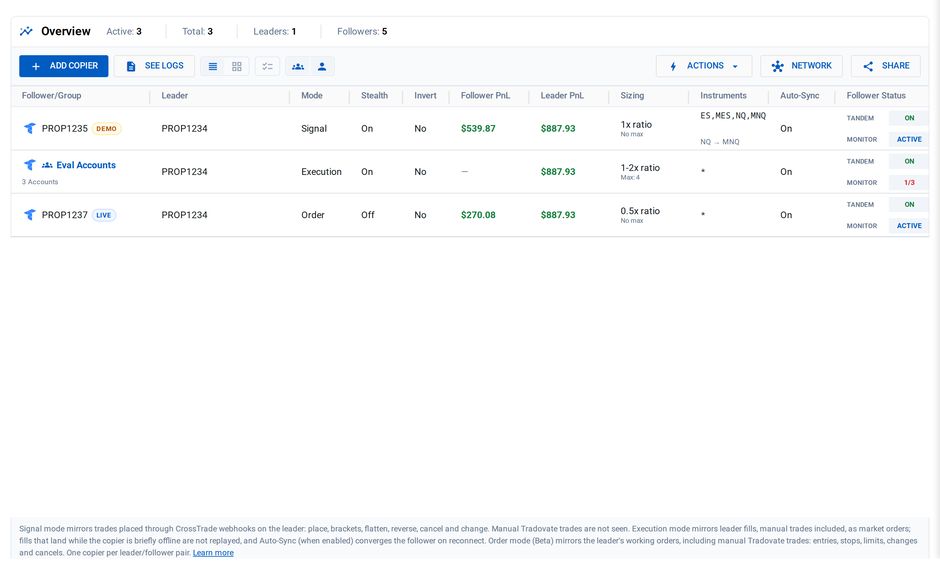
One leader, three copiers: one per mode, including a group
Same-environment copying (Demo leader to Demo followers, or Live to Live under one login) is the validated configuration. Copying across environments or across linked identities, such as live-to-demo or between funded-firm logins, is still being validated. Verify the behavior with demo accounts before relying on it.
What signal mode copies
| Leader action (webhook command) | What followers do |
|---|---|
place, including take_profit / stop_loss brackets | Same order, transformed qty/symbol/direction. Brackets ride along as the same server-side OSO. |
flatplace | Each follower's own position and working orders on that contract are flattened and confirmed clear immediately before its entry is copied. |
closeposition / flatten (full) | Follower's own position on that contract is liquidated (which also cancels its working orders for the contract). |
closeposition with quantity / percent | Partial close against the follower's own size: percent mirrors proportionally, quantity re-applies your sizing rules. |
Account-scoped flatten sweeps | Every successfully closed leader contract is mirrored to that account's followers. Unscoped all-account sweeps are not replayed. |
reverse / reverseposition | Follower clears its own position and working orders before the new entry. Stale working orders are canceled even when the follower is already flat. A bare reverse then enters from the follower's previous size; if it was flat, cleanup still runs but the entry is skipped. reverseposition uses the explicit alert quantity. |
cancel / change | Mirrored to the follower's twin order. CrossTrade keeps a 7-day map of leader order to follower orders, so changing or canceling a copied order updates every follower. Quantity changes re-apply your sizing rules. A copied cancelreplace confirms every mapped follower cancellation before any replacement fan-out. The cancel or change must itself arrive through CrossTrade: moving or canceling the leader order inside Tradovate's own platform is not seen and leaves follower twins unchanged. |
cancelandbracket | Non-inverted followers proceed only when their live position side matches the leader side named by action. The side check happens before cancellation. Matching followers run a scoped cancel, a cancel-window side re-check, and bracket placement with quantity clamped to live size. Inverted followers remain skipped because absolute bracket prices cannot be inverted safely. |
What execution mode copies
Every fill on the leader account, regardless of source. Duplicate broker events are atomically suppressed before fan-out, then the fill is transformed through the follower's sizing and symbol rules and placed as a market order. Fills the copier itself produced are never copied again; if that check can't run, execution copying pauses rather than risk a loop. A failed follower placement is logged and is not blindly replayed; post-trade drift correction is the recovery path when enabled.
Execution mode copies fills, not order structure. When a leader entry that carries take-profit / stop-loss protection fills, each follower enters at market with no resting bracket orders of its own at the broker. Followers exit the same way they entered: when the leader's take-profit or stop-loss fills, that exit fill is copied to the followers at market. Between entry and exit, follower positions have no independent broker-side protection.
If you need server-side bracket fidelity on followers, use order mode, or route entries through CrossTrade webhooks and use signal mode, where brackets ride along as the same server-side OSO. You can also protect execution-mode followers with Tradovate Account Manager monitors.
Two behaviors to understand before going live:
- Brief offline windows are not replayed. If the copier's connection to Tradovate drops, fills in the gap are not copied after the fact. With drift correction enabled, reconnect runs a bounded catch-up pass (up to 20 follower/contract probes per sync burst); excess candidates wait for later activity.
- Fixed-quantity followers only auto-correct to flat. When the leader is flat, a drifted fixed-qty follower is flattened; mid-position, the correct target size is ambiguous for a fixed-qty config, so drift is logged as a warning instead.
What order mode copies
Every order event on the leader account, regardless of source: webhook and API orders, manual orders placed in Tradovate's own platform, and orders sent from TradingView's native Tradovate integration.
| Leader activity | What followers do |
|---|---|
| A new working order (market, limit, stop, stop-limit) | The same order type is placed on each follower, with your sizing, instrument filter, and replacement rules applied. |
| Brackets and OCO pairs | Placed on the follower as linked orders, so a fill on one leg cancels its sibling at the broker. ATM strategies mirror as the orders the broker actually works. A bracket's stops and targets are sized to the follower's own entry, keeping the leader's scale-out proportions, so they protect the follower's position rather than a ratio of the leader's. |
| A price or quantity change | The follower's twin order is modified to match, with sizing re-applied to the new quantity. |
| A cancel | The follower's twin order is canceled. |
| A fill | Nothing extra: the follower's own mirrored order fills at the broker. |
Three behaviors to understand before going live:
- Turning a copier on does not adopt the leader's existing orders. Orders already resting on the leader when you enable the copier are left alone, so there is no burst of copies at setup. Copying starts with what the leader does from that point forward.
- Reconnects do not duplicate work. If the connection to Tradovate drops briefly, orders placed during the gap are copied once the connection returns, and orders that were already copied are not placed a second time.
- A cancel after a partial fill cancels the follower's whole remainder. If the leader partially fills an order and then cancels the rest, the follower's remaining order is canceled too, which can leave the accounts holding different sizes. With Auto-Sync enabled, the difference is corrected.
Per-follower settings
| Setting | Behavior |
|---|---|
| Qty ratio | Multiplier on the leader quantity (0.5x, 2x, ...). Signal and order modes round to the nearest contract; execution mode carries a signed fractional remainder isolated per copier, leader, and contract so buys and sells converge without sharing carry across configurations. If carry state cannot be read safely, that follower placement is withheld. |
| Fixed qty | Overrides the ratio with a constant quantity. |
| Max Position Size | A ceiling on the follower's resulting net position, applied on top of a per-order clamp. An entry that would push the follower past the cap is trimmed down or skipped (the copy log records which; the NT8 copier skips rather than trims), and fills that reduce the position always pass. If the follower's position cannot be read in time, that copy proceeds with the per-order clamp only and a warning is logged. Drift-correction orders respect the cap. |
| Invert direction | Buy becomes Sell and vice versa for unpriced market entries. Priced and bracketed entries are skipped because absolute entry, stop, and target prices cannot be inverted safely. In order mode, where most mirrored orders are priced, inversion therefore has little effect. |
| Instrument filter | * (everything), exact roots (ES,MES), or root globs (ES*,N*). Non-matching leader trades are skipped and logged. |
| Symbol replacements | Swap contracts per follower, e.g. ES=MES trades micros on the follower. Root-level and exact-symbol swaps both work; month and year carry over. |
| Stealth | Suppresses descriptive "copied from ..." order text. Internal client-order identifiers remain so CrossTrade can prevent loops and correlate copies. |
| Fills Only | Signal mode only: market entries are copied, while pending limit and stop entries are skipped. It never converts a pending leader order into an immediately executable market order. Execution mode always copies fills at market, and order mode mirrors the working orders themselves. |
| Auto-Sync drift check | Shortly after each copy, leader and follower direction are compared and a mismatch writes a drift warning to the copier log. In signal mode this is detection only. In execution mode it also places correction orders, capped by the per-copier rate limit, both after each copy and on reconnect after downtime. In order mode the correction pass runs on reconnect after downtime. |
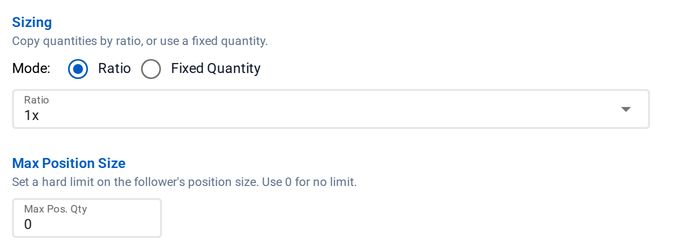
Sizing and the Max Position Size cap
Symbol replacements only apply to unbracketed market orders. When a replacement is configured and the leader sends a limit, stop, or bracketed order on that instrument, the follower skips the copy rather than placing prices computed for a different contract. This applies to every replacement, including ES to MES. Use market leader entries, or enable Fills Only so pending orders are skipped up front, if you want a replacement to take effect reliably.
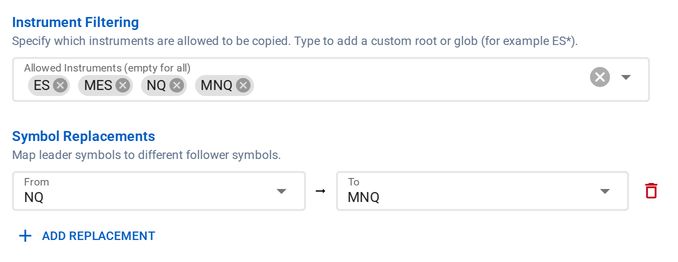
An instrument filter and an NQ to MNQ replacement
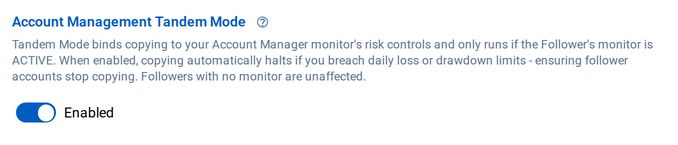
Tandem Mode: copying follows each follower's monitor

Auto-Sync on Tradovate is a drift check after each copy
Group copiers
A group copier is one config applied to several followers at once: pick multiple follower accounts, give the group a name, and every member receives the same sizing and filter rules. The copy log records the group name on each entry, so a group's activity reads as one unit.
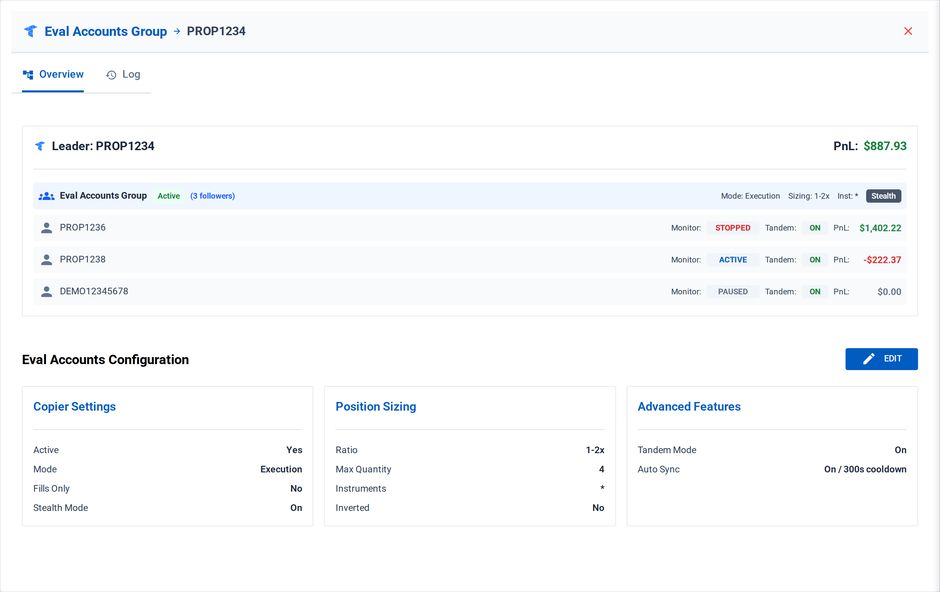
A group copier: one config, each member's monitor and P/L
The copy log
The copy log records submitted actions, broker rejections, drift warnings/corrections, and many skip/error decisions. Leader and follower order IDs are included when that stage has them. Open it with See Logs on the Tradovate Copier page.
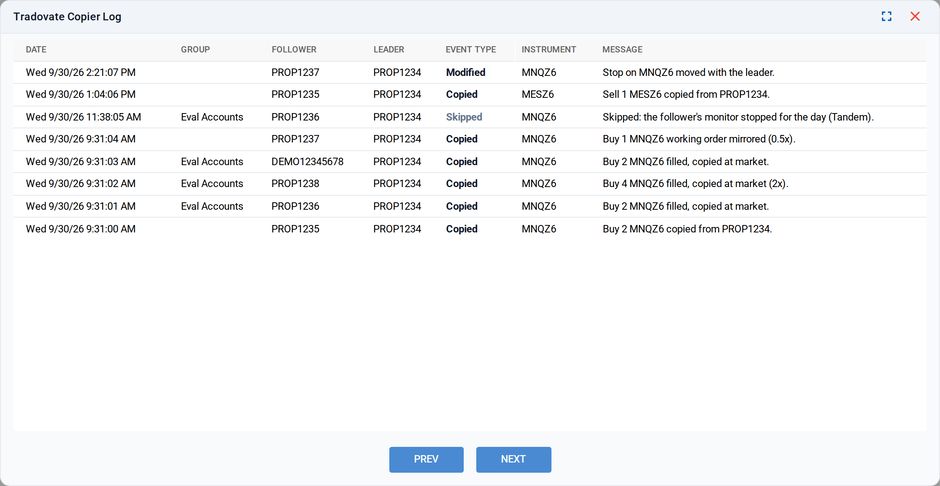
The copy log, including a copy Tandem Mode skipped
Request load and partial failures
Each leader event costs roughly one broker request per active follower on top of the leader's own, and position-aware actions add reads; the full request math is in Tradovate execution internals.
Follower results are independent. Once Tradovate accepts the leader order, a later follower timeout or rejection does not roll the leader back, and one failed follower does not cancel successful copies on the others. CrossTrade attaches follower results or a copier warning to Alert History and writes the per-follower outcome to the Copy Log. Review both before retrying. Retrying the original leader signal can duplicate real broker exposure when the first outcome was ambiguous.
CrossTrade applies a per-identity Tradovate request governor and reserves capacity for liquidations and reconciliation. A fill copy that waits past its copy deadline is skipped as stale rather than entered late. See Tradovate execution internals and rate limits.
A Copy Log row that says a copy was skipped because the order could not be sent means the request never reached Tradovate, so it is not a broker rejection. The usual cause is a Tradovate rate-limit penalty on the follower's login: a penalty ticket (p-ticket) with a wait time (p-time), or Tradovate's user-level HTTP 429. Order placement has its own hourly limit, which Tradovate reports in the penalty's p-message as Rate limit exceeded: more than 1500 requests per hour, and every follower on a login draws on it. A leader that places 100 orders an hour with 15 followers on one login reaches that on its own. If skips cluster during busy sessions, reduce the number of followers per login or the leader's order count, and check for followers whose orders keep getting rejected, since rejected orders count too.
Parity with the NT8 Trade Copier
| Capability | NT8 Trade Copier | Tradovate Copier |
|---|---|---|
| Copies webhook-driven trades | Yes | Yes (all modes) |
| Copies manual platform trades | Yes (fill-driven, inside NT8) | Yes, in execution and order modes |
| Sizing: ratio / fixed / max | Yes | Yes |
| Instrument filter + symbol replacement | Yes | Yes |
| Direction inversion | Yes | Yes |
| Stealth mode | Yes (neutral order names) | Yes (descriptive text suppression; internal IDs remain) |
| Group copiers | Yes | Yes |
| Exit and cancel mirroring | Yes | Yes (signal and order modes) |
| Order-modification mirroring | Yes | Yes (signal and order modes) |
| Copy modes | Order and execution | Signal (webhook-driven, order-preserving), execution (fill-driven), and order (broker-level order lifecycle) |
| Auto-sync engine (continuous, corrective) | Yes | Execution mode: rate-limited corrections after each copy and on reconnect. Order mode: corrections on reconnect after downtime. Signal mode: drift detection only. |
| Tandem mode (Account Manager binding) | Yes | Yes |
| Reconnect delay | Yes | Not applicable (server-side connection) |
| Works with computer off | No (NT8 must be running) | Yes |
If you trade inside NinjaTrader or copy across NT8-connected brokers, use the NT8 Trade Copier.
Current limitations
The mode sections above describe what each mode does not copy. Two more:
- One leader action fans out concurrently to followers; broker response and fill timing can still differ by account.
- Unlinking any Tradovate identity pauses all Tradovate copiers and Account Manager monitors. Re-linking does not automatically re-enable them.