Bracket Orders
The examples below are the NinjaTrader path, where the bracket is placed after the entry fills and offsets are measured from the actual fill price. Tradovate submits a native OSO bracket whose prices are fixed at submission and never recalculated from the fill, so the same payload puts your stop somewhere else. See Order Types and Exits on Tradovate.
Take-profit and stop-loss levels can be attached to PLACE and FLATPLACE entries. Tradovate also accepts them on the explicit entry leg of REVERSEPOSITION. CANCELANDBRACKET is different: it cancels the instrument's working orders and applies the supplied protection to an existing position. Absolute price levels and relative prices, including percentages, points, dollars, and ticks, are supported where noted below.
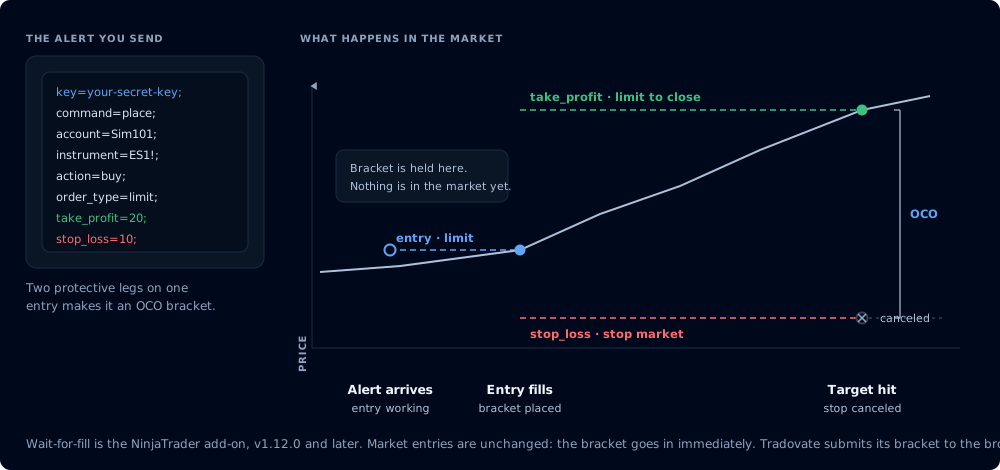
The bracket is held until the entry fills, then placed at the real fill price
Relative take_profit and stop_loss* values are action-aware protective magnitudes, measured from your expected entry: the submitted limit_price or stop_price for limit and stop entries, or the live quote for market entries. For action=buy, a positive take profit resolves above that entry reference and a positive stop resolves below it. For action=sell, the directions are reversed. Entry fields such as limit_price and stop_price are not auto-oriented: positive remains above the quote and negative remains below it.
The Automated Trading Interface (ATI) requirement applies to NinjaTrader's legacy order-instruction path. Tradovate submits its bracket directly to the broker and does not use ATI.
Wait-for-Fill Behavior
This section describes the NinjaTrader Add-On (destination=nt8). Tradovate handles the same payload differently: see the On Tradovate note at the end of this page and the reference-price table.
Starting in v1.12.0, when you attach TP/SL to a Limit or Stop entry order, the bracket orders are deferred until the entry fills. This is now the default behavior and requires no configuration.
Previously, bracket orders were submitted at the same time as the entry, regardless of order type. This was problematic for non-market entries: if your limit order never fills, the bracket legs are already live in the market with no parent position to protect. Worse, a bracket leg could fill first, creating an unintended position in the opposite direction.
Now the add-on holds the bracket configuration internally and monitors the entry order's lifecycle:
- Entry fills - the bracket is placed using the actual fill price and filled quantity.
- Entry partially fills then reaches a terminal state (canceled, rejected) - the bracket is placed for the filled quantity only.
- Entry is canceled or rejected with no fills - the bracket is discarded. No orphaned orders.
Bracket configurations are persisted to the local database and survive add-on restarts. If the add-on restarts while an entry order is still working, the pending bracket is restored and continues monitoring.
Market orders are unchanged. Market orders fill immediately, so the bracket is submitted right away alongside the entry, exactly as before. The wait-for-fill logic only applies to Limit and Stop entry orders.
One-sided TP/SL Order
When CrossTrade receives a request for a take_profit, stop_loss, stop_loss_limit, or stop_loss_stop price inside of a place order message, it creates an opposing order (buy becomes sell and vice versa, same quantity, etc.).
take_profitbecomes a buy or sell limit order to guarantee the profit target is hitstop_lossbecomes a buy or sell stop market order
All orders are entered as GTC (Good-til-Canceled).
Alternatively, stop_loss_limit can be used in place of stop_loss. stop_loss_limit creates a stop limit order instead of a stop market order.
A stop limit order is a stop loss level composed of 2 parts: the stop trigger and the limit price. When the stop price is breached the order at the limit price is created.
When using stop_loss_limit orders alone, please be aware that, by default, the stop price and limit price are being set as the same value. In fast moving markets, there's a chance the underlying price can quickly move beyond the limit price before it has a chance to trigger and close the position.
To explicitly set the stop price of the stop limit order, you can optionally include a stop_loss_stop price level that will act as the initiator or trigger of the limit order. stop_loss_stop must be used in conjunction with stop_loss_limit, otherwise its presence will be ignored. Please see examples on how to use stop losses below.
Two-sided TP/SL OCO Bracket Order
If both take_profit and stop_loss or stop_loss_limit are included in the alert message, it will automatically become an independent OCO bracket order. If the position is closed by means other than the take profit or stop loss orders, the bracket remains active.
When submitting a TP/SL bracket, only one of stop_loss or stop_loss_limit is allowed in the alert message. If both are present, stop_loss takes priority and will be accepted over stop_loss_limit, which is ignored.
Appending to an ATM Strategy
It's possible to append take_profit and/or stop_loss/stop_loss_limit to an ATM strategy for management. To do so, you must indicate the strategy name with the optional flag append_atm=true; This will move the TP/SL order(s) under the ATM strategy for management. If the position or strategy is closed, all related positions and orders will be closed or canceled.
On destination=tradovate;, strategy= / atm_strategy= resolves a template stored in CrossTrade, not a Tradovate or NT8 template. append_atm= and strategy_id= remain NinjaTrader-only. CrossTrade expands the template into a Tradovate-native multibracket and can add CrossTrade-exclusive profit-triggered trailing and target-fill breakeven. See Tradovate ATM.
Example Payloads
We are using the TradingView continuous contract format ES1! in these examples. If you're not using TradingView you would provide a NinjaTrader specific format. (ES 12-26 or ES DEC26 or ESZ6)
Market Order with Take Profit
key=your-secret-key;
command=PLACE;
account=sim101;
instrument=ES1!;
action=BUY;
qty=1;
order_type=MARKET;
tif=DAY;
take_profit=(price above);
Market Order with OCO Bracket
A take profit and stop loss together are automatically converted into an OCO bracket:
key=your-secret-key;
command=PLACE;
account=sim101;
instrument=ES1!;
action=BUY;
qty=1;
order_type=MARKET;
tif=DAY;
take_profit=(price above);
stop_loss=(price below);
Limit Entry with OCO Bracket (Wait-for-Fill)
This is where v1.12.0's wait-for-fill behavior matters most. The limit entry is submitted immediately, but the TP/SL bracket is held until the entry fills. If the limit price is never hit and the order is canceled, the bracket is discarded: no orphaned orders are created.
Once the entry fills, the bracket is placed using the actual fill price and filled quantity. This means offset-based TP/SL values (e.g., 100 ticks) are calculated from the real fill price, not the requested limit price. (On destination=tradovate; the same payload behaves differently: the bracket prices are fixed at submission, measured from the submitted limit price. See the Tradovate note below.)
key=your-secret-key;
command=PLACE;
account=sim101;
instrument=ES1!;
action=BUY;
qty=1;
order_type=LIMIT;
limit_price=(price below market);
tif=DAY;
take_profit=(price above);
stop_loss=(price below);
Limit Entry with Stop Limit Loss
This variation uses a stop limit order instead of a stop market order. The stop price level and the limit price value of the stop limit order are equal to the stop_loss_limit price:
key=your-secret-key;
command=PLACE;
account=sim101;
instrument=ES1!;
action=BUY;
qty=1;
order_type=LIMIT;
limit_price=(price below market);
tif=DAY;
take_profit=(price above);
stop_loss_limit=(price below);
Explicit Stop Price for Stop Limit Orders
In this version, we are explicitly setting the level of the stop price that triggers the stop loss limit order:
key=your-secret-key;
command=PLACE;
account=sim101;
instrument=ES1!;
action=BUY;
qty=1;
order_type=MARKET;
tif=DAY;
take_profit=(price above);
stop_loss_stop=(price below);
stop_loss_limit=(price below stop);
OCO Bracket Appended to an ATM Strategy
A market order with TP/SL OCO bracket appended to an ATM strategy called "crosstrade":
key=your-secret-key;
command=PLACE;
account=sim101;
instrument=ES1!;
action=BUY;
qty=1;
order_type=MARKET;
tif=DAY;
take_profit=(price above);
stop_loss=(price below);
strategy=crosstrade;
append_atm=true;
Tick and Percentage Offsets
To add stops and targets in Ticks or Percentages, simply replace the numerical value.
Tick Example:
key=your-secret-key;
command=PLACE;
account=sim101;
instrument=ES1!;
action=BUY;
qty=1;
order_type=MARKET;
tif=DAY;
take_profit=100 ticks;
stop_loss=100 ticks;
Percentage Example:
key=your-secret-key;
command=PLACE;
account=sim101;
instrument=ES1!;
action=BUY;
qty=1;
order_type=MARKET;
tif=DAY;
take_profit=5%;
stop_loss=5%;
Learn more about Percentage and Tick Prices
With destination=tradovate;, take_profit and stop_loss become a Tradovate-native OSO bracket: the entry and both exits are submitted in one call, linked OCO, and hosted by Tradovate. Relative offsets are converted to absolute prices by CrossTrade server-side before placement, measured from your submitted limit_price or stop_price when the entry carries one, or from live market data for market entries. Unlike the NinjaTrader wait-for-fill behavior above, the bracket prices are fixed at submission and are not recalculated from the actual fill; for fill-measured distances, use the atm_* fields instead. Both exit legs are sent GTC regardless of the entry's tif, and Tradovate activates them on the entry's first fill, sized to that fill; CrossTrade repairs the coverage for any later fills (see Partial fills on bracketed entries). The requester's Add-On and Tradovate market-data entitlement are never pricing fallbacks, so the alert fails closed if fresh pricing isn't available. For a continuous symbol such as ES1!, CrossTrade must identify the concrete contract that is pinned on the order. stop_loss_limit and oco_id are not supported. See the Tradovate bracket example.