Multi-Account Placement
Multi-account placement works the same with destination=tradovate;: every name in the comma list must be a linked Tradovate account, the alert is replicated per account, and each replica executes (and is recorded in Alert History) independently. cycle_accounts=true uses the shared Account Manager state and skips stopped Tradovate accounts just as it skips stopped NinjaTrader accounts.
It is possible to execute orders in multiple accounts using a single webhook alert. You can copy the command into as many eligible NinjaTrader or linked Tradovate accounts as you want.
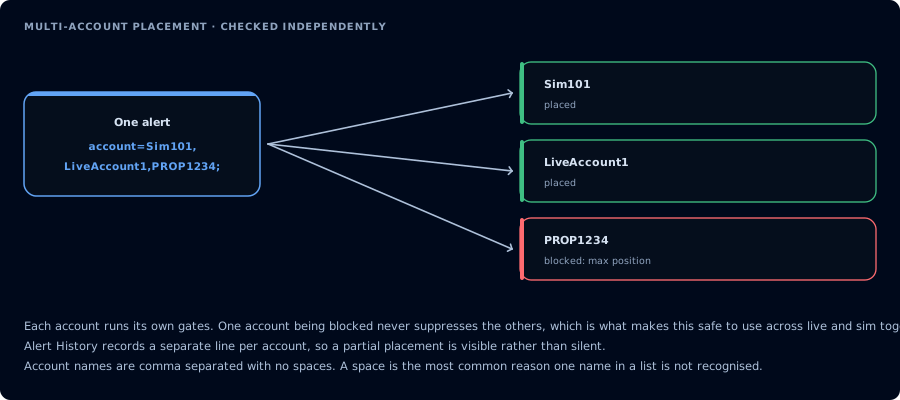
Each account runs its own gates, so one being blocked never stops the others.
Simply separate each account name with a comma and we'll generate an identical order for each account. CrossTrade dispatches the account copies concurrently, so arrival order is not guaranteed.
January 2025 Update
In January 2025, we identified a way to significantly increase the speed performance of order entry using multi-account placement. Previously, if more than 1 account was defined for a PLACE order, e.g., account=Sim101,Sim102,Sim103; we would wait for confirmation of order entry before sending the next order in true synchronous fashion.
Now, account replicas are launched asynchronously at the same time and the selected broker destination decides the sequence of order placement. The sequence of account orders is not guaranteed to match their CSV order.
The major benefit of doing it this way is the speed of multi-account placement is on par with fast trade-copier fan-out at 1:1 quantity ratios.
Multi-Placement vs. Copy Trading
Multi-account placement is similar but distinctly different from copy trading. Typically with trade copiers, a leader account is elected along with one or more follower accounts. Whichever order actions take place in the leader account will then propagate to the follower accounts.
With multi-account placement, CrossTrade copies the entire order instruction before broker dispatch and then executes identical orders against one or more accounts.
Account Cycling
This feature is only available to CrossTrade Pro subscribers using Account Manager.
A very powerful feature of Multi-Account Placement is Account Cycling. If you're prop farming, or just want to decrease the odds that you fail multiple evals at the same time through copy trading, consider Account Cycling.
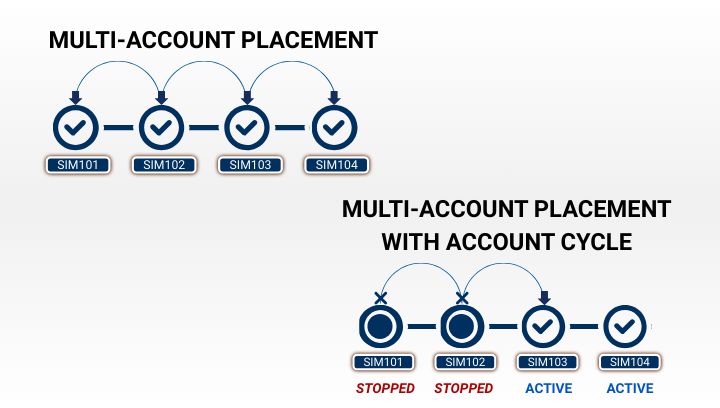
Unlike standard Multi-Account Placement where orders get copied to all accounts in the list, if you have Account Manager monitors set up for multiple accounts, Account Cycling allows you to auto-select the first account in the alert's account list whose monitor is not STOPPED.
Orders will continue to flow to that account until the Monitor is STOPPED (or inactive) for hitting a profit/loss threshold, minimum profit or trailing drawdown, etc.
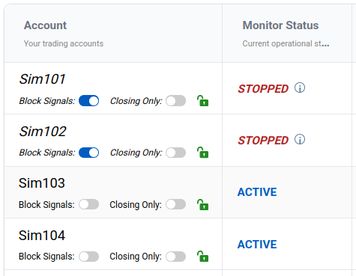
If cycling accounts, the next order would go to Sim103
By setting the singular ACCOUNT field, account=Sim101,Sim102,Sim103,Sim104;, with the option cycle_accounts=true;, CrossTrade will iterate over the list of accounts, in the order listed, until it finds the first account that does not have a stopped Monitor. The order will then be sent to that account and only that account. In the example above, the order would be sent to Sim103.
Note that this account selection happens before any other evaluation takes place. In the Sim103 example, if the Block Signals switch were engaged, for instance, the order would ultimately be blocked.
If no Monitor exists for an account in the list, it will always be selected during cycle evaluation.
Example Payloads
The following alert message will execute identical ES 12-26 market orders in accounts sim101, sim102, and sim103.
key=your-secret-key;
command=place;
account=sim101,sim102,sim103;
instrument=ES 12-26;
action=buy;
qty=1;
order_type=market;
tif=day;
Note that multi-account placement does not guarantee delivery or execution. Orders are replicated independently, which means each can succeed or fail independent of other orders.
Account Cycling: The following alert message will execute a single ES 12-26 market order in accounts Sim101, Sim102, Sim103, or Sim104. If all Monitors are stopped for all accounts, the alert will be marked Failed.
key=your-secret-key;
command=place;
account=sim101,sim102,sim103,sim104;
instrument=ES 12-26;
action=buy;
qty=1;
order_type=market;
tif=day;
cycle_accounts=true;