Require Market Position
The flag require_market_position is available to any command with both an account and instrument field. It blocks and prevents the signal from going through unless the NT8 market position is:
- flat
- short
- long
- flat or long
- short or long
- long or short
Require market position is available to any of the following command types:
- PLACE
- FLATPLACE
- CANCELREPLACE
- CANCELORDERS
- CLOSEPOSITION
- REVERSEPOSITION
- FLATTEN
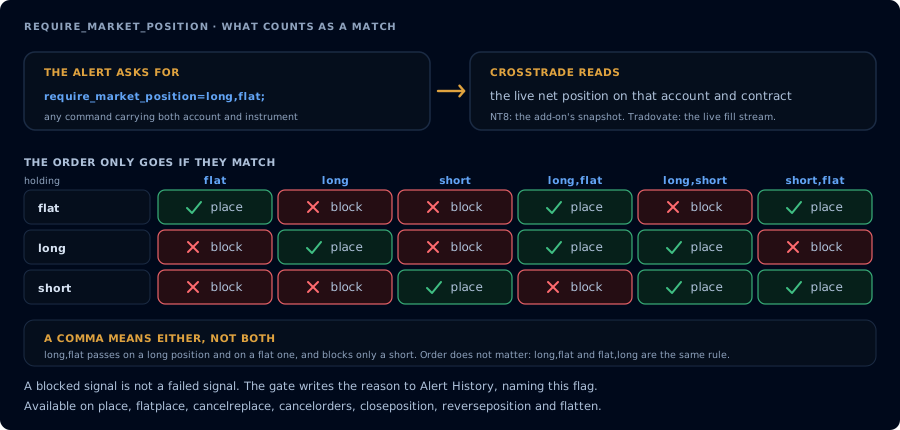
A comma means either, not both. The order only goes when what you hold is in the list.
require_market_position works the same with destination=tradovate;, evaluated against the live Tradovate net position for the account and contract (instead of the add-on's NT8 snapshot). All single and comma-combined forms behave identically.
Because Tradovate's position API can lag fills by many seconds, the gate does not read position/find alone: it derives the live net position from the broker's real-time fill stream, so a gate that immediately follows an entry alert sees the real position. A flat reading is re-checked once (about a second) before the gate trusts it.
Checking Multiple Market Positions
In addition to the standard long, short, flat market positions, we've included the ability to check for 2 of the 3 conditions. That is, if any one of 2 conditions are true, the signal won't be blocked.
The use case here is if you want to add to a position in a certain direction, but only if you're already long or flat in that direction. For example, if you are long +3 contracts and you want to add +1 contracts, you want to ensure you are either long or flat in that direction already. Otherwise, if you're short, you would only be making your position "less short" by closing 1 contract.
To check for the "long or flat" conditions, separate the values with a comma. CSV values represent an "or" condition between them: "flat or long", "long or short", etc. They can be in any order: "flat,long", "long,flat", etc.
An example command would be:
key=your-secret-key;
command=place;
account=sim101;
instrument=ES 12-26;
action=buy;
qty=1;
order_type=market;
tif=day;
require_market_position=long,flat;
which translates to buy +1 ES 12-26 at market if and only if a position already exists in ES 12-26 that is flat or long. If a short position is open, block the signal.
Example Payloads
In the simplest case, a PLACE command with require_market_position=flat; for account "sim101" and instrument "ES 12-26" will not be processed unless there's no preexisting position in ES 12-26 under account sim101. The position must be flat for the order to proceed:
key=your-secret-key;
command=place;
account=sim101;
instrument=ES 12-26;
action=buy;
qty=1;
order_type=market;
tif=day;
require_market_position=flat;
Let's say you have multiple alert types in play: Long Entry, Long Exit, Short Entry, Short Exit. You don't want to process the "Short Exit" signal to close if there's a long position already in play. In this instance, you could require the alert to be processed if and only if the current market position is short:
key=your-secret-key;
command=closeposition;
account=sim101;
require_market_position=short;
Similar to our example in the Multiple Market Positions section above, if we want to sell short an "ES 12-26" contract if and only if the exist position in the "sim101" account is flat or short:
key=your-secret-key;
command=place;
account=sim101;
instrument=ES 12-26;
action=sell;
qty=1;
order_type=market;
tif=day;
require_market_position=flat,short;