Cancel and Bracket
Bracket handling differs on Tradovate, including which protective fields are supported. Order Types and Exits on Tradovate covers the Tradovate path.
Overview
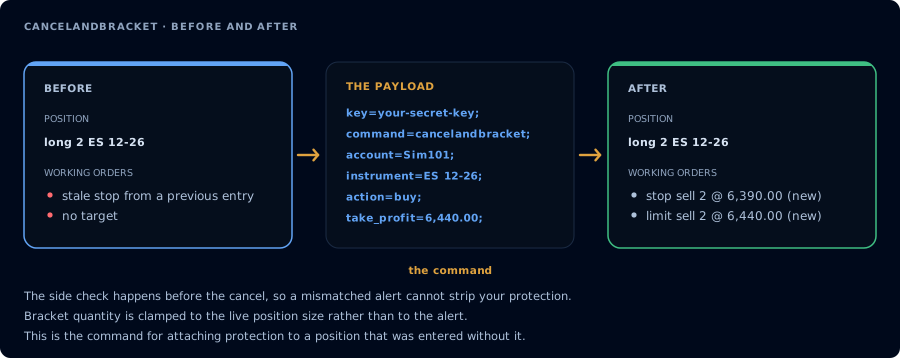
Checks the side before it cancels, then sizes the bracket to the live position.
The CANCELANDBRACKET command safely replaces all working orders on an instrument with a new take-profit and/or stop-loss bracket (OCO pair) as one managed operation. The typical use case is a strategy signal that needs to move stops or targets while applying cancellation and position checks inside the same command.
This is a common problem with the traditional two-step approach of sending CANCELORDERS followed by a separate PLACE for the new bracket. CANCELANDBRACKET keeps both steps in one managed workflow and confirms the cancellation state before replacement. A brief broker cancel window can still exist, so the command also re-checks the live position before placing protection and aborts rather than creating naked exit orders.
On NinjaTrader, CancelAndBracket requires the CrossTrade NT8 Add-On v1.12.0+ connected to your account. It is not classified as an opening order, so closing-only mode does not block it. Normal start/end trade windows still apply on both destinations.
How It Works
At a high level, CANCELANDBRACKET does three things: it cancels every working order on the instrument, waits briefly for the broker to process those cancellations, and then places your new bracket orders.
Before any of that happens, the command runs through the same safety checks as a normal order. If you're using Strategy Lock, ownership is verified. A different strategy cannot move the stops on a position it doesn't own. Opposing Position Protection is also checked to make sure the new bracket won't create a conflict.
The add-on automatically reads your live position size and clamps the bracket quantity to match. If you send QTY=5 but you're only holding 3 contracts, the bracket is placed for 3. This prevents an oversized bracket from accidentally opening a position in the opposite direction.
There's also a built-in safety net for the cancel window itself. If a stop-loss fills during the brief gap between canceling old orders and placing new ones (meaning the position goes flat), the add-on detects this and aborts the bracket placement entirely. Without this check, your new bracket orders would become naked entries in the opposite direction. See Cancel Window Safety for details.
Webhook Fields
| Field | Required | Description |
|---|---|---|
COMMAND | Yes | CANCELANDBRACKET |
KEY | Yes | Your CrossTrade secret key |
ACCOUNT | Yes | Target account name (e.g., Sim101) |
INSTRUMENT | Yes | Instrument name (e.g., ES 12-26, NQ1!) |
ACTION | Yes | The position side being protected (BUY = long, SELL = short). See Action Field Behavior below. |
QTY | Yes | Bracket quantity. Automatically clamped to the live position size if larger. |
TAKE_PROFIT | No | Limit price for the take-profit leg. Supports %, $, tick, and point offsets if a quote is available. |
STOP_LOSS | No | Stop price for the stop-loss leg (StopMarket). Same offset support as take-profit. |
OCO_ID | No | Custom OCO ID to link the bracket legs. Auto-generated if omitted. |
STRATEGY_TAG | No | Strategy tag for position locking. |
At least one of TAKE_PROFIT or STOP_LOSS must be provided. If both are omitted, the command is rejected before any working order is canceled; use CANCELORDERS when cancellation alone is intended.
Action Field Behavior
The ACTION field in CANCELANDBRACKET works differently than in PLACE. Here, it describes the position you are protecting, not the order you are submitting.
| ACTION value | Position you hold | Exit orders placed as |
|---|---|---|
BUY | Long | Sell |
SELL | Short | Buy to Cover |
This design lets you use a single, consistent alert payload: your strategy always sends ACTION=BUY when it's long and ACTION=SELL when it's short. The add-on handles the inversion internally.
NinjaTrader's standard API defines "Action" as the order direction (e.g., "Buy to Cover"). CrossTrade's CANCELANDBRACKET intentionally departs from this convention so that the action always matches the position side being protected, which is more intuitive for alert-based workflows.
Example Payloads
Replacing a bracket on a long position
You're long 2 ES and want to move your stop and target:
key=your-secret-key;
command=CancelAndBracket;
account=Sim101;
instrument=ES 12-26;
action=BUY;
qty=2;
take_profit=6620;
stop_loss=6580;
This cancels all working orders on ES 12-26 in Sim101, then places a new Sell Limit at 6620.00 (take-profit) and a Sell StopMarket at 6580.00 (stop-loss), linked as an OCO pair.
Replacing a bracket on a short position
key=your-secret-key;
command=CancelAndBracket;
account=Sim101;
instrument=NQ 12-26;
action=SELL;
qty=1;
take_profit=24400;
stop_loss=24100;
Using offset-based prices
Instead of absolute prices, you can use tick, percentage, dollar, or point offsets. CrossTrade resolves them against the current quote before routing absolute prices to the selected destination's executor.
key=your-secret-key;
command=CancelAndBracket;
account=Sim101;
instrument=ES 12-26;
action=BUY;
qty=2;
take_profit=40 ticks;
stop_loss=20 ticks;
Offset-based values are resolved against the current market quote at the time the command is processed, on both destinations (the position already exists, so there is no entry price to measure from). That differs from PLACE / FLATPLACE bracket offsets, which measure from the entry: on NinjaTrader they are recalculated from the actual fill price, and on Tradovate they are measured from the submitted limit_price / stop_price (or the live quote for market entries). If you need fill-price-relative brackets, use PLACE or FLATPLACE with take_profit and stop_loss offsets on NinjaTrader, or the atm_* fields on Tradovate.
One-sided bracket (stop-loss only)
Both TP and SL are optional individually, so you can place just one leg if needed:
key=your-secret-key;
command=CancelAndBracket;
account=Sim101;
instrument=ES 12-26;
action=BUY;
qty=2;
stop_loss=6580;
With Strategy Lock
key=your-secret-key;
command=CancelAndBracket;
account=Sim101;
instrument=ES 12-26;
action=BUY;
qty=2;
take_profit=6620;
stop_loss=6580;
strategy_tag=momentum;
Quantity Clamping
The bracket quantity is automatically clamped to the live position size to prevent unintended entries. This happens twice:
- Before the cancel phase - the position is read and the quantity is clamped if needed.
- After the cancel phase - the position is re-read. If a working order filled during the cancel window (e.g., a partial fill), the quantity is re-clamped to the new position size.
For example, if you send QTY=5 but the account is only long 3 contracts, the bracket is placed for 3 contracts. If during the cancel window a stop fills 1 contract, bringing the position to 2, the bracket is re-clamped to 2.
An open position is required. If the instrument is flat, or action does not describe the live position side, the command is rejected before any working order is canceled.
Cancel Window Safety
The most critical edge case CANCELANDBRACKET handles is what happens if the position is lost during the cancel window. For example, a stop-loss fills in the brief moment between canceling the old orders and placing the new bracket.
If the add-on detects that the position was open before the cancel phase but is now flat afterward, it aborts bracket placement entirely. Without this check, the new bracket orders would become naked exit orders that open a new position in the opposite direction.
When this abort path is triggered, the response looks like:
"Position flattened during cancel window (was 2, now flat). Bracket orders not placed to prevent unintended entry."
This is a safety feature, not an error. Your position was closed by a protective order doing its job. No further action is needed from the strategy. The next signal can open a fresh position normally.
Key Differences from PLACE Bracket Orders
| Behavior | PLACE with TP/SL | CANCELANDBRACKET |
|---|---|---|
| Cancels existing orders first | No | Yes, all working orders on the instrument are canceled before bracket placement |
| Order type for stop-loss | StopMarket or StopLimit (stop_loss_limit) | StopMarket only |
| Offset resolution | NinjaTrader: from the actual fill price. Tradovate: from the submitted limit/stop entry price (live quote for market entries) | Offsets are resolved from current quote at command time on both destinations |
| Opens a new position | Yes | No. An open position is required and the command is rejected before cancellation when flat. |
| Blocked by trade windows | Yes | Yes outside the allowed window; it is not classified as opening for closing-only checks |
| Quantity behavior | Uses the requested quantity directly | Clamped to the live position size if larger |
Important Notes
- The stop-loss leg is always a StopMarket order. There is no
STOP_LOSS_LIMIT/ StopLimit support inCANCELANDBRACKET. If you need stop-limit exits, usePLACEwithstop_loss_limit. - When both TP and SL are provided, they are OCO-linked automatically. If one fills, the other is canceled.
- At least one of
TAKE_PROFITorSTOP_LOSSis required. UseCANCELORDERSwhen you only want to cancel protection. ACTIONdescribes the side being protected (buyfor a long position,sellfor a short position). A side mismatch is rejected before any order is canceled.CANCELANDBRACKETrespects Opposing Position Protection and Strategy Lock. If either check fails, the entire operation is blocked before any orders are canceled.
CANCELANDBRACKET works with destination=tradovate; with the same safety behavior: an open position and matching action are required before cancellation, quantity is clamped and re-checked, and the bracket is aborted if the position goes flat or changes direction during the cancel window. Both legs are placed as one OCO pair on Tradovate's servers. Absolute prices always work; relative offsets use CrossTrade's quote service. strategy_tag / Strategy Lock do not apply.