Change Order
Order modification behaves differently on Tradovate. Tradovate Webhooks documents the Tradovate path.
This command changes a pending, unfilled order. It requires an order_id and at least one value to modify. The optional strategy_id narrows a NinjaTrader change to an order owned by that ATM strategy.
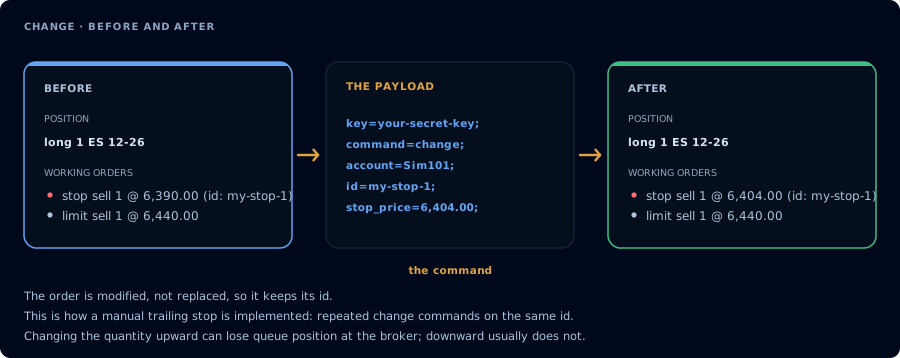
Modified in place, so the order keeps its id.
The order_id value must match the order_id you assigned to the order on the original PLACE command.
Omit fields you do not want to change. Price values must use US decimal format (1212.25, not 1212,25).
The only values that can be changed in the order are qty, limit_price, or stop_price. This is a limitation of how the NT8 change order system works internally.
Advanced Usage
You can only change an order that you gave an order_id to when you placed it. That id is a value you choose yourself on the PLACE command: CrossTrade does not assign referenceable order names (the old ENTRY1, STOP1, TARGET1 style names). The optional strategy_id narrows the change to an order owned by that ATM strategy and must match a strategy_id used in the PLACE command.
Example Payload
key=your-secret-key;
command=change;
limit_price=XXX;
order_id=your-order-id;
qty, stop_price, and NinjaTrader-only strategy_id are optional fields. Include them only when needed; (optional) is explanatory prose and is not valid webhook payload syntax.
CHANGE works with destination=tradovate; and can additionally modify order_type, tif, expire_time, max_show, and trail_offset. order_id accepts either the numeric Tradovate order id or the order_id set on the original place alert (tracked for 7 days). For a partial change, CrossTrade reads the live order version and restores every field Tradovate requires on the modify request: quantity, order type, the applicable limit_price and/or stop_price, and trail_offset for a trailing order. If one of those required values cannot be recovered, the change fails instead of sending an incomplete modification.
strategy_id is NinjaTrader-only. If the leader order was copied by the Tradovate copier, each follower restores omitted fields from its own live order version and reapplies follower sizing before its change is submitted.