Close Position
This command will close a position and requires an account name value and an instrument name value. The instrument name value is the name of the NinjaTrader instrument including the exchange name. For equities, the symbol is sufficient.
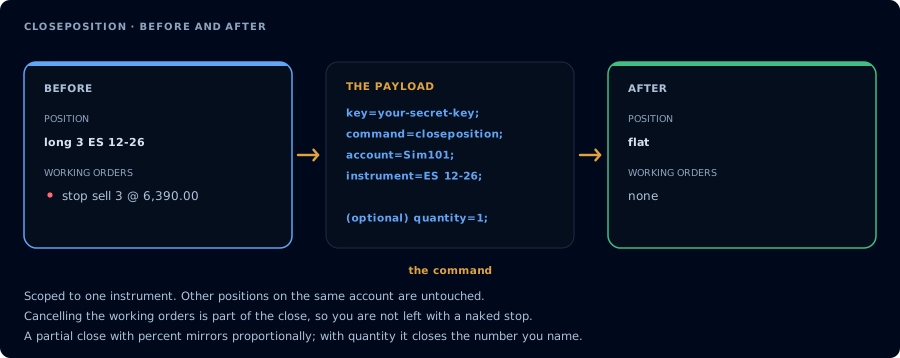
Closes one instrument and cancels its working orders as part of doing so.
This command will cancel any account-level working or pending orders and flatten the position if the position exists.
It is important to note that open or pending orders will not be canceled unless a position already exists that can be closed.
Advanced Usage - Scaling out
The generic CLOSEPOSITION command will close the entire position. It is also possible to scale out of a position by specifying the quantity or percent of contracts that should be closed.
The percentage of contracts to be closed is specific as a decimal number between 0 and 1. For example, percent=0.25; would be used to close 25% of the remaining contracts.
Percentages are always rounded up. So 10% of 1 remaining contract will close 1 contract. Quantities will close up to the remaining contract quantity. So if quantity=4; with 1 remaining contract, the 1 contract will be closed.
If both quantity and percent appear in the alert payload, quantity will take priority and percent will be ignored.
Quantity and percent must always be greater than zero.
Example Payloads
Close the entire ES 12-26 positions in account Sim101.
key=your-secret-key;
command=closeposition;
account=sim101;
instrument=ES 12-26;
Close 2 contracts of however many are remaining in account Sim101:
key=your-secret-key;
command=closeposition;
account=sim101;
instrument=ES 12-26;
quantity=2;
Close 50% of the remaining contracts in account Sim101:
key=your-secret-key;
command=closeposition;
account=sim101;
instrument=ES 12-26;
percent=0.5;
The instrument name value is the name of the NinjaTrader instrument, including the exchange name. For equities, the symbol is sufficient. This command will cancel any working orders and flatten the position.
CLOSEPOSITION has full parity with destination=tradovate;, including scaling out: quantity closes up to the remaining size and percent (decimal between 0 and 1, always rounded up) closes that fraction, with quantity taking priority when both are present. A full close uses Tradovate's liquidate endpoint, which also cancels the contract's working orders; partial closes are sent as an opposing market order and leave working orders in place.