Flatten Positions
The FLATTEN positions command is very powerful. It provides the option to flatten all positions and pending orders across all accounts, a specific position for a particular instrument in a certain direction in one account, or anything in between.
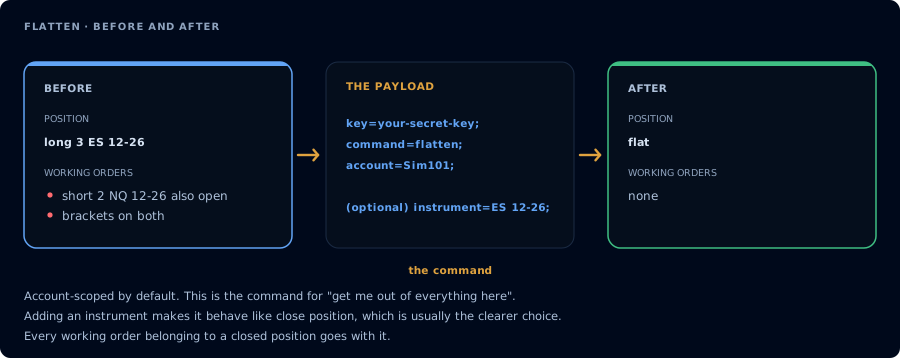
Account-scoped by default. Everything on the account goes.
The FLATTEN command accepts several parameters:
accountinstrumentmarket_position(long, short)- nothing
The parameters act as filters, searching for positions that match the criteria to be flattened.
Most importantly, if you execute command=FLATTEN; without any other filters, it is similar to the FLATTENEVERYTHING command. All positions will be closed. The only difference is FLATTENEVERYTHING will close all positions and all orders across all accounts.
If FLATTEN is executed with both an account and an instrument it will be equivalent to a generic CLOSEPOSITION command.
Advanced Usage
If no account is specified, but an instrument and/or market_position is provided, FLATTEN will exit all positions across all accounts that match that criteria.
Example Payloads
Flatten all MES 12-26 positions in Sim101 account (CLOSEPOSITION equivalent):
key=your-secret-key;
command=flatten;
account=Sim101;
instrument=MES 12-26;
Flatten all positions in the Sim101 account:
key=your-secret-key;
command=flatten;
account=sim101;
Flatten all short positions in Sim101:
key=your-secret-key;
command=flatten;
account=sim101;
market_position=short;
Flatten all long positions across all NT8 accounts:
key=your-secret-key;
command=flatten;
market_position=long;
Flatten all MNQ 12-26 positions across all NT8 accounts:
key=your-secret-key;
command=flatten;
instrument=MNQ 12-26;
Flatten all positions in all accounts:
key=your-secret-key;
command=flatten;
FLATTEN supports the same filters with destination=tradovate;: account, instrument, and market_position (long or short) are each optional, and with no filters every open position on every linked Tradovate account is closed. Instrument matching is per exact contract (for example ESZ6, ES 12-26, or ES1! resolved to the front month).