JSON Webhook Format
CrossTrade accepts a webhook command in two formats. The original is a string of key=value; pairs. You can also send a flat JSON object using the same field names.
Neither is preferred. Send whichever your alerting tool makes easier to produce.
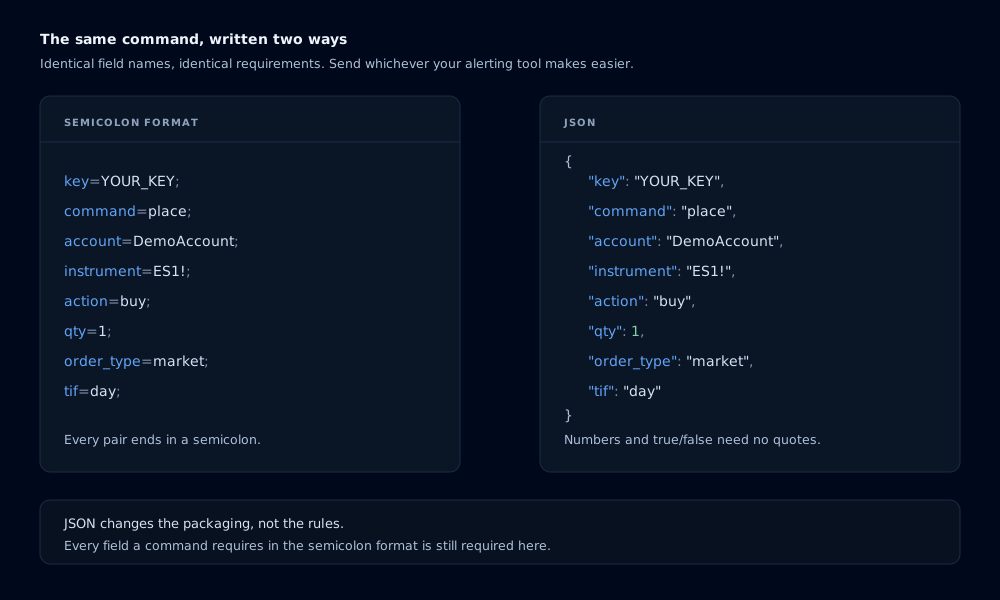
The same command in both formats. Identical field names, identical result.
The same command, both ways
key=YOUR_KEY;command=place;account=DemoAccount;instrument=ES1!;action=buy;qty=1;order_type=market;tif=day;
{
  "key": "YOUR_KEY",
  "command": "place",
  "account": "DemoAccount",
  "instrument": "ES1!",
  "action": "buy",
  "qty": 1,
  "order_type": "market",
  "tif": "day"
}
Both are parsed into the same command. Alert History, multi-account placement, diagnostics and every downstream behavior are identical.
Every field a command requires in the semicolon format is still required in JSON. A place needs account, instrument, action, qty and order_type on both destinations, plus tif on NinjaTrader. Leave one out and you get the same PLACE is missing required field(s) error you would get from the semicolon form.
See Webhook Commands for each command's required set.
How CrossTrade decides which format you sent
If the message body starts with {, it is read as JSON. Anything else is read as the semicolon format. You do not set a flag or a header, and you do not need to change your webhook URL.
The rules
One flat object. A single JSON object, containing no nested objects and no arrays. A top-level array is rejected.
CrossTrade field names. The keys are the same field names you use in the semicolon format. They are not case-sensitive, so "key", "Key" and "KEY" all work. quantity is accepted as an alias for qty.
Values are strings, numbers or booleans.
{ "qty": 1, "flatten_first": true, "account": "DemoAccount" }
Numbers and true / false do not need quotes, though quoting them is fine. A whole-number float like 1.0 is read as 1.
No null, arrays or nested objects. There is no field where any of those carries meaning, so they are refused rather than silently ignored.
No duplicate fields, including duplicates that only differ by case or that collide through an alias. {"qty": 1, "QTY": 2} and {"qty": 1, "quantity": 2} are both rejected, because neither has an obvious winner.
No semicolons or equal signs inside a value. Those characters delimit the semicolon format, which some internal paths still use, so a value containing one is refused rather than allowed to corrupt a command later.
No empty values. {"account": ""} is an error, not a way to clear a field.
Comma-separated account lists behave identically in JSON. {"account": "DemoAccount,LiveAccount1"} places on both, exactly as account=DemoAccount,LiveAccount1; does.
Examples
A bracket order
{
  "key": "YOUR_KEY",
  "command": "place",
  "account": "DemoAccount",
  "instrument": "NQ1!",
  "action": "buy",
  "qty": 2,
  "order_type": "limit",
  "limit_price": "21500",
  "take_profit": "50",
  "stop_loss": "25",
  "tif": "gtc"
}
Closing a position
{
  "key": "YOUR_KEY",
  "command": "closeposition",
  "account": "DemoAccount",
  "instrument": "ES1!"
}
Routing to Tradovate
{
  "key": "YOUR_KEY",
  "command": "place",
  "account": "DEMO12345678",
  "instrument": "MES1!",
  "action": "sell",
  "qty": 1,
  "order_type": "market",
  "destination": "tradovate"
}
Strategy sync from a TradingView strategy
TradingView's placeholders work inside JSON string values the same way they do in the semicolon format.
{
  "key": "YOUR_KEY",
  "command": "place",
  "account": "DemoAccount",
  "instrument": "{{ticker}}",
  "action": "{{strategy.order.action}}",
  "qty": "{{strategy.order.contracts}}",
  "order_type": "market",
  "tif": "day",
  "market_position": "{{strategy.market_position}}",
  "prev_market_position": "{{strategy.prev_market_position}}",
  "sync_strategy": "true"
}
TradingView substitutes placeholders as raw text, so a value that resolves to something unexpected can produce invalid JSON. If an alert fails, open Alert History and look at the body CrossTrade received rather than the body you wrote.
Errors you might see
| Message | What it means |
|---|---|
Invalid JSON command or duplicate field. Send one flat CrossTrade object. | The body is not parseable JSON, or the same field appears twice. |
JSON command must be one non-empty object. | You sent an array, an empty object, or a bare value. |
Unsupported JSON command field. | A field name CrossTrade does not recognize. See below. |
<field> must be a string, number, or boolean; null, arrays, and nested objects are not supported. | A value has a type with no meaning here. |
<field> field is empty or has no value | The value is empty or only whitespace. |
<field> cannot contain semicolons, equal signs, or control characters. | A value contains a reserved delimiter. |
Coming from another vendor
This accepts CrossTrade field names. It is not a universal translator, and an alert built for another platform will be rejected rather than guessed at, because guessing wrong on an order is worse than refusing it.
To carry one over, open the Command Builder in your dashboard and use the converter at the top of the page. Paste the JSON you send today and it returns the CrossTrade equivalent, naming anything it cannot carry across, such as percentage-based trailing or profit-and-loss-based exits, rather than dropping it silently.
Related
- Webhook Commands covers every command and field.
- Destinations covers which fields apply to NinjaTrader and Tradovate.
- Alert History shows the exact body CrossTrade received.