Overview
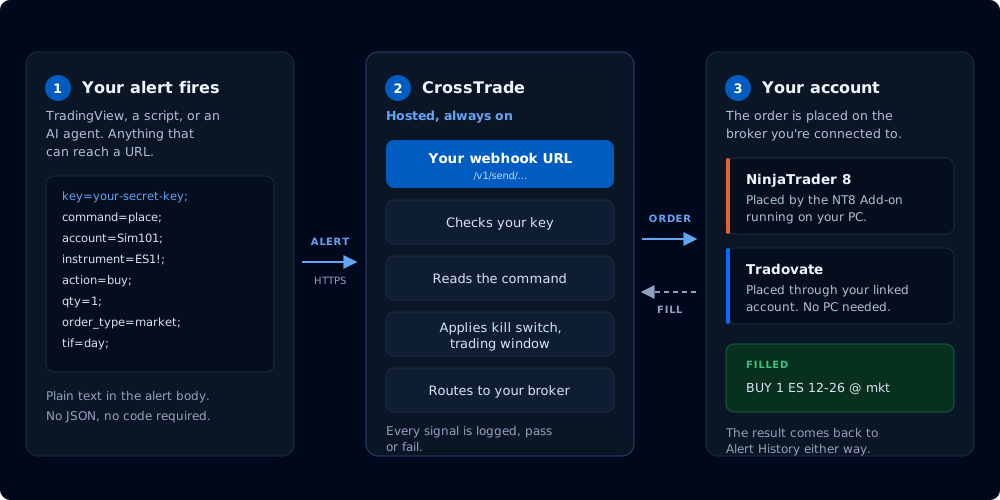
Alert to order, with the return path drawn in.
A webhook is an HTTPS request one system sends another when something happens. Here, TradingView sends your alert message to your CrossTrade webhook URL, and CrossTrade turns that message into an order on your account.
CrossTrade webhooks route to NinjaTrader 8 by default. Add destination=tradovate; to send a supported command directly to a linked Tradovate account. Shared command names describe common intent, but broker fields, sequencing, and guarantees can differ. See Destinations for the capability matrix and documented differences.
What a command looks like
An alert message is a set of key=value; pairs. This one places a market buy:
key=your-crosstrade-secret-key;
command=place;
account=Sim101;
instrument=ES1!;
action=buy;
qty=1;
order_type=market;
tif=day;
key authenticates the request and command selects the action. The remaining fields depend on which command you sent. Every command is listed in Commands, and Advanced Options covers brackets, position sizing, trading windows, rate limiting and the rest.
JSON alert messages
Your existing Webhook URL accepts either key=value; commands or a flat JSON object using the same CrossTrade field names. Include your Secret Key in the body. Both formats use the same required fields, risk controls, and destination routing. Existing alerts do not need to change.
For scripts, send JSON with Content-Type: application/json; JSON sent as text/plain also works. In TradingView, paste the object into the alert's Message field. Use CrossTrade's flat schema, not nested objects or another platform's field names.
See Webhook Trading for JSON examples for both brokers, supported values, TradingView placeholders, and Python, JavaScript, and cURL requests.
Creating the alert
Building the alert in TradingView, the dynamic variables you can put in the message, and the XT Alert Builder are covered in TradingView Alerts.
Writing a trading bot outside TradingView instead? See the CrossTrade API.