Auto-Reconnect
Overview
Auto-Reconnect only activates when a connection is actually lost. If you manually disconnect a connection through the dashboard or NinjaTrader, Auto-Reconnect does not interfere. It distinguishes between intentional disconnects and unexpected drops.
Auto-Reconnect is available in CrossTrade NT8 Add-On v1.12.0+. It is configured per connection in the CrossTrade dashboard, under My Account > Trading.
How It Works
When a connection drops unexpectedly, Auto-Reconnect waits for a configurable delay period before attempting to reconnect. This delay gives the broker's servers time to recover if the disconnect was caused by a broker-side issue. After the delay, it checks whether the connection has already come back on its own (NinjaTrader sometimes recovers internally), and only issues a reconnect command if the connection is still down.
If the reconnect fails, it retries up to 5 times and then stops, so a runaway loop never reaches your broker.
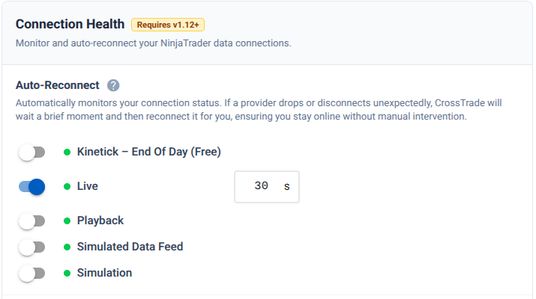
Configuration Options
Auto-Reconnect is configured per connection from My Account → Trading, in the Connection Health section:
- Enable / Disable: turn Auto-Reconnect on or off per connection.
- Timeout Delay: how long to wait, in seconds, after a drop before reconnecting. The default is 10. A short delay (5 to 10 seconds) suits stable connections; 30 to 60 seconds is better if your broker has brief outages.
Attempt Limits
After 5 failed attempts the logs show Reconnect attempts exhausted (5/5). Manual intervention required. Connecting the account by hand, or re-enabling Auto-Reconnect, resets the counter.
Interaction with Data Watchdog
Auto-Reconnect and the Data Watchdog work together. When the Data Watchdog detects stale market data and determines that a reconnect is needed, it delegates the actual reconnection to Auto-Reconnect (if enabled for that connection). This means the Data Watchdog benefits from Auto-Reconnect's delay, retry limits, and deduplication logic.